

【Special Events 30% OFF】Korea SK Telecom eSIM: All Time High Speed Unlimited Data + Korean Phone Number | Instant email
Get SK Telecom (SKT) eSIM—Korea’s No.1 carrier with nationwide coverage, including Jeju Island, at a better price than the official SK Telecom site!
- Unlimited High-Speed Data with no speed reduction—stream YouTube 24/7!
- Korean Mobile Number (010) with voice and SMS included.
- Instant eSIM Delivery via email—no airport pickup needed.
- Nationwide Coverage, including Jeju Island.
Special Events start now. Please check the details below [Product Info]
Package Options
Product Info
— What You Can Expect —
Get Korea’s No.1 SK Telecom eSIM and enjoy its superior and modern advantages over traditional SIM cards.
Scan the designated QR code to set up the eSIM, which is much more convenient than manually installing SIM cards that may be lost or may break from time to time. Enjoy guaranteed coverage in all South Korean territories, including Jeju Island. Install the eSIM, which supports iOS devices and some Android devices.
Enjoy real High Speed Unlimited Data without speed reduction. You can enjoy Youtube streaming 24 hours a day throught the period.
Korean Mobile Phone Number (prefix 010) + Voice/Message function(international and Korean local)
※ except for 1 day product
※ This feature become available only after the online registration at https://skroaming.com/passport/ with the foreign passport.
※ The outgoing voice/messages service charge is not included with the price of the product. Please top up at https://skroaming.com/reservation/charging after the registration.
Instant email delivery on your order
You can scan the QR code in your country before your flight and start using it in South Korea immediately after landing.
Services are guaranteed throughout all Korean Territories, including Jeju Island.
The usage period is calculated from the actual start of internet use, not the purchase date.
※ If you purchased a 5-day eSIM on June 1st and scanned the QR code at 10 AM on the 4th, you can use it until 10 AM on the 9th.
A 1-YEAR activation period is guaranteed after receiving the QR code.
m-VoIP(Voice Talk, FaceTime, etc.) and tethering(Mobile Hotspot) are available.


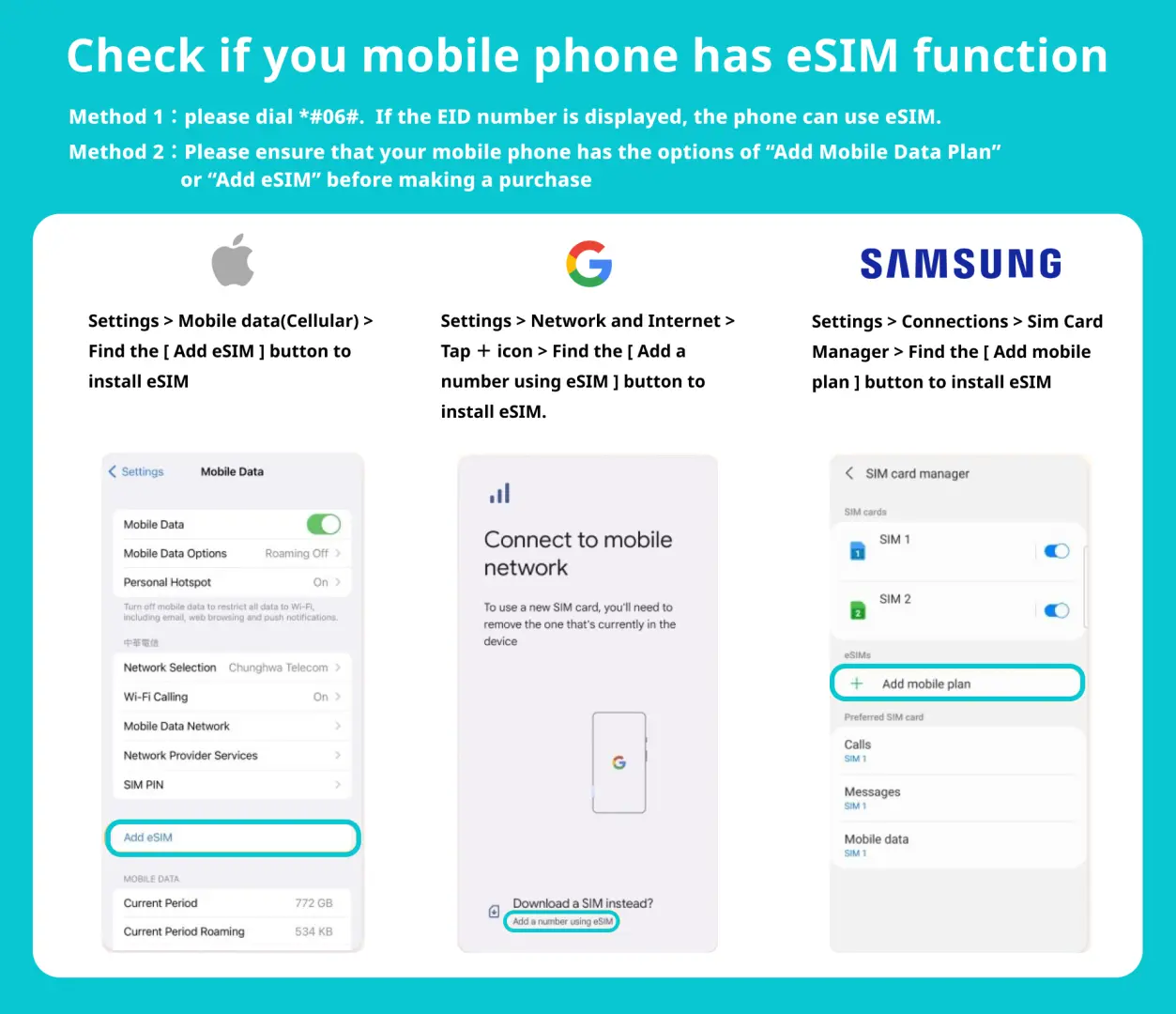
eSIM-Compatible Devices

SIM Card Specifications
| Data Usage Specifications | Unlimited data |
| Transmission Specifications | 4G |
| Signal Coverage Area | South Korea |
| Mobile Carrier | SK Telecom |
| Supported Sizes | eSIM |
| Hotspot Sharing | Available |
| Supported Frequencies(4G) | B5(850 MHz), B3(1800 MHz), B7(2600 MHz) |
| Top-Up Availability | Top-up availablefor outgoing voice and texts only. Top-up for period extension is unavailable. |
| Not Supported | SIM-locked device, Carrier-customized device, Mobile hotspot |
| Reminders | 1-year activation period after Receiving QRCode is guaranteed |
| Network Type | Local |
Purchase Notice
How to check if your phone is compatible:
- Enter 【*#06#】 on the Phone app. If the eSIM IMEI or EID number starts with '89...', your device supports eSIM
If it’s not working properly after installation, NEVER delete eSIM profile and follow the below step by step.
1. Check if your phone is unlocked and supports eSIM again from the above guide
2. Set all the other USIM or eSIM off
3. Scan QR code
- Go to Settings > Cellular > 'Add eSIM Profile' or 'Add Cellular Plan’
4. Check the Profile or VPN (Setting > General) If you see any Profile or VPN, please delete it and then reboot your phone
5. Go to Setting > Cellular > Network Selection
- Turn off Automatic, manually select SKT, and reboot your phone
6. Go to Settings > General > Reset
- Choose 'Reset Network Setting' and reboot your phone
7. Contact us through KKday message (SK Telecom technical support team)
Includes/Excludes
Reminders
Due to the nature of electronic products, refunds are not possible in any case after purchase.
Only unlocked smartphones that support eSIM can be used.
※ Before purchasing, please confirm that your phone supports eSIM.
※ It cannot be used on tablets such as iPads.
Please DO NOT REMOVE the eSIM profile after installation. Once installed, the QR code cannot be rescanned or reused.
※ In case of trouble after the scan, please check 'Trouble Shooting' section in this page.
For phone number and voice/message function, online passport registration is needed at https://skroaming.com/passport/ after immigration(8AM~10PM). Till then, only data service is available.
If the registration fails or is attempted outside the available hours, visit the SKT roaming center in the international airports in Korea.
The price of the product excludes the outgoing service charge. Please visit https://skroaming.com/reservation/charging, after completing registration.
It cannot be used for self-authorization or any online services that require identity authentication.
Once the eSIM QR code has been scanned, it cannot be added to other phones.
To use 2 eSIMs consecutively, usage period of first eSIM must be finished to activate second eSIM.
If technical issues or difficulties occur, contact SK Telecom via chat service or call the customer service center at 02-6343-9000. (Additional charges may apply if calling from a non-SK Telecom line.)
This product is for short-term visitors staying in Korea for 90 days or less. Passports with a long-term stay visa (over 90 days) could be denied at the online registration.
SK Telecom reserves the right to constantly monitor service usage for service provision and may suspend services if multiple eSIMs are registered in one device, considered beyond the service provider's intentions, or suspected of misuse violating this contract.
Pickup Point
Incheon International Airport (ICN) T1
SKT Roaming Booth (Opposite to the Gate 13) - T-money pick-up point
Monday 00:00 - 23:59
Tuesday 00:00 - 23:59
Wednesday 00:00 - 23:59
Thursday 00:00 - 23:59
Friday 00:00 - 23:59
Saturday 00:00 - 23:59
Sunday 00:00 - 23:59


Incheon International Airport (ICN) T1
SKT Roaming Booth (Opposite to the Gate 2) - T-money pick-up pointMonday 06:00 - 22:00
Tuesday 06:00 - 22:00
Wednesday 06:00 - 22:00
Thursday 06:00 - 22:00
Friday 06:00 - 22:00
Saturday 06:00 - 22:00
Sunday 06:00 - 22:00
Incheon International Airport (ICN) T2
SKT Roaming Booth (Between Gate 6 and Gate 7) - T-money pick-up point
Monday 00:00 - 23:59
Tuesday 00:00 - 23:59
Wednesday 00:00 - 23:59
Thursday 00:00 - 23:59
Friday 00:00 - 23:59
Saturday 00:00 - 23:59
Sunday 00:00 - 23:59


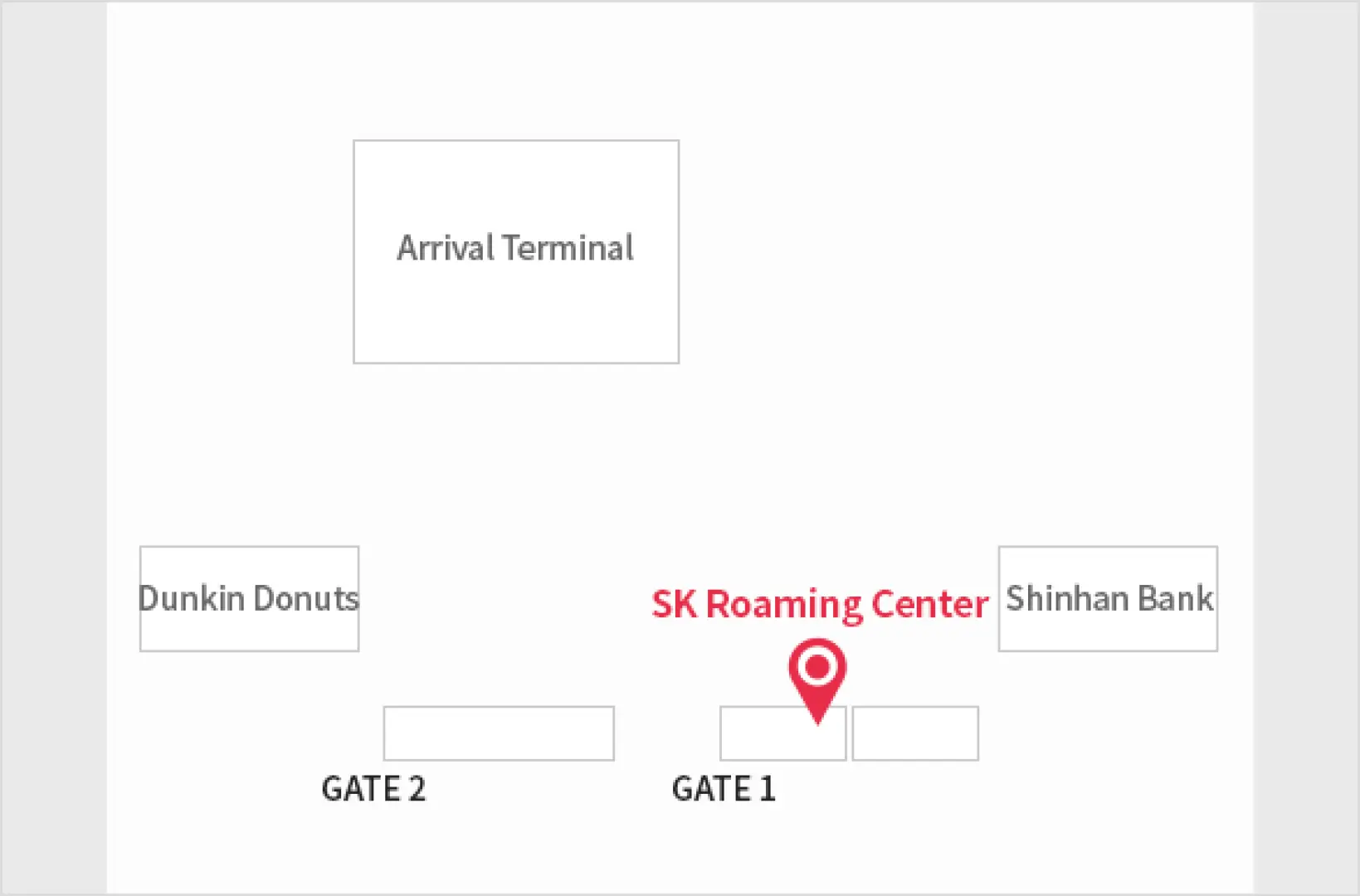
Gimpo International Airport (GMP) -
SKT Roaming Booth (Gate 1) - T-money pick-up point
Monday 06:30 - 23:00
Tuesday 06:30 - 23:00
Wednesday 06:30 - 23:00
Thursday 06:30 - 23:00
Friday 06:30 - 23:00
Saturday 06:30 - 23:00
Sunday 06:30 - 23:00
Jeju International Airport (CJU) -
SKT Roaming booth in front of international terminal, 1F - T-money pick-up point(pickup orders will no longer be available from June 30 onward.)
Monday 07:00 - 19:00
Tuesday 07:00 - 19:00
Wednesday 07:00 - 19:00
Thursday 07:00 - 19:00
Friday 07:00 - 19:00
Saturday 07:00 - 19:00
Sunday 07:00 - 19:00

Busan Gimhae International Airport (PUS) -
SKT Roaming booth is in between Gate 2 and Gate 3 - T-money pick-up point
Monday 06:00 - 22:00
Tuesday 06:00 - 22:00
Wednesday 06:00 - 22:00
Thursday 06:00 - 22:00
Friday 06:00 - 22:00
Saturday 06:00 - 22:00
Sunday 06:00 - 22:00

How to Use
- Purchase eSIM.
- Receive the eSIM QR code instantly via email.
- Scan the eSIM QR code in the Settings menu(Cellular Data > Add Cellular Plan) while internet connected.
- (For Korean Phone Number and Voice/Message function) Register your passport(foreign) at https://skroaming.com/passport/ .
※ Registration should be made after passing the immigration.
※ Online registration is available from 8AM to 10PM. For offline registration, please visit SKT Roaming Booth at the international airport.
※ 1 day product is Data-Only.
Cancellation Policy
- Once the order has been completed, it cannot be canceled, modified, or refunded
- Due to time zone differences, the confirmed cancellation date is based on the supplier’s local time. Please allow 2–5 business days to process your cancellation request, after which the cancellation fee will be charged according to the product’s cancellation policy. Once the cancellation is confirmed, you will receive your refund within 14 working days.
FAQ
Yes, the SK Telecom eSIM provides unlimited high-speed 4G LTE data throughout your trip in Korea. There is no speed reduction, allowing you to stream videos, browse the web, and use navigation apps continuously without interruption. It's ideal for heavy data users who rely on constant connectivity.
After purchasing, your SK Telecom eSIM will be delivered instantly via email as a QR code. To activate, simply scan the QR code before your departure to Korea. The eSIM will then be ready for use immediately upon your arrival, allowing for seamless connectivity without needing any physical pickup at the airport.
You can easily purchase the SK Telecom eSIM through KKday, a convenient platform that offers instant email delivery of your eSIM. This eliminates the need for airport pickups or searching for physical SIM cards upon arrival. Booking with KKday ensures a smooth, hassle-free process from purchase to activation, letting you focus on enjoying your trip.
Yes, the SK Telecom eSIM is highly reliable for travel across South Korea. It operates on SK Telecom, Korea's No.1 carrier, ensuring nationwide 4G LTE coverage. This includes major cities, rural areas, and popular destinations like Jeju Island, providing consistent connectivity wherever your travels take you.
Absolutely. The SK Telecom eSIM includes a Korean mobile number (starting with 010), allowing you to make and receive local calls and send SMS messages. This feature is particularly useful for making reservations, contacting local services, or communicating with travel companions during your stay in Korea.
The SK Telecom eSIM offers premium 4G LTE connectivity with a truly unlimited high-speed data experience. A key feature is the "no speed reduction" guarantee, ensuring consistent performance even with heavy usage, such as continuous video streaming or online gaming. This allows for uninterrupted internet access throughout your entire trip.
Using an SK Telecom eSIM offers several advantages over a pocket WiFi. An eSIM means no extra device to carry, charge, or return, reducing travel bulk. It allows instant activation via QR code before arrival, and you can keep your personal phone number for receiving important calls while using the eSIM for data.
The SK Telecom eSIM is delivered digitally via email as a QR code immediately after your purchase. You can scan this QR code to install the eSIM profile onto your device even before you depart. Once installed, the eSIM is active and ready to connect to the SK Telecom network as soon as you arrive in Korea, providing instant connectivity.
Get Help


