

Malaysia 4G 5/7/10days eSIM
- Enjoy 4G connection while traveling in Malaysia with a prepaid eSIM
- Use the cost-effective eSIM to surf the internet while traveling in Malaysia
- Alleviate SIM Card pin needle and installation trivialities with the help of eSIM
Package Options
Product Info
-What You Can Expect-
Get your hands on the magical eSIM, and enjoy its superior advantages over traditional SIM cards. Simply scan the designated QRcode to set up the eSIM, and get rid of traditional SIM cards that you may lose or break from time to time. With or without a dual SIM card tray, you may make/receive calls and send text messages using different numbers via 1 phone. Book now with KKday and add another delight to your trip to Japan!
eSIM-Applicable Countries:
Malaysia
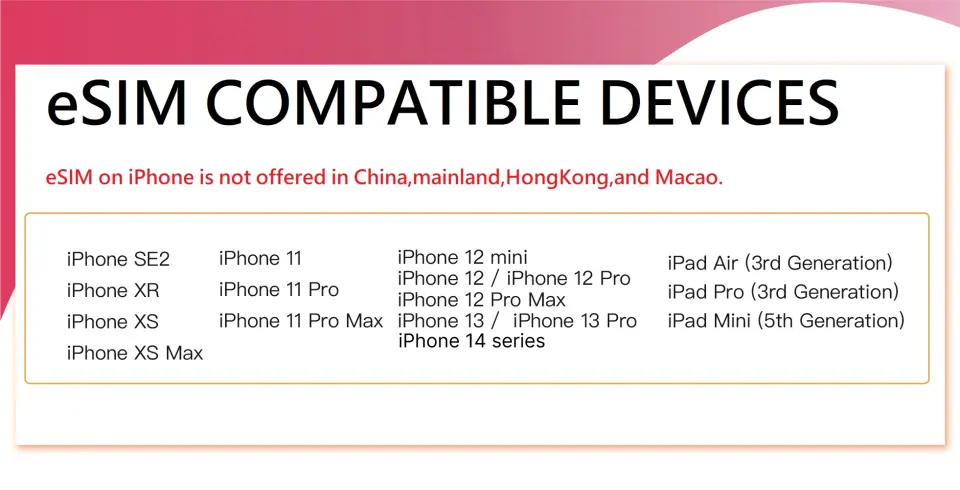
eSIM-Compatible Devices

eSIM installation guideline


SIM Card Specifications
| Data Usage Specifications | Unlimited data |
| Transmission Specifications | 4G |
| Signal Coverage Area | Malaysia |
| Mobile Carrier | Maxis |
| Supported Sizes | eSIM |
| Hotspot Sharing | Available |
| Supported Frequencies(4G) | B1(2100 MHz) |
| Excludes | Voice calls, Texts |
| Not Supported | SIM-locked device, Carrier-customized device, Mobile hotspot |
Purchase Notice
- Calculation method of days: 24-hour system (user purchases a 3-day eSIM and installs it at 10:00 am, 9/1. The eSIM will be terminated at 9:59 am, 9/4)
- Please make sure your cell phone and its operating system are compatible with eSIM, failure to do so may result in activation failure, refunds will not be granted
- iOS requires version 12.1 or later; please note that iPhones sold in China ,Hong Kong and Macao do not support eSIM
Includes/Excludes
Reminders
Each QRcode can only be scanned once, and no changes can be made once the QRcode is scanned
To end the eSIM function, please tap "Remove Cellular Plan"
In accordance with the Fair Usage Policy, excessive video streaming or data consumption may cause slower or weaker signal reception
In order to make sure all users' accessibility to the internet, each telecom carrier implements their fair usage policy to monitor data consumption. If a user's data consumption negatively affects other users' internet connection, the telecom carrier may enforce speed restrictions temporarily. Please note that under such circumstances, KKday has no right to intervene
The quality of communication may be affected by outside conditions; surrounding landforms (e.g. mountains), weather, obstruction by buildings, the number of users, or locations will affect the speed and quality of the internet
How to Use
- Receive the eSIM QRcode
- Scan the QRcode with your phone and complete installation (please refer to the pictures above)
* Please activate roaming before using eSIM
* If you are using 2 SIM cards at the same time, please make sure your data comes from eSIM
If you are using an iPhone, please click here for instructions. For Android users, please visit the official website of your phone for instructions
Once the installation process is completed (after QRcode scanning), the eSIM cannot be transferred to a different cell phone
Cancellation Policy
- Once the order has been completed, it cannot be canceled, modified, or refunded
- Due to time zone differences, the confirmed cancellation date is based on the supplier’s local time. Please allow 2–5 business days to process your cancellation request, after which the cancellation fee will be charged according to the product’s cancellation policy. Once the cancellation is confirmed, you will receive your refund within 14 working days.
FAQ
Yes, foreigners can generally use an eSIM for travel in Malaysia. eSIMs simplify staying connected as they eliminate the need for a physical SIM card. Travelers should ensure their device is eSIM compatible and unlocked before purchasing. The eSIM profile can be downloaded and activated digitally, offering immediate connectivity upon arrival.
Potential disadvantages of using an eSIM for Malaysia include device compatibility limitations, as not all phones support eSIM technology. Some older models may not be compatible. Switching devices can also be less straightforward than with a physical SIM, requiring re-downloading the profile. Additionally, troubleshooting may sometimes require an internet connection, which can be tricky if the eSIM is the only source of connectivity.
An eSIM for Malaysia offers greater convenience as it's digital, eliminating the need for physical insertion or removal. This means no lost SIM pins or carrying multiple cards. It also allows users to easily switch between different mobile plans or maintain their home number simultaneously. Physical SIMs, however, offer broader device compatibility and are often simpler for quick troubleshooting by swapping cards. eSIMs are ideal for seamless digital activation.
To choose the best eSIM for Malaysia, travelers should consider their data needs, trip duration, and budget. Look for plans that offer sufficient 4G data for your expected usage. Compare different providers for network coverage in your planned travel areas. Review activation processes and customer support options. Ensure the eSIM plan's validity period matches your travel dates.
An eSIM for Malaysia is compatible with most newer smartphone models, including recent iPhones (XR and later), Google Pixel phones (3 and later), and select Samsung Galaxy models (S20 and later). Compatibility also extends to certain tablets and smartwatches. Before purchasing, travelers should always check their specific device model's specifications to confirm eSIM support and ensure it is unlocked by their home carrier.
Many eSIM plans for Malaysia offer large data allowances, but truly "unlimited" mobile data without any speed caps or fair usage policies is less common. Some plans may advertise unlimited data, but often include a high-speed allowance followed by reduced speeds once that threshold is reached. Travelers should carefully review the terms and conditions of each eSIM plan to understand specific data limits and speed restrictions.
The activation process for an eSIM purchased for Malaysia typically involves scanning a QR code provided via email or a voucher. After scanning, the eSIM profile downloads automatically to your device. You may then need to enable the eSIM line in your phone settings and ensure data roaming is turned on. Activation usually takes just a few minutes, allowing for quick connectivity without physical installation.
For eSIM users in Malaysia, customer support is usually provided by the eSIM vendor via online channels. This can include email support, live chat on their website, or a dedicated help center with FAQs. It's crucial to check the provider's support options before purchasing. Having a backup internet connection (like hotel Wi-Fi) is advisable for contacting support if your eSIM encounters issues.
Get Help


