

【Limited Time 50% Off🔥】Australia & New Zealand eSIM | 1–30 Day Plans | Daily Data / Total Data Options | 5G/4G High-Speed Internet
- Utilizing Australian Optus / New Zealand Vodafone roaming networks, supporting 5G/4G internet speeds
- No need to swap SIM cards, search for Wi-Fi, or use a VPN while traveling abroad
- Scan the QR code to connect automatically and get online immediately upon arrival
- Supports daily data and large total data plans, with flexible options from 1–30 days to meet all your internet needs (data only, hotspot sharing supported)
Package Options
What You Can Expect

Please confirm your phone is compatible with eSIM before purchasing. Orders cannot be cancelled or refunded after purchase.

Before enabling eSIM, please update your iOS to the latest version and connect to a stable Wi-Fi network. Older iOS versions and unstable networks are common reasons for eSIM activation failure.

Open your camera to scan for the eSIM, then tap "Action Plan".

The startup time is about 2-3 minutes, and the installation may fail if the startup screen pops up.

You can customize the eSIM name for easy management of multiple eSIMs.
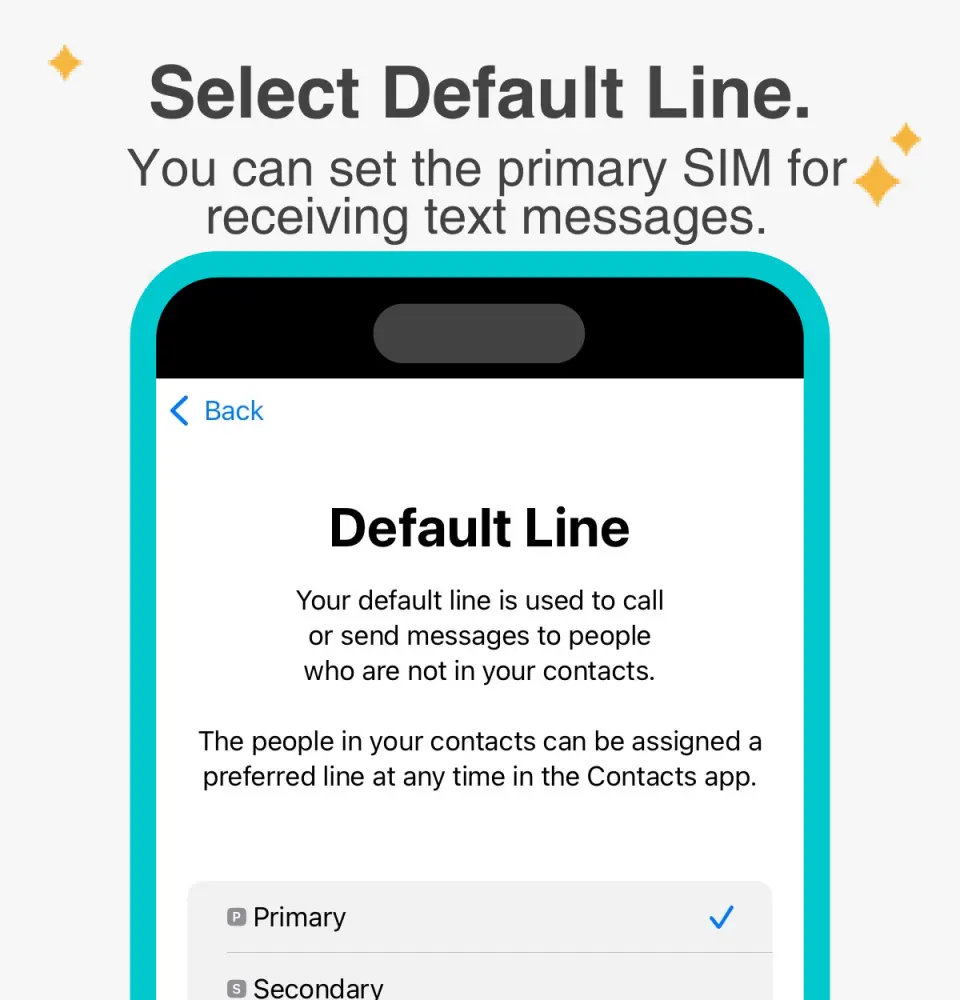
Selecting a preset number allows you to specify your primary mobile number to receive messages (you need to apply to your original telecom operator to activate international roaming for your primary mobile number before you can receive SMS messages).

You can specify the primary phone number to use iMessage and FaceTime features.

Choosing to use eSIM mobile data, "eSIM mobile data is not enabled" is a common reason for being unable to access the internet.

You can also manually add an eSIM if you cannot scan the QR code.

After copying the eSIM activation code, please follow the steps to manually add eSIM information.
Purchase Notice
- The usage date you select when placing your order will be your arrival date.
- You need to fill in your passport name and email address. Incorrect information may affect account activation.
- Once the SIM card is activated, it must be used within a specified period. The card cannot be topped up or reused.
- Provides Chinese and English customer service
- Orders cannot be cancelled or refunded after eSIM is sent. Please first confirm that your phone supports eSIM (dial *#06#; if it displays 32 characters for EID, it means eSIM is supported).
- iPhones and Android phones sold in China, Hong Kong, and Macau do not support eSIM functionality; most Android phones sold in Taiwan do not support eSIM.
- For Android phones that support eSIM, please refer toFigures 1 and2 for the steps to manually enter the activation code.
- If your location or mobile phone does not support 5G, it will automatically switch to 4G/3G signal. The actual network speed depends on the local signal.
Reminders
It will be automatically activated on the selected usage date, calculated in 24-hour increments, and must be used within the specified period; otherwise, it will expire.
The service cannot be topped up or reused; it will be discontinued once the data allowance or number of days is used up.
The usage date you select when placing your order will be the date you arrive at your destination.
You need to fill in your passport name and email address. Incorrect information may affect account activation.
Installing an eSIM requires an internet connection. Please install it when you have a stable Wi-Fi or mobile data connection (installation may fail due to Wi-Fi at some airports).
eSIM only supports one-time QR code installation. Do not delete it after installation, otherwise it will no longer be usable.
If your location or mobile phone does not support 5G, it will automatically switch to 4G/3G signal. The actual network speed depends on the local signal.
Telecommunications network quality varies from country to country, and base station coverage is not as dense as in Taiwan. Each country also has its own regional and telecommunications infrastructure differences. Therefore, refunds cannot be requested based on signal conditions in a few specific areas.
Please adhere to the principles of fair internet usage. To maintain network connection quality and ensure fair use, telecommunications companies worldwide sometimes impose data rationing on customers who consume excessive amounts of data within a short period. This may result in internet access disruptions or slower speeds. To ensure uninterrupted internet access, please avoid prolonged periods of watching videos or updating software that consumes large amounts of data.
Cancellation Policy
- Once the order has been completed, it cannot be canceled, modified, or refunded
- Due to time zone differences, the confirmed cancellation date is based on the supplier’s local time. Please allow 2–5 business days to process your cancellation request, after which the cancellation fee will be charged according to the product’s cancellation policy. Once your refund request is confirmed, KKday will initiate the refund to your original payment method within 15 days. The actual refund timing depends on your card-issuing bank’s policy.


