

New Zealand and Australia eSIM|Australia, New Zealand 4G high-speed Internet access Total eSIM【China Unicom official product】
- No need to wait for mail, no need to travel to pick it up, no more worries about losing the SIM card ejector tool, travel abroad with peace of mind.
- Carefully selected local operators ensure stable signal, no need to change SIM cards, and no missed calls to your original number, making business trips more efficient.
- China Unicom official product, with guaranteed connection quality and after-sales customer service!
* Please click the following link https://www.optus.com.au/support/checkdevice to check if your mobile device is compatible with Optus mobile networks.
Package Options
Product Info
The content of this product is provided by machine translation and may not reflect the actual information, please take this into consideration before booking.
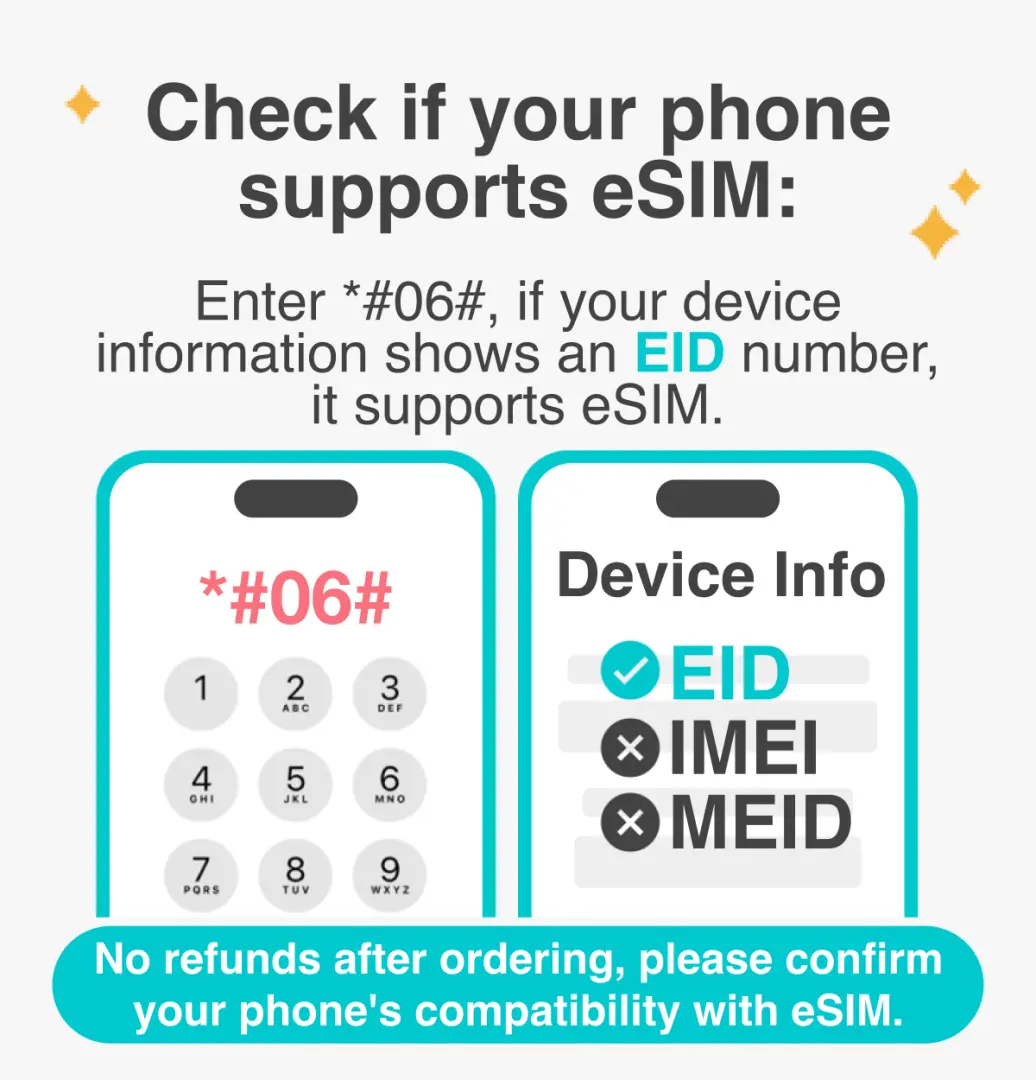
Please confirm your device is compatible with eSIM before purchasing

eSIM Installation Instructions (iOS)


eSIM Installation Instructions (Android)


Please follow the instructions in the China Unicom Hong Kong email to scan the QR Code to use the eSIM (if you do not receive the email, please check your spam folder first)


SIM Card Specifications
| Data Usage Specifications | 6GB, 8GB |
| Transmission Specifications | 4G |
| Signal Coverage Area | Australia, New Zealand |
| Mobile Carrier | Australia: Optus / New Zealand: 2 degree, Spark |
| Supported Sizes | eSIM |
| Hotspot Sharing | Unavailable |
| Supported Frequencies(4G) | B1(2100 MHz), B3(1800 MHz), B8(900 MHz) |
| Top-Up Availability | Top-up unavailable |
| Not Supported | SIM-locked device, Mobile hotspot, Carrier-customized device |
| Reminders | ・Day calculation method: Natural day system (If the user purchases a 5-day Internet plan and installs and activates it at 10:00 am on September 1, this plan will end at 23:59 on September 5, China Standard Time (UTC+8)) ・If the location or mobile phone does not support 4G, it will automatically switch to 3G signal. The actual network speed will be based on the local signal. ・Dial *118*50# to check remaining data ・This product does not support the use of TikTok. ・The 10-day 6GB card provides 40 minutes of calls (can be used to receive calls in Australia and New Zealand, and to make local calls, China and Hong Kong numbers) and 10 text messages (sent from Australia and New Zealand); the 15-day 8GB card provides 60 minutes of calls (can be used to receive calls in Australia and New Zealand, and to make local calls, China and Hong Kong numbers) and 10 text messages (sent from Australia and New Zealand). |
| Network Type | Roaming |
| Mobile Virtual Network Operator (MVNO) | 中國聯通 |
Purchase Notice
- After purchase, you will receive an email from China Unicom Hong Kong containing the eSIM QR code within the first two business days (excluding Saturdays, Sundays and public holidays). Scan the QR code according to the instructions in the email to use the eSIM. If you do not receive the email, please check your spam folder first.
- Please ensure your phone has eSIM functionality and no SIM card restrictions. Once your order is placed, no refunds, changes, or cancellations will be accepted for any reason.
- Under Australia's latest mobile business regulations, all mobile devices must support making emergency calls to 000 via 4G VoLTE. Devices unable to do so will be prohibited from connecting to the local mobile network to use mobile communication services. This regulation is already in effect. Before traveling to Australia, customers should click the following link: https://www.optus.com.au/support/checkdevice to check if their mobile device complies with the new Australian standards for using the Optus mobile network.
- In accordance with the principle of fair use of the network, telecommunications companies may, at their discretion, limit the data traffic of users who consume large amounts of data in a short period of time. Please avoid watching videos for extended periods or processing large amounts of data in a short time.
- Internet quality may be affected by factors such as location, terrain, building obstruction, number of users, and weather. Please be aware of this.
Reminders
Please print the QR code on your voucher before departure, or prepare another device that can display the QR code on your voucher to facilitate the installation of the eSIM
After purchase, you will receive an email from China Unicom Hong Kong containing the eSIM QR Code within the second working day (Monday to Friday, excluding Saturdays, Sundays and public holidays) at the earliest. Scan the QR Code according to the instructions in the email to use the eSIM. If you do not receive the email, please check your spam folder first.
The first day of your Internet access is counted as the first day of your Internet access. It is recommended that you scan the QR code and install the service before departure or after arriving at your destination to avoid premature activation, which may affect your rights and interests.
This eSIM must be activated within 365 days of issuance. It is recommended to activate it as soon as possible after arriving at your destination to ensure your rights and interests.
eSIM only supports one-time scan code installation. Please do not delete the eSIM arbitrarily after successful installation.
【China Unicom Customer Service Information】WhatsApp: +852 6361 0010 / Hong Kong phone +852 2122 1188 / Customer Service Email: hk-cs@cuniq.com (09:00–21:00 daily)
Under Australia's latest mobile business regulations, all mobile devices must support making emergency calls to 000 via 4G VoLTE. Devices unable to do so will be prohibited from connecting to the local mobile network to use mobile communication services. This regulation is already in effect. Before traveling to Australia, customers should click the following link: https://www.optus.com.au/support/checkdevice to check if their mobile device complies with the new Australian standards for using the Optus mobile network.
Cancellation Policy
- Once the order has been completed, it cannot be canceled, modified, or refunded
- Due to time zone differences, the confirmed cancellation date is based on the supplier’s local time. Please allow 2–5 business days to process your cancellation request, after which the cancellation fee will be charged according to the product’s cancellation policy. Once the cancellation is confirmed, you will receive your refund within 14 working days.
FAQ
Yes, this eSIM is specifically designed for dual-country use across Australia and New Zealand. It provides seamless 4G high-speed internet access in both destinations, allowing you to stay connected without needing to switch between different SIMs or services as you travel between the two countries. This ensures continuous connectivity and convenience throughout your trip.
This Australia and New Zealand eSIM offers 4G high-speed internet access. It utilizes carefully selected local operators to ensure stable signal and reliable network coverage throughout your journey in both countries. You can expect consistent connectivity for streaming, browsing, using navigation apps, and staying in touch with family and friends.
The eSIM setup is significantly simpler and more convenient than a physical SIM card. Instead of needing to wait for mailing, rush to pick it up, or physically insert a card, you simply scan a QR code to activate the eSIM. This eliminates the need for a card ejector and removes the worry of accidentally losing your physical SIM card, allowing for a more peaceful and efficient travel experience.
This eSIM is a suitable choice because it provides 4G high-speed internet access and leverages carefully selected local operators for stable signal in both Australia and New Zealand. As an official product, it guarantees connection quality and robust after-sales customer service, ensuring reliable and fast internet access throughout your entire trip, whether for leisure or business.
This eSIM is compatible with most modern smartphones and other mobile devices that support eSIM functionality. Before purchasing, it is recommended to verify if your specific mobile device model supports eSIM technology. This ensures seamless activation and usage, guaranteeing you can stay connected during your travel in Australia and New Zealand.
This Australia and New Zealand eSIM is an official product of China Unicom. This distinction guarantees both the high connection quality through their reputable network infrastructure and reliable after-sales customer service. You can travel with peace of mind, knowing that professional support is readily available for any connectivity questions or issues you might encounter.
Activating this eSIM is straightforward. Once you have acquired it, you will receive a QR code via email. Upon arrival in Australia or New Zealand, simply scan this QR code with your eSIM-compatible device settings. Follow the easy on-screen prompts to complete the setup, and your 4G high-speed internet access will be ready for immediate use, connecting you instantly.
No, you will not miss calls to your original phone number when using this Australia and New Zealand eSIM. One of its key features is that it allows you to keep your original number active for calls and texts while using the eSIM for data. This means you can maintain contact with your primary number without needing to swap out your physical SIM card.
Get Help


