

Japan eSIM Unlimited Data | Softbank Network | Dosirak eSIM App Install Immediately
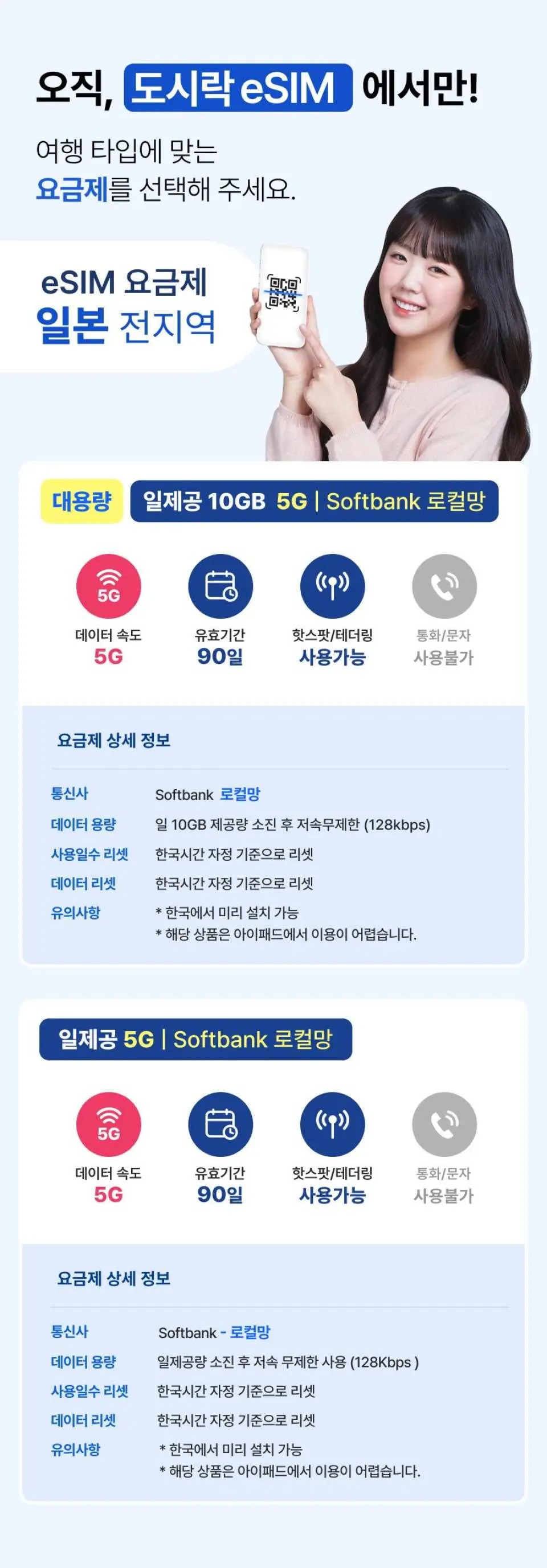
- You can easily use Japan's Softbank high-speed data with an eSIM.
- You can use it affordably by selecting the capacity you want, from 1GB to 2GB, 3GB, or 10GB.
- You can use it immediately without replacing the SIM card simply by installing the QR code in the Dosirak eSIM app.
- This is a multi-functional travel eSIM product that supports hotspot, voice calls, and text messaging.
Package Options
Product Info
The content of this product is provided by machine translation and may not reflect the actual information, please take this into consideration before booking.
- How to check if your phone has an eSIM module
Dial *#06# → If there is an EID in the device information, eSIM is available.
- eSIM User Guide
Korean [iOS/Android]
English [iOS/Android]
Japanese [iOS/Android]
eSIM plan

eSIM-enabled terminal


How to install eSIM


How to set up APN manually


eSIM Precautions


eSIM installation video - iPhone (iOS)
eSIM installation video - Android
Important Info
Reminders
Before making a purchase, please ensure that your mobile phone model supports eSIM service. For more information, please refer to our detailed page
If you have set up mobile phone protection service, please cancel the SIM lock and protection service with your telecom provider before using our eSIM service
After purchasing our eSIM product, we will send you the product information (QR code) via email or AlimTalk. Please note that refunds and exchanges are not possible once the QR code has been sent or scanned
To register your eSIM product, please make sure you have a data connection (cellular network or wifi connection mode)
Do not delete the registered cellular plan after QR scanning, as eSIM cannot be used without it. Please keep the plan until the end of use
Our eSIM product can be installed in advance at the departure point, and the usage date starts from the point of connecting to the destination network
To avoid roaming charges, we recommend switching off data roaming on your domestic carrier before departing. Improper operation may result in unexpected charges while abroad
Please note that depending on the communication environment of the local carrier, data usage may not be smooth in some areas, and you may be connected to 3G or 2G if your mobile phone model does not match the frequency band of the local carrier
Our product options, such as data amount, days of use, and promotions, are subject to change without prior notice in accordance with the terms and conditions of the provider
If you experience any issues with eSIM registration or usage, please contact our customer service. Please note that we are unable to provide assistance after returning from your trip, and returns/refunds are not available. [In Korea: 1566-9070 / When calling from abroad: 02-775-1401]
Once deleted, eSIM cannot be rescanned or restored. Please ensure that you familiarize yourself with the user guide to avoid any negligence or mistakes. Refunds are not possible if you are unable to use the service due to your own negligence
Please note that refunds and exchanges are not possible once the QR code has been sent or scanned
In the event of network maintenance by the local carrier, natural disasters, or other unforeseen circumstances, refunds will not be available if our service is temporarily unavailable
eSIM User Guide - Korean [iOS/Android]:https://wmstgbb001.blob.core.windows.net/wm-images/market/KR_eSIM_Manual_iOS_AOS.pdf
eSIM User Guide - English [iOS/Android]:https://wmstgbb001.blob.core.windows.net/wm-images/market/EN_eSIM_Manual_iOS_AOS.pdf
eSIM User Guide - Japanese [iOS/Android]:https://wmstgbb001.blob.core.windows.net/wm-images/market/JP_eSIM_Manual_iOS_AOS_v2.pdf
Cancellation Policy
- Once the order has been completed, it cannot be canceled, modified, or refunded
- Due to time zone differences, the confirmed cancellation date is based on the supplier’s local time. Please allow 2–5 business days to process your cancellation request, after which the cancellation fee will be charged according to the product’s cancellation policy. Once the cancellation is confirmed, you will receive your refund within 14 working days.
FAQ
The Japan eSIM offers high-speed data access through KDDI and Softbank, two of Japan's leading carriers, ensuring reliable connectivity. Travelers can choose from various data plans, including options from 500MB up to unlimited data, catering to different usage needs. Installation is straightforward: simply scan a QR code via the Dosirak eSIM app, eliminating the need to replace your physical SIM card. Additionally, this eSIM is multifunctional, supporting features like mobile hotspot sharing, voice calls, and text messaging capabilities.
Beyond the unlimited data option, the Japan eSIM offers a range of flexible data plans to suit diverse travel needs. These plans include options for 500MB, 1GB, 2GB, and 3GB. This variety allows travelers to select a plan that best matches their expected data consumption during their trip, providing flexibility for shorter stays or lighter usage requirements.
Activating and using the Japan eSIM is designed for ease and convenience, particularly for travelers. The entire process is digital: you install the eSIM by scanning a QR code directly through the dedicated Dosirak eSIM app. This means there's no need to handle or replace a physical SIM card, which simplifies setup significantly. Once installed, the eSIM can be used immediately, providing instant access to data upon arrival in Japan.
The Japan eSIM provides high-speed data connectivity by utilizing the robust networks of KDDI and Softbank. These are two of Japan's top telecommunication carriers, known for their extensive coverage and reliable performance across various regions. This dual-carrier support helps ensure stable and fast internet access throughout your travels in Japan.
The installation process for the Japan eSIM is designed to be simple and quick. First, you will need to download the Dosirak eSIM app. Within the app, you'll receive a unique QR code. To install the eSIM, simply use your device's camera to scan this QR code through the app. Once scanned and confirmed, the eSIM profile will be downloaded and configured on your device, allowing for immediate activation and use without needing a physical SIM card.
Yes, the Japan eSIM is specifically designed for international tourists visiting Japan. It provides a convenient way for visitors to stay connected without needing a local physical SIM card. As long as your mobile device is eSIM-compatible and unlocked, you can utilize this travel eSIM during your trip to Japan, making it accessible for a wide range of travelers.
It is ideal to complete the setup of your Japan eSIM before you travel, typically before departing for Japan. You can download and install the eSIM profile onto your device using the Dosirak eSIM app while still in your home country. Activation, however, should generally occur upon your arrival in Japan when you are ready to connect to the local network. This ensures you have immediate connectivity as soon as you land.
Yes, the Japan eSIM is a multifunctional travel eSIM that extends beyond just data connectivity. It fully supports hotspot functionality, allowing you to share your internet connection with other devices. Additionally, it offers capabilities for voice calls and text functions, providing comprehensive communication options for your trip. This ensures you can stay fully connected in various ways while exploring Japan.
Get Help


