

Korean eSIM|SKT 5G/4G Unlimited eSIM
- Operated by DHA Corporation, Japan
- Multilingual (Chinese, English, Japanese) live customer service provides reliable after-sales support.
- Using SKT 5G/4G networks, unlimited data is available to meet your internet needs.
- Hotspot sharing is available.
This eSIM data roaming service is provided by China Unicom.
Package Options
What You Can Expect
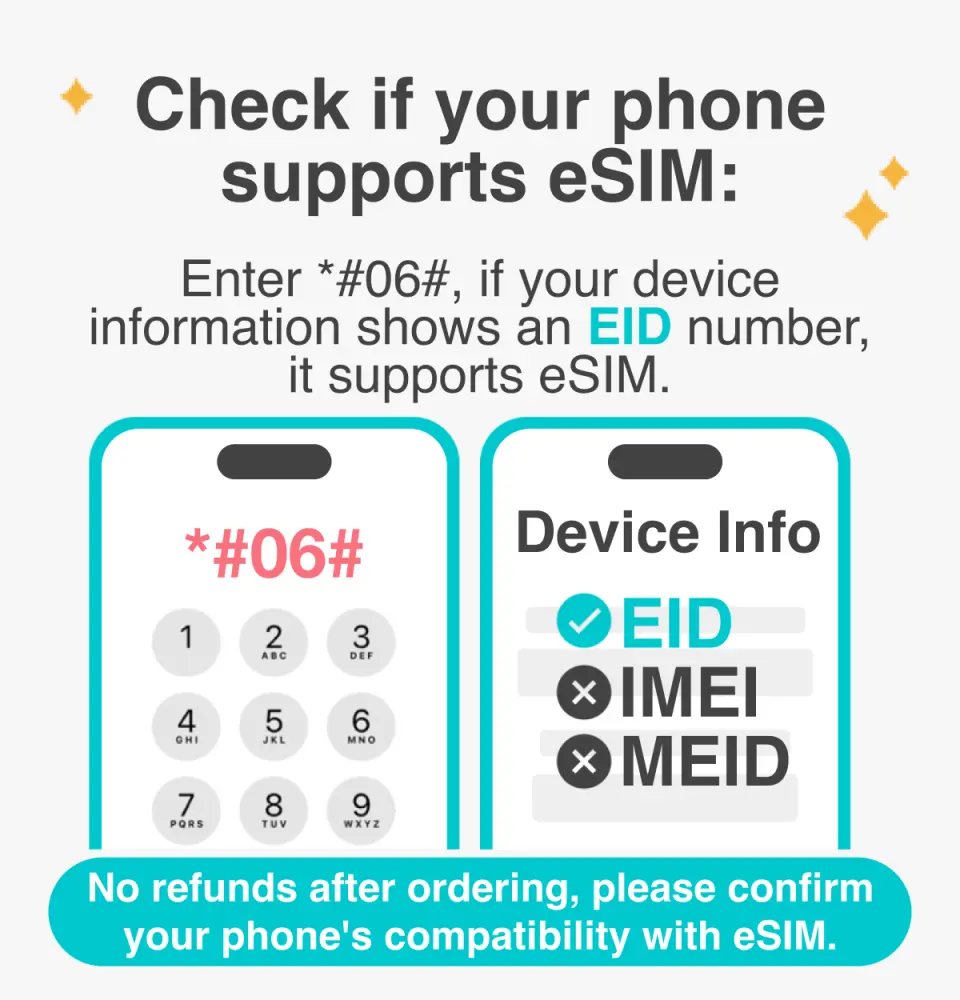
Please confirm that your device is compatible with eSIM before purchasing

eSIM Installation Instructions
Purchase Notice
- Before purchasing, please ensure that your phone and its operating system support the eSIM function. If the order is cancelled due to device incompatibility, no refund will be given.
- iOS requires the latest version; Please note that iPhones sold in mainland China do not support eSIM. In Hong Kong and Macau, only the iPhone 13 mini, iPhone 12 mini, iPhone SE 2020, 2022, and iPhone XS have eSIM functionality. (Please visit Apple's official website for details)
- Samsung phones vary in different countries. Samsung phones purchased in Taiwan do not support eSIM. Please confirm with the Samsung official website for other regions first.
- This product is for Internet access only and does not include call and text messaging functions (you can use communication software such as LINE for calls).
- Provide customer service in Chinese, Taiwanese, English, and Japanese.
- Please note that signal quality may be affected by factors such as location, terrain, building obstruction, number of users, and weather.
Reminders
Before purchasing, please ensure that your phone and its operating system support the eSIM function. If the order is cancelled due to device incompatibility, no refund will be given.
iOS requires the latest version. Please note that iPhones sold in mainland China do not support eSIM. In Hong Kong and Macau, only the iPhone 13 mini, iPhone 12 mini, iPhone SE 2020, 2022, and iPhone XS have eSIM functionality.
Samsung phones vary in different countries. Samsung phones purchased in Taiwan do not support eSIM. Please confirm with the Samsung official website for other regions first.
An internet connection is required to install the eSIM. Please ensure that there is WiFi or mobile data available before installation.
It is recommended that you scan and install the eSIM after arriving in Korea and connecting to the free Wi-Fi at the airport. Do not install the eSIM while in a vehicle to avoid network interruption and failure of eSIM installation.
Each QR code can only be scanned and installed once. Once bound, you cannot change the device or delete it. Once scanned and installed, no returns or refunds are available. Please note that we do not accept returns or refunds.
Please remember to turn off data roaming on the original SIM card to avoid using the original SIM card's mobile network and incurring high roaming charges.
When you finish using the eSIM plan in your phone, click [Remove Action Plan] at the bottom to remove it.
If you encounter any problems with the network card, please contact customer service immediately. Cancellations and refunds without prior contact will not be accepted.
Please note that signal quality may be affected by factors such as location, terrain, building obstruction, number of users, and weather.
How to Use
Installation steps:
- Settings > Mobile Network > Add eSIM > Scan the QR code to install the eSIM
- Turn off other SIM cards and turn on mobile data communication for this eSIM (roaming must be turned on)
- The APN of the eSIM is usually automatically recognized. If it cannot be automatically recognized, you need to set it manually.
Cancellation Policy
- Once the order has been completed, it cannot be canceled, modified, or refunded
- Due to time zone differences, the confirmed cancellation date is based on the supplier’s local time. Please allow 2–5 business days to process your cancellation request, after which the cancellation fee will be charged according to the product’s cancellation policy. Once your refund request is confirmed, KKday will initiate the refund to your original payment method within 15 days. The actual refund timing depends on your card-issuing bank’s policy.
FAQ
1. Does the SKT Korean eSIM offer unlimited 5G/4G data for travelers?
Yes, the SKT Korean eSIM operates on SKT's 5G/4G networks and provides unlimited data. This ensures continuous internet access throughout your trip for navigation, communication, and staying connected without worrying about data caps. It is designed to meet various internet needs during your travel in Korea, offering consistent connectivity.
2. What specific features does the SKT 5G/4G unlimited eSIM provide for internet connectivity?
The SKT 5G/4G unlimited eSIM offers several key features for robust internet connectivity. It leverages the reliable SKT 5G/4G networks, ensuring fast and stable internet access across Korea. A significant advantage is its support for hotspot sharing, which allows you to connect other devices like laptops or tablets. Additionally, multilingual customer service in Chinese, English, and Japanese is available for support.
3. How do I activate and install the SKT Korean eSIM on my device?
To activate and install the SKT Korean eSIM, you typically receive a QR code via email after your purchase. You will scan this QR code using your device's settings to add the eSIM profile. Ensure your device is connected to Wi-Fi during the installation process. After successful installation, you may need to enable the eSIM line in your phone settings and set it as your primary data source for use in Korea. Detailed instructions are usually provided.
4. Can the SKT Korean eSIM be used for hotspot sharing with other devices?
Yes, the SKT Korean eSIM fully supports hotspot sharing functionality. This feature allows you to convert your smartphone into a portable Wi-Fi hotspot, enabling other devices such as laptops, tablets, or even travel companions' phones to access the internet using your eSIM's data plan. This is a convenient option for maintaining connectivity for multiple devices during your trip.
5. What kind of network performance can I expect with the SKT 5G/4G unlimited eSIM in Korea?
With the SKT 5G/4G unlimited eSIM, travelers can expect high-speed and reliable network performance across Korea, as it operates on SKT's advanced 5G/4G infrastructure. This enables smooth streaming of videos, fast web browsing, clear video calls, and efficient use of navigation applications. The unlimited data ensures consistent performance for typical usage without concerns of data depletion.
6. What devices are compatible with the SKT Korean eSIM?
The SKT Korean eSIM is compatible with most modern smartphones and devices that support eSIM technology. This generally includes newer models of iPhones (e.g., iPhone XR and later), Google Pixel phones (Pixel 3 and later), Samsung Galaxy devices (S20 and later), and various other flagship Android phones. It is crucial to verify that your specific device model supports eSIM functionality before using the service to ensure seamless operation.
7. What are the potential limitations or considerations when using a Korean eSIM in Korea?
While highly convenient, there are a few considerations when using a Korean eSIM. Device compatibility is essential, as only eSIM-enabled phones can utilize the service. Installation typically requires an existing internet connection, often Wi-Fi, to scan the activation QR code. Additionally, this eSIM primarily offers data services and generally does not include a local Korean phone number for traditional calls or SMS, though internet-based communication apps work perfectly.
8. What kind of customer support is available for the SKT Korean eSIM?
For the SKT Korean eSIM, comprehensive multilingual live customer service is available to provide reliable after-sales support. This support is offered in Chinese, English, and Japanese, ensuring that users can receive assistance in their preferred language. This service is designed to help with any activation, usage, or technical issues that may arise, providing peace of mind during your travels.


