

Malaysia eSIM | Tune Talk 5G Total Data eSIM (DUM DUM SIM)
- Introducing Malaysia DUM DUM eSIM - Now with 5G!
- Enjoy seamless and fast data connection in Malaysia.
- Upload your photos anytime you want and easily get in touch with your family and friends online.
★★★ Must Experience In Malaysia ★★★
Product Info
- Download Tune Talk App: iOS, Android
- Visit Tune Talk official website to check the data balance or resubscribe an additional data.
- Validity: Counted per day. For example - If a 15 days sim card activated on 1st Jan 2 PM, it will valid until 15th Jan 11:59 PM.
- The DUM DUM eSIM Plan is a data-only service and is available for Non-Malaysian Only.
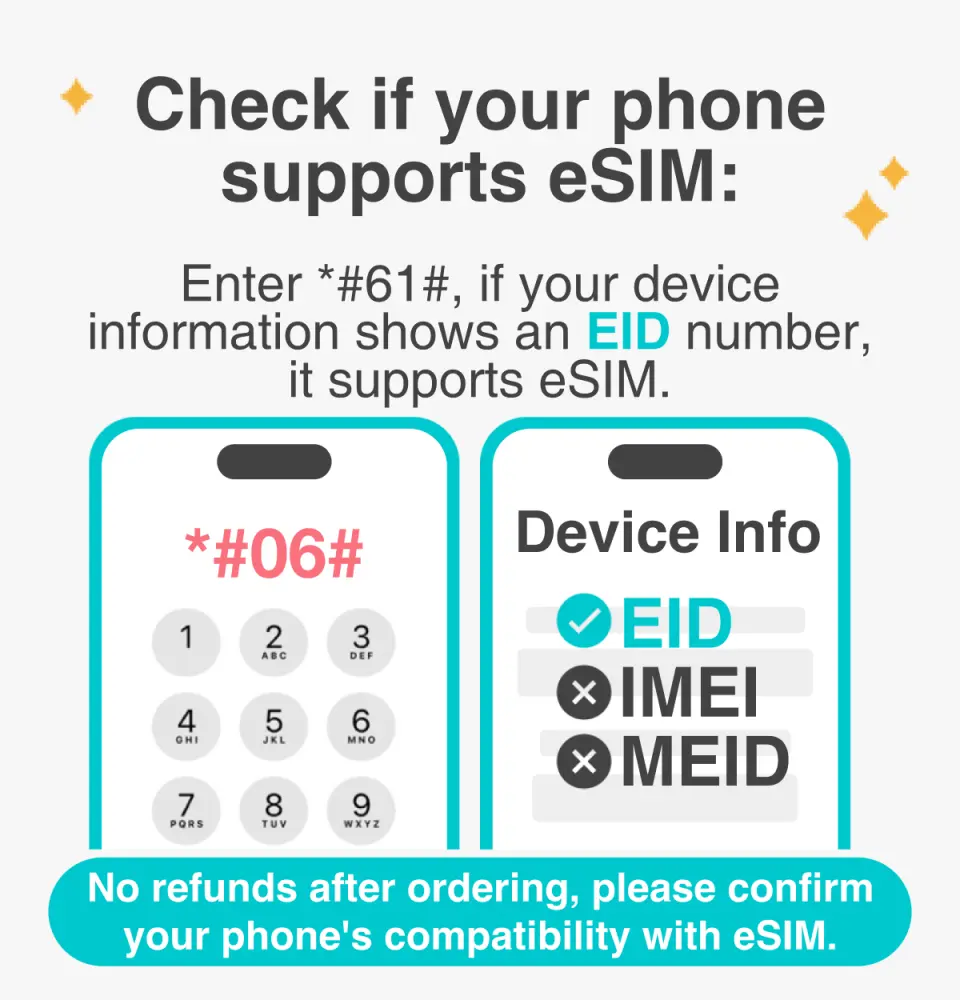
No refunds after purchase; please confirm your phone's eSIM compatibility beforehand.

Before activating the eSIM, please update your iOS to the latest version and connect to a stable Wi-Fi network. Older iOS versions and unstable networks are common causes of eSIM activation failures.


Open the camera, scan the eSIM QR code, and tap "Add Cellular Plan."


After scanning the eSIM QR code, the activation typically takes around 2–3 minutes. Any interruptions during this process may result in installation failure.


You can assign a label to each cellular plan, and customize your eSIM label by going to Settings and selecting Cellular.


Select the default line (Primary SIM) to designate the main phone number for receiving text messages.


You can designate the primary SIM for iMessages and FaceTime.


Make sure to select eSIM as your cellular data plan. A common reason for being unable to access the internet is that eSIM mobile data is not enabled.


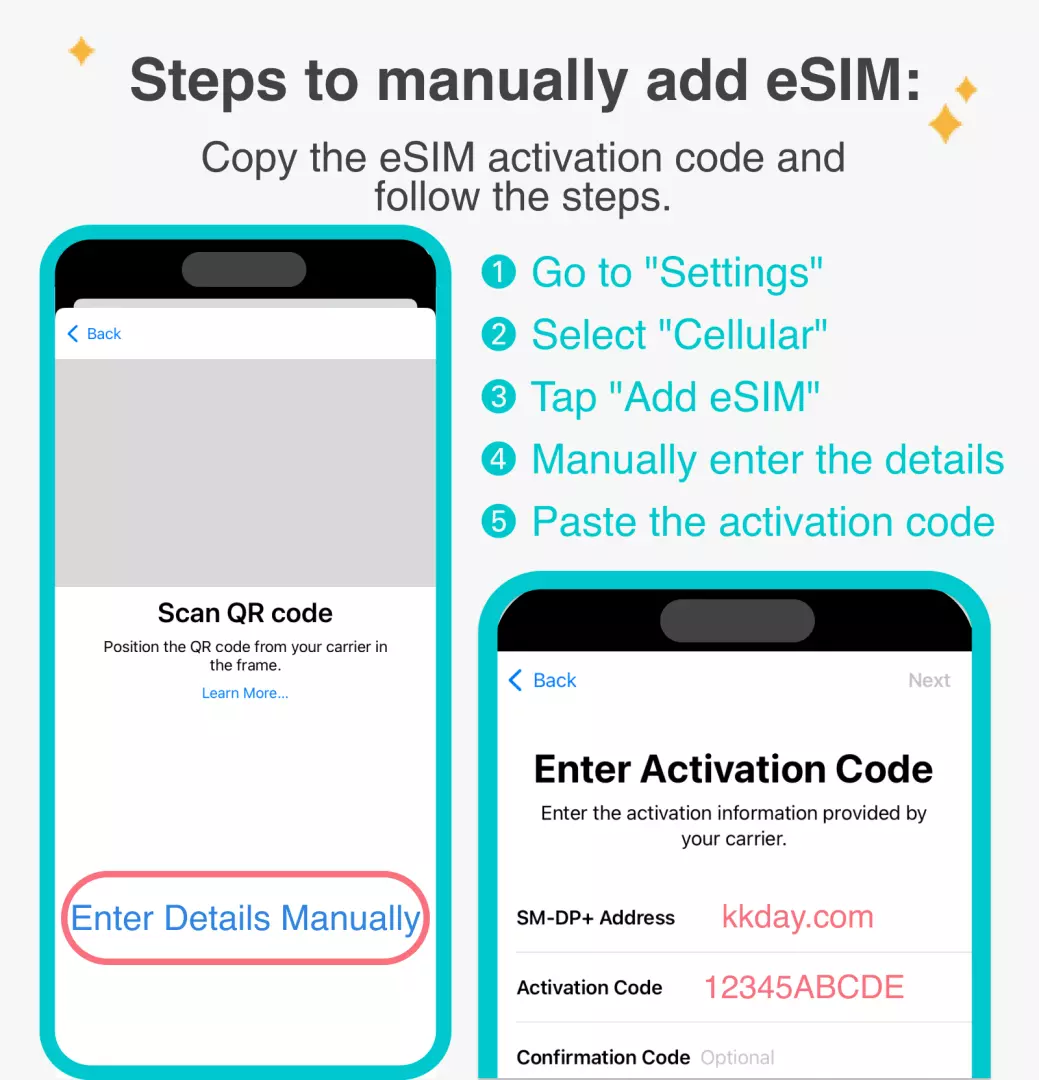
You can also manually add the eSIM if you're unable to scan the QR code.


After copying the eSIM activation code, please follow the steps to manually enter the eSIM information.After copying the eSIM activation code, please follow the steps to manually add the eSIM information.

Purchase Notice
- The DUM DUM eSIM Plan is a data-only service and is available for Non-Malaysian Only.
- Your eSIM can only be installed ONCE. Subsequent eSIM installations will require a new eSIM purchase. (e.g, switching devices, accidental deletion etc.)
- Please ensure your mobile phone and its operating system are compatible with eSIM, failure to do so may result in activation failure, and refunds will not be granted. Not sure if your device is eSIM compatible? Check list of devices here.
How to Redeem Your Voucher
Validity Period
- Valid for use within 30day(s) from the date of issue; Invalid after expiration
- Please complete the installation process within 30 days of booking on KKday.
Cancellation Policy
- Once the order has been completed, it cannot be canceled, modified, or refunded
- Due to time zone differences, the confirmed cancellation date is based on the supplier’s local time. Please allow 2–5 business days to process your cancellation request, after which the cancellation fee will be charged according to the product’s cancellation policy. Once the cancellation is confirmed, you will receive your refund within 14 working days.
FAQ
Yes, the Tune Talk eSIM is designed to support 5G connectivity across Malaysia. This allows users to enjoy faster data speeds for browsing, streaming, and uploading during their travels, provided their device is 5G-compatible and they are in a 5G coverage area.
To activate 5G services with your Tune Talk eSIM, ensure your device supports 5G and that its software is up to date. After installing the eSIM profile, navigate to your device's mobile data settings. Select the Tune Talk eSIM profile and enable 5G network mode. Sometimes, restarting your device can help establish the connection.
While convenient, eSIMs require a compatible device, which not all older phones may support. Activation relies on an internet connection to download the profile, which could be an issue if you arrive without initial connectivity. Also, if you frequently switch devices, transferring an eSIM can sometimes be more complex than swapping a physical SIM card.
When choosing a 5G eSIM for Malaysia, prioritize widespread nationwide coverage for seamless connectivity, especially if you plan to visit diverse regions. Look for clear instructions on activation and usage, and ensure it offers sufficient data allocation for your planned activities like navigation, photo uploads, and staying in touch online.
Tune Talk's 5G network coverage, utilized by the eSIM, is generally strong in major urban centers such as Kuala Lumpur, Penang, and Johor Bahru, as well as other developed areas. Coverage may vary in remote or rural regions. It is recommended to consult the latest coverage map from the provider for specific location details.
Absolutely. The Tune Talk 5G eSIM provides a seamless and fast data connection throughout Malaysia, making it ideal for uploading high-resolution photos and videos to social media platforms and easily staying in touch with family and friends through messaging apps and video calls during your trip.
Yes, an eSIM like the Tune Talk 5G Total Data eSIM provides comprehensive internet access across Malaysia. It offers nationwide coverage, allowing you to access maps, browse information, and communicate from most locations, ensuring you stay connected during your travels without needing a physical SIM card.
The Tune Talk 5G eSIM is compatible with most modern smartphones and tablets that support eSIM technology. This typically includes newer models from major manufacturers like Apple (iPhone XR/XS and later), Samsung (Galaxy S20 and later), and Google Pixel (Pixel 3 and later). Always verify your specific device's eSIM capability before purchasing.
Get Help


