

[Limited Time 20% OFF] Korean SKT High-Speed Data Unlimited Traffic eSIM
Order a Korean eSIM for instant use within 12 hours by scanning the QR code; no collection needed. Enjoy internet in Korea with super large bandwidth.
- Experience stable and high-speed unlimited data eSIM in South Korea at a great price!
- Scan and install with ease. Once you receive the voucher, there's no need to make trips for physical card collection or wait for delivery
- Enjoy fast and reliable roaming data network in South Korea
- Skip the hassle of changing the SIM card. Install it before departure and use it immediately upon arrival, worry-free
Package Options
Product Info
The content of this product is provided by machine translation and may not reflect the actual information, please take this into consideration before booking.
— What You Can Expect —
Stay connected as you travel in South Korea with convenient and easy to use eSIM. Skip the hassle of changing the SIM card. Install it before departure and use it immediately upon arrival, worry-free.
— eSIM Specifications —
- Data: 1GB per day (4G/LTE speed) + unlimited roaming data at 5mbps Voice calls and
- SMS: Not available
- Duration: 1/3/5/7 days
- Calculation of usage days: Usage days are calculated based on natural days, starting from the moment the eSIM is activated or at the activation time. Day 1 begins at 1:00 am Korea time (GMT+9)
- Please ensure that data roaming on the eSIM is turned off. Otherwise, it will activate once connected to the roaming network
- Validity period: Installation and use of eSIM must be completed within 30 days of purchase, and can be used for 1/3/5/7 days
- Hotspot sharing: Not available
Confirm the mobile phone's compatibility with eSIM


Set up eSIM using the following method

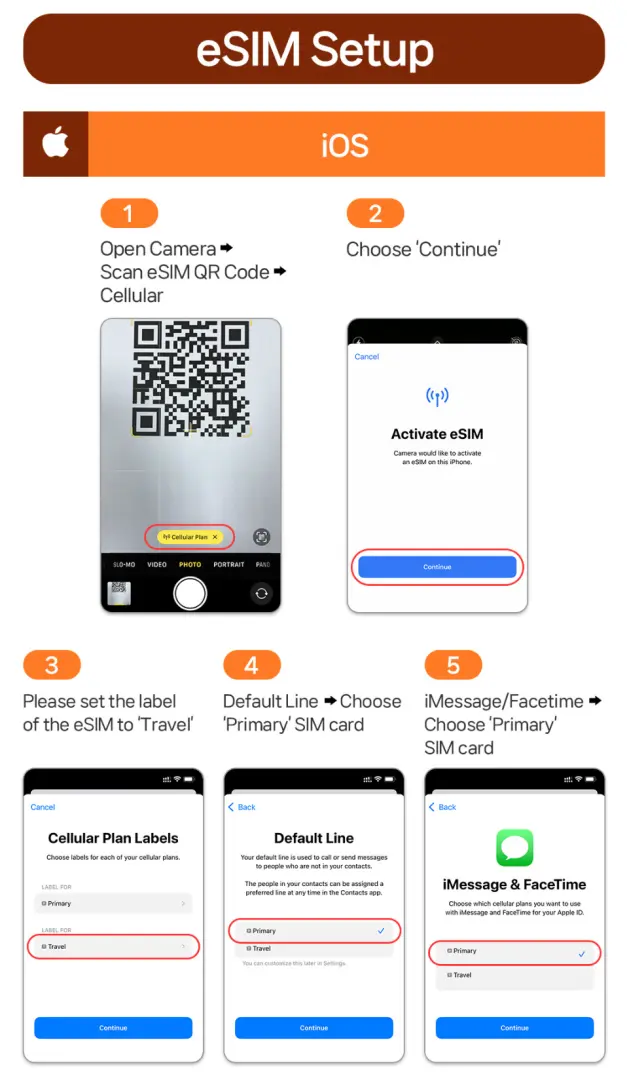
Prepare sSIM setup before and after departure by following these steps


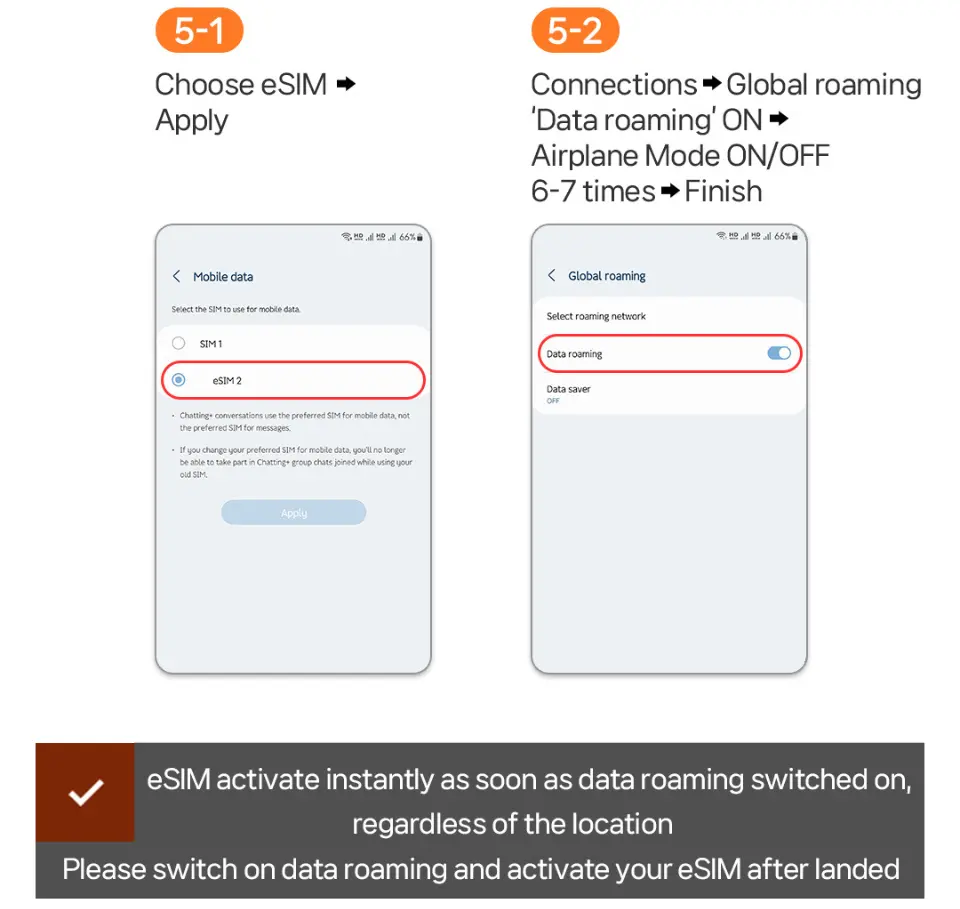
Activate eSIM for Android phones using the following steps


Take note of the eSIM specifications

SIM Card Specifications
| Data Usage Specifications | Unlimited data, 1GB |
| Transmission Specifications | 4G |
| Signal Coverage Area | South Korea |
| Mobile Carrier | SKT |
| Supported Sizes | eSIM |
| Hotspot Sharing | Unavailable |
| Supported Frequencies(4G) | B3(1800 MHz) |
| Top-Up Availability | Top-up unavailable |
| Excludes | Voice calls, Texts |
| Not Supported | SIM-locked device, Carrier-customized device, Mobile hotspot |
| Reminders | Before purchasing, confirm if your mobile phone supports eSIM installation; no refunds will be provided if installation is not supported after purchase |
Purchase Notice
- Even if it is the same mobile phone model, since the versions provided by each country are different, please be sure to confirm whether the mobile phone supports eSIM.
- Once the eSIM QR Code is sent, it cannot be canceled, exchanged or refunded.
- The eSIM QR Code needs to be activated and used within the validity period; if it cannot be used after expiration, it cannot be canceled, replaced or refunded.
- After the order is successfully placed, the voucher containing the eSIM QR Code will be sent within 24 hours.
- Please make sure data roaming on eSIM is turned off. Otherwise, it will be activated once connected to the roaming network.
- Internet speeds may vary by location, so minimum Internet speeds are not guaranteed. Please confirm before placing an order.
- In order to maintain network quality, telecommunications companies will implement traffic control for users who use excessive data within a short period of time, which may cause network interruptions or slower network speeds.
- If the phone was purchased from the United States, Canada, Japan or the Philippines, please confirm with the local telecommunications provider that the phone has been unlocked (Country Lock)
【FAQ】
Q1: Can I cancel or get a refund after purchasing?
A: No. eSIM products cannot be canceled, refunded or exchanged for other products once the QR Code is sent. Since the QR code contains all relevant information about the product, it can be installed at any time once sent and deleted by setting it on the mobile phone, so it cannot be canceled or refunded.
Q2: How many mobile phones can one eSIM be used on?
A: eSIM can only be used on one mobile phone and the mobile phone installed for the first time; it cannot be changed to other devices or used by logging in to the same eSIM with multiple devices.
Q3: What should I do if "code invalid" or "unable to join eSIM" continues to appear after scanning?
A: If eSIM has been installed in the phone, "Code Invalid" or "Unable to Join eSIM" will be displayed when scanning again. Please first confirm whether eSIM has been installed on the device. If it is confirmed that it has not been installed, please contact the customer service center for further enquiries.
Q4: Will the 5mbps network speed be very slow?
A: Even at 5mbps speed, you can still use GPS, Youtube, Messenger, etc. smoothly. But please note that in subway areas or crowded places, the Internet connection may sometimes be slower.
Q5: What should I do if my eSIM is deleted or accidentally deleted?
A: Once the eSIM is deleted, it cannot be restored and scanned again.
Q6: What should I do if my eSIM cannot be used?
A: Please do not delete the eSIM, please contact the customer service center. Once deleted, it cannot be used or refunded.
Q7: Can eSIM and physical SIM cards be used at the same time?
A: Yes, but you must select the correct mobile data and voice settings. Incorrect settings may incur international roaming charges. Please be sure to apply to your home country's telecommunications company to turn off international roaming services before leaving the country.
Q8: Can I purchase multiple eSIMs and use them continuously?
A: The eSIM can be activated immediately after being scanned into the phone. Please be sure to end the eSIM in use before adding a new eSIM.
Includes/Excludes
Reminders
This eSIM only offers unlimited Korean 4G/LTE network. Voice calls and text messages are not provided.
The calculation method for this product is based on 1:00 a.m. Korean time (GMT+9). (Example: Starting at 22:00 in the evening, one day will be counted until 1:00 in the morning the next day)
Please make sure data roaming on your eSIM is turned off. Otherwise, it will be activated once connected to the roaming network.
Once the eSIM QR Code is sent, it cannot be canceled, exchanged or refunded.
eSIM QR Code needs to be installed and activated within 30 days after purchase.
If the eSIM is accidentally deleted, it cannot be canceled, replaced or refunded; once the eSIM is deleted, it cannot be restored and scanned again.
Please pre-print the paper QR Code or save it on another device for easy scanning
eSIM can only be used on one mobile phone and the mobile phone installed for the first time; it cannot be changed to other devices or used by logging in to the same eSIM with multiple devices.
When activating eSIM, be sure to turn off the roaming function provided by the SIM card in your country. (Incorrect operation may result in international roaming charges, and you will have to bear the relevant charges yourself.)
If you are worried about unnecessary international roaming charges, please take the initiative to apply to your home country's telecommunications company to turn off international roaming services before going abroad.
When the eSIM shows that it cannot be scanned and used, or the product is defective, just contact the customer service center before returning to the country, and a refund will be issued after confirmation.
In order to maintain network quality, telecommunications companies will implement traffic control for users who use excessive data within a short period of time, which may cause network interruptions or slower network speeds.
Mobile network coverage and data speed will vary depending on the communication environment of the country of travel.
No additional compensation is provided, including roaming fees, overseas USIM purchase fees, transportation fees, etc.
Please note that TikTok (the application) cannot be used during the use of this eSIM
How to Use
[Setup method – iPhone]
- Settings>Mobile Services>Mobile Network>Turn off data roaming (please print the eSIM QR Code paper copy in advance)
- Open the basic camera>Scan eSIM QR CODE>Click on the yellow icon of "Action Plan"
- When the eSIM activation screen appears, click "Continue" > After completion, set the eSIM mobile plan label (for example: travel)
- Setup before departure: Default number, iMessage and Facetime, mobile data – use “Main”
- Please make sure data roaming on eSIM is turned off. Otherwise, it will be activated once connected to the roaming network
- After arriving at the destination, go to Settings>Mobile Services>Mobile Data – Use “Travel” (i.e. eSIM) > Then follow step 8 below to set up after arriving at the destination: Default Number, iMessage and Facetime – Use “Main”; Mobile Data -Use "Travel" (i.e. eSIM)
- Setup upon arrival: Default line, iMessage and Facetime - select primary SIM; Mobile data - select 'Travel' (eSIM)
- Turn on data roaming service on eSIM > Turn it on and off 6-7 times until 4G or LTE is displayed
【Setup method – Android】
- Please turn off roaming before setting up (please print the eSIM QR Code paper copy in advance)
- Open the basic camera > Scan the eSIM QR CODE > Click the yellow icon "Add plan to phone"
- When setting up before departure, turn on data roaming = start counting usage days; please turn on data roaming and activate eSIM after arriving at the destination.
- After successfully installing eSIM, close eSIM > After arriving at the destination, proceed to step 6 below
- Setup after arriving at destination: (SIM Administrator) eSIM ON > Press "Mobile Data" > Select eSIM and press Apply
- Turn on data roaming service on eSIM > Turn it on and off 6-7 times until 4G or LTE is displayed.
Cancellation Policy
- Once the order has been completed, it cannot be canceled, modified, or refunded
- Due to time zone differences, the confirmed cancellation date is based on the supplier’s local time. Please allow 2–5 business days to process your cancellation request, after which the cancellation fee will be charged according to the product’s cancellation policy. Once the cancellation is confirmed, you will receive your refund within 14 working days.
FAQ
Using a Korean SKT eSIM for data in South Korea typically offers a more predictable and often more economical option compared to traditional international roaming from your home carrier. Traditional roaming can incur high, unpredictable charges based on usage. An eSIM provides a fixed-price data plan, helping you manage your travel budget effectively without unexpected bills. This allows for stable, high-speed connectivity at a great value.
To use a Korean SKT eSIM, your mobile device must be eSIM-compatible and unlocked by your home carrier. Most newer smartphone models from brands like Apple (iPhone XS/XR and later), Samsung (Galaxy S20 and later), Google Pixel (Pixel 3 and later), and others support eSIM functionality. You should verify your specific phone model's eSIM support with the manufacturer or your carrier before purchasing to ensure seamless activation.
The main differences lie in convenience and physical handling. A Korean SKT eSIM offers instant activation via a QR code scan, eliminating the need to physically swap SIM cards or collect a physical card upon arrival. This means no waiting for delivery. A physical SIM requires insertion into your device and potentially activation at a local counter. With an eSIM, you can often retain your primary SIM card for calls and texts while using the eSIM for data.
When using a Korean SKT eSIM, data roaming typically refers to allowing your device to connect to local networks in South Korea. For the eSIM to function correctly as your data plan, you generally need to ensure 'Data Roaming' is enabled for that specific eSIM profile in your phone's cellular settings. This allows the eSIM to access the local SKT network for high-speed data. It is important to confirm that only the eSIM profile's data roaming is active, not your primary SIM's, to avoid unwanted charges.
Activating your SKT eSIM on an iPhone involves a few simple steps. First, ensure your phone is connected to Wi-Fi. Go to Settings > Cellular (or Mobile Data) > Add eSIM. You will typically be prompted to scan a QR code provided after purchase. Follow the on-screen instructions to complete the installation. Once installed, label your eSIM (e.g., "Korea Travel") and set it as your primary line for cellular data. Remember to enable "Data Roaming" for the SKT eSIM profile in its settings for proper functionality.
The installation process for a Korean SKT eSIM is straightforward. After purchasing, you will receive a QR code, often via email. Simply scan this QR code using your smartphone's camera or by navigating to your phone's cellular settings and choosing to add an eSIM. The eSIM profile installs digitally onto your device. You can install it up to 12 hours before your departure. Once installed, it is typically ready for immediate use upon arrival in South Korea, providing instant connectivity without waiting.
The Korean SKT eSIM provides unlimited data with high-speed access. While the data itself is unlimited, providers typically implement a Fair Usage Policy. This means that after consuming a very large amount of high-speed data within a short period, your speed might be temporarily reduced to ensure network quality for all users. However, for most typical travel usage, you can expect stable and fast connectivity throughout your trip. This ensures a reliable internet experience for navigation, communication, and social media.
Purchasing a Korean SKT eSIM is designed for convenience. You can easily purchase it through KKday, a platform known for offering a wide range of travel essentials with reliable service. After selecting your desired eSIM plan on KKday, you complete the purchase online. Within 12 hours of your order, you will receive a digital voucher containing a QR code via email. This eliminates the need for physical card collection or delivery, allowing you to install the eSIM by scanning the QR code directly onto your device. KKday streamlines this process, ensuring you receive your eSIM details quickly and hassle-free, ready for your trip.
Get Help


