

China, Hong Kong and Macau eSIM Card | No VPN required, daily high-speed/total/unlimited data plans, roaming resources | Supports TikTok and ChatGPT
- KKday China, Hong Kong, Macau eSIM card daily high-speed/total plan roaming resources multiple options
- KKday China, Hong Kong, Macau eSIM card does not require VPN, you can use Facebook, X (Twitter), WhatsApp and other applications without VPN
Package Options
Product Info
The content of this product is provided by machine translation and may not reflect the actual information, please take this into consideration before booking.
- eSIM Overview
eSIM (Embedded-SIM), also known as "embedded SIM card" or "virtual SIM card". Unlike traditional network cards, which are all removable and need to be inserted into the card slot of the mobile device before use, eSIM adopts a "virtual" form. Users only need to scan the exclusive QR Code to set it up, and the card can be directly implanted into the mobile phone. There is no need to insert a physical card separately to download the traffic plan to the mobile phone. Book now at KKday and add another fun to your travel!
- Things to know before buying
- Please make sure your phone and its operating system support the eSIM function before purchasing. If you cancel the order due to device incompatibility, no refund will be given.
- iOS version 12.1 or higher is required; Please note that iPhones sold in mainland China do not support eSIM. In Hong Kong and Macau, only iPhone 13 mini, iPhone 12 mini, iPhone SE 2020 and iPhone XS have eSIM function. (Please visit Apple official website for inquiries)
- Samsung phones vary in different countries. Samsung phones purchased in Taiwan do not support eSIM. Please confirm with Samsung's official website for other regions first.
- Each QR code can only be scanned and installed once. Once bound, you cannot change the device or delete it. Once deleted, you cannot scan and install again and need to purchase it again.
- The customer service hours for this product are 9:30~18:00 (GMT+8), please be advised.
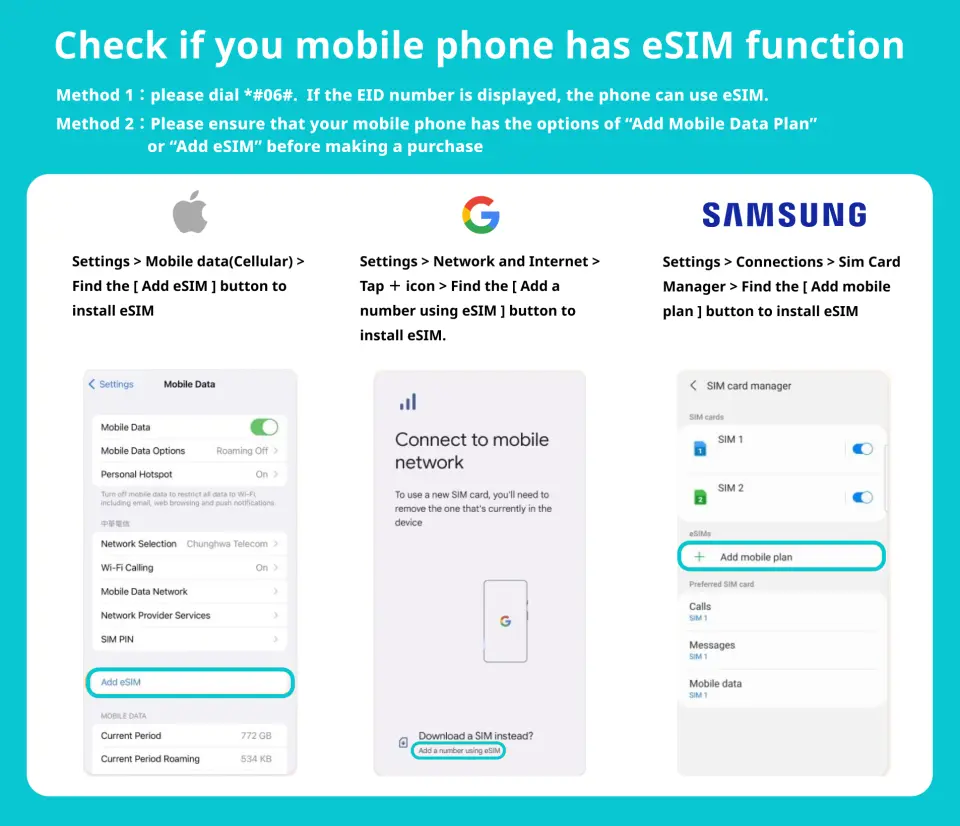
Please confirm that your phone has eSIM function before purchasing

Applicable models


eSIM installation instructions (ios)


Method 2


eSIM installation instructions (Android)


Purchase Notice
- Please make sure your phone and its operating system support the eSIM function before purchasing. If you cancel the order due to device incompatibility, no refund will be given.
- iOS version 12.1 or higher is required; Please note that iPhones sold in mainland China do not support eSIM. In Hong Kong and Macau, only iPhone 13 mini, iPhone 12 mini, iPhone SE 2020 and iPhone XS have eSIM function. (Please visit Apple official website for inquiries)
- Samsung phones vary in different countries. Samsung phones purchased in Taiwan do not support eSIM. Please confirm with Samsung's official website for other regions first.
- Each QR code can only be scanned and installed once. Once bound, you cannot change the device or delete it. Once deleted, you cannot scan and install again and need to purchase it again.
- The customer service hours for this product are 9:30~18:00 (GMT+8), please be advised.
Reminders
Before purchasing, please make sure that your phone and its operating system support the eSIM function. No refund will be given if the order is cancelled due to device incompatibility.
iOS 12.1 or later is required; Please note that iPhones sold in mainland China do not support eSIM. In Hong Kong and Macau, only iPhone 13 mini, iPhone 12 mini, iPhone SE 2020, and iPhone XS have eSIM capabilities.
Each QR code can only be scanned once. Once bound, you cannot change the device or delete it. Once deleted, you cannot scan and install it again.
An internet connection is required to install the eSIM. Please make sure there is WiFi or mobile data available before installation.
The eSIM must be installed and activated at the destination within 90 days of ordering, otherwise it will become invalid and unusable.
Please remember to turn off data roaming on the original SIM card to avoid using the mobile network of the original SIM card and incurring high roaming charges.
When you finish using the eSIM plan in your phone, click [Remove Action Plan] at the bottom to remove it.
Please be aware that the quality of Internet access may be affected by factors such as location, terrain, building shielding, number of users and weather.
The customer service hours for this product are 9:30~18:00 (GMT+8), please be advised.
How to Use
【Please note】
- The customer service hours for this product are 9:30~18:00 (GMT+8), please be advised.
- When used in Hong Kong, you need to manually set the APN: pmci. The setting steps are as follows:
- Apple mobile phone: Cellular network - Cellular data - APN, fill in pmci and save.
- Android phone: Turn on mobile data, roaming, then go to Settings - Mobile Network - Access Point Name (APN) - Create a new APN name and fill in pmci to save.
- iOS
1) Select the "Settings" page, then select "Mobile Network" 2) Click "Add Mobile Network" 3) Scan the QR code in the scan box that appears 4) After the download is complete, make some basic settings and you can start using it - Android
1) On the "Settings" page, select "Network & Internet" 2) Select "Mobile Network" 3) Select "Download SIM card instead?" 4) Scan the QR code when the scanning screen appears - If the APN is not loaded automatically, please set the APN manually.
APN: smartone/mobile.three.com.hk - Frequently asked questions
- How to check ICCID?
If the mobile network is turned on, you can check the ICCID in “Settings – About this device – ESIM”. - I have successfully activated the eSIM service, but the applicable device cannot connect to the network. What should I do?
Please shut down and restart your device and update the iOS version before trying again. - If the eSIM can be used normally but cannot share the hotspot, please refer to the following instructions to try to restore it:
1) Is the phone a contract phone or a card-locked phone?
2) Is VPN turned off?
3) Is data roaming enabled?
4) Whether to set the eSIM as the primary phone number
5) Is the phone updated to the latest iOS version (iOS13.6)
6) Please use a physical card to access the Internet, turn on the mobile phone hotspot sharing function (make sure the hotspot is available), then do not turn off the hotspot, and then switch the phone to the eSIM to access the Internet. Please try several times and turn the phone on and off.
7) If the above problems have been eliminated, please contact customer service
Cancellation Policy
- Once the order has been completed, it cannot be canceled, modified, or refunded
- Due to time zone differences, the confirmed cancellation date is based on the supplier’s local time. Please allow 2–5 business days to process your cancellation request, after which the cancellation fee will be charged according to the product’s cancellation policy. Once the cancellation is confirmed, you will receive your refund within 14 working days.
FAQ
When selecting an eSIM for these regions, consider the required data allowance (daily high-speed, total, or unlimited plans), regional coverage (ensuring it spans all three destinations), and the ability to bypass China's Great Firewall for direct access to social media and messaging apps like Facebook, X (Twitter), and WhatsApp without a VPN. Device compatibility and ease of activation are also important factors for a seamless travel experience.
Generally, using an eSIM for internet access in China is permissible. The primary consideration is ensuring the eSIM service explicitly offers a solution to bypass China's Great Firewall. This allows travelers to access common international websites and apps (like Facebook, X (Twitter), WhatsApp) that are typically restricted, without needing to use a separate VPN. There are no specific legal restrictions on using a compliant eSIM for personal internet use, but always ensure your chosen eSIM clearly states its firewall bypass capability.
Yes, an eSIM card designed for travel across China, Hong Kong, and Macau typically includes comprehensive roaming resources that extend coverage to all three regions. This means travelers can enjoy seamless high-speed data connectivity using a single eSIM, eliminating the need to switch or purchase separate SIMs when moving between these destinations. Always verify the specific regional coverage details of your chosen eSIM plan before purchasing.
For travelers in China, a crucial eSIM feature is the built-in capability to bypass the Great Firewall. This allows direct access to international social media platforms such as Facebook and X (Twitter), and messaging apps like WhatsApp, without requiring a separate VPN. Additionally, having flexible data plans (daily high-speed, total data, or unlimited options) provides convenience for varying usage needs. Seamless multi-region coverage for Hong Kong and Macau is also highly beneficial for a connected journey.
For the China, Hong Kong, and Macau eSIM card, various data plans are available, including daily high-speed allowances, total data packages, and unlimited total plans. For plans with high-speed data limits, once the specified allowance is consumed, the data speed will typically be reduced to a lower, but still functional, speed (e.g., 128kbps or 256kbps) until the daily refresh or the plan's validity period ends. Unlimited total plans usually provide continuous high-speed data within reasonable usage policies.
The China, Hong Kong, Macau eSIM card is specifically provisioned with roaming resources that route internet traffic through international servers, effectively bypassing China's Great Firewall. This specialized setup allows direct and uninterrupted access to commonly restricted applications and websites, such as Facebook, X (Twitter), and WhatsApp. This integrated solution enables travelers to stay connected with ease and convenience without the need for additional VPN software or configurations on their device.
To use an eSIM card, your smartphone or tablet must be eSIM-compatible; typically, newer models support this technology. You should check your device manufacturer's specifications to confirm. The activation process usually involves scanning a QR code provided after purchase, which automatically installs the eSIM profile onto your device. Ensure your device is connected to the internet during activation and follow the on-screen prompts, which often takes just a few minutes.
If you experience network connectivity issues, first ensure your device's data roaming is enabled and your eSIM profile is correctly selected as the primary data line in your phone settings. Try restarting your device, as this often resolves minor glitches. If problems persist, verify your Access Point Name (APN) settings against the instructions provided with your eSIM. If still unresolved, connect to Wi-Fi and reach out to the customer support contact indicated in your eSIM purchase information for further assistance.
Get Help


