

UK Total Data eSIM
Set up the novel eSIM by scanning the QR code after booking for hassle-free access to powerful internet services, and explore useful information about attractions in UK for a great start to your next adventure.
- Simplify your travel with eSIM, eliminating SIM card pin needle and installation hassles
- Experience seamless connectivity throughout your trip with its easy-to-use design
- Enjoy high-speed internet across the UK with 4G LTE coverage
Package Options
What You Can Expect
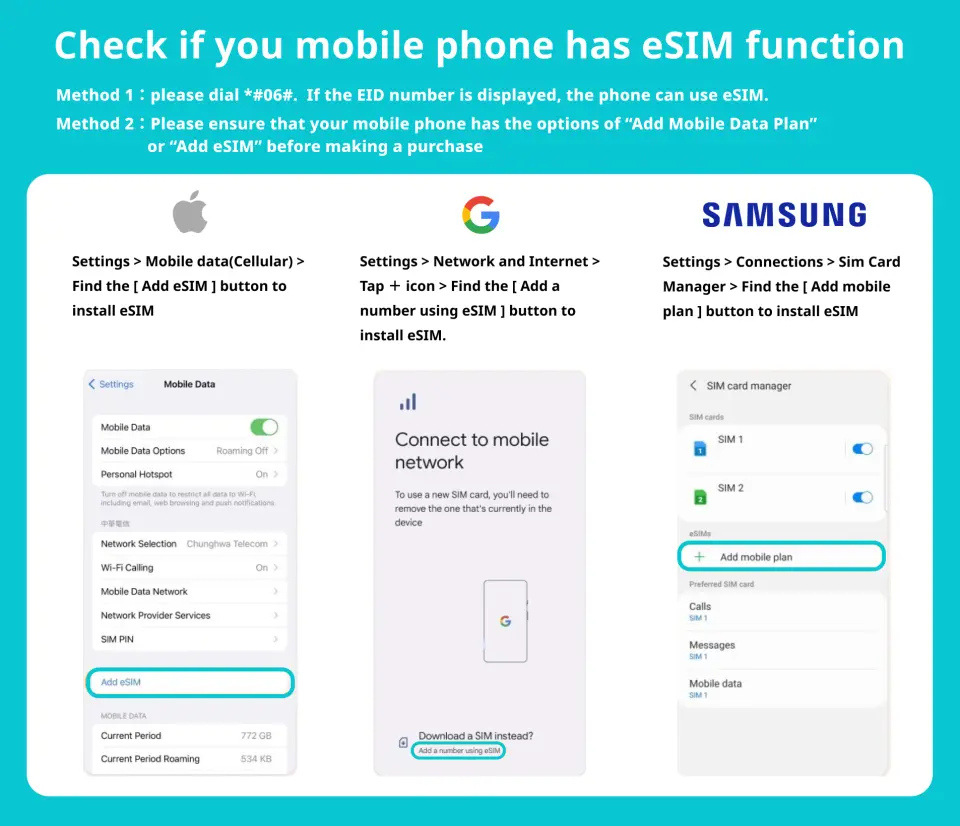
Check if you mobile phone has eSIM function

eSIM Compatible Devices


eSIM installation instruction


Important Info
Reminders
Stable internet connection is essential during eSIM QR code scanning.
The validity of the eSIM starts upon successful scanning and installation.
Calculation method of days: 24-hour system. For example, you purchase a 3-day plan and install it at September 1 at 10:00 am. The plan will end at September 4 at 9:59 am
The day you scan the QR code counts as the first day of use. It is recommended to scan the QR code and install it before taking off or after arriving at your destination to avoid activating it in advance and affecting your usage rights.
The eSIM QR Code is a one-time scan, and once removed, reactivation is not possible.
The eSIM is exclusively functional within Spain.
To ensure proper functionality, Data Roaming must be enabled for the eSIM.
In order to ensure all users' accessibility to the internet, each telecom carrier implements their fair usage policy to monitor data consumption. If a user's data consumption negatively affects other users' internet connections, the telecom carrier may enforce speed restrictions temporarily. Please note that under such circumstances, KKday has no right to intervene
The quality of communication may be affected by outside conditions; surrounding landforms (e.g. mountains), weather, obstruction by buildings, the number of users, or locations may affect the speed and quality of the internet
Please turn off the data roaming function of the original SIM Card to avoid high roaming fees
How to Use
f1 ) Once the purchase has been confirmed, we shall send you the eSIM QR Code
2 ) Access eSIM Settings: Open the settings menu on your mobile device.
3 ) Find Mobile or Cellular Options: Depending on your device, look for options like "Mobile Data," "Cellular," or "Network & Internet."
4 ) Select Add eSIM: Within the mobile or cellular settings, you should find an option to "Add eSIM" or "Add Cellular Plan." Tap on it.
5 ) Scan QR Code: Use your device's camera to scan the eSIM QR code. Ensure that the QR code is well-lit and clear for successful scanning.
6 ) The eSIM will successfully installed in your device once the QR Code has been scanned
- Set eSIM APN : Usually the APN will be automatically recognized. If it cannot be automatically recognized, you need to set it manually.
* iPhone ( Setting > Cellular > Cellular data options > set the APN ) APN : 3gnet / Username : empty / Password: empty
* Android ( Settings > SIM 1 > APN > Add new APN ) APN : 3gnet / Username : empty / Password: empty
Cancellation Policy
- Once the order has been completed, it cannot be canceled, modified, or refunded
- Due to time zone differences, the confirmed cancellation date is based on the supplier’s local time. Please allow 2–5 business days to process your cancellation request, after which the cancellation fee will be charged according to the product’s cancellation policy. Once the cancellation is confirmed, you will receive your refund within 14 working days.
FAQ
The UK Total Data eSIM is a digital SIM embedded directly into your phone, eliminating the need for physical SIM cards. After purchase, you receive a QR code to scan, which quickly installs the eSIM profile on your device. It provides seamless high-speed internet access throughout the UK by connecting to local 4G LTE networks, allowing you to use navigation, communication apps, and access online information without hassle.
Common issues include an unstable internet connection during activation, an invalid QR code (e.g., already used), or incorrect device settings. Ensure you have a strong Wi-Fi connection when scanning the QR code. Double-check that your device is eSIM-compatible and unlocked. If problems persist, verify your device's APN settings and ensure data roaming is enabled for the eSIM line.
The UK Total Data eSIM is primarily designed to provide comprehensive high-speed data coverage exclusively within the United Kingdom. Its service is optimized for seamless connectivity across England, Scotland, Wales, and Northern Ireland. If your travel plans include other countries, you would need to acquire a separate eSIM that specifically covers those regions.
First, ensure your device's data roaming is turned on for the eSIM line. Check if the eSIM profile is selected as your primary data source in your phone's settings. Restart your device, and if still unresolved, verify the APN settings are correct as provided by the eSIM provider. Also, confirm you have sufficient data allowance remaining.
When using a UK travel eSIM, you can typically designate your physical SIM as your primary line for calls and texts, and the eSIM as your secondary line for mobile data. In your phone's cellular settings, you can assign labels (e.g., "Personal" for primary, "Travel" for eSIM) and choose which line handles data, voice, and messages, ensuring your home number remains active for receiving calls if needed.
When selecting an eSIM for the UK, consider the data allowance to match your usage needs, the duration of validity to cover your trip, and network coverage to ensure reliable connectivity across your planned destinations within the UK. Also, verify that your device is eSIM-compatible and unlocked.
After purchasing your UK Total Data eSIM, you will receive a QR code. To install, go to your phone's cellular settings, select "Add Cellular Plan," and scan the provided QR code. Follow the on-screen prompts to complete the setup. Activation typically occurs automatically upon successful installation, ensuring hassle-free access to data services upon arrival in the UK.
The UK Total Data eSIM provides high-speed internet access, primarily leveraging 4G LTE networks across the United Kingdom. This ensures robust coverage in major cities and most populated areas, allowing for smooth browsing, streaming, and app usage. Connection speeds are generally fast and reliable, suitable for typical travel communication and information needs.
Get Help


