

Korean eSIM Card|SKT / LG Dual Telecom Roaming Resources All You Can Eat / Daily Plan
- Support iOS one-click installation: Update to the latest iOS App version and iOS 17.4 or above, you can install eSIM in one click on the KKday App
- KKday Korean eSIM card, stable 5G/4G Internet quality
- KKday Korean eSIM card, using Korean SKT / LG dual telecom roaming resources
Package Options
Product Info
The content of this product is provided by machine translation and may not reflect the actual information, please take this into consideration before booking.
Please confirm that your device is compatible with eSIM before purchasing. After sending the eSIM QR code, this product is non-refundable


eSIM compatible mobile phone models


eSIM iOS Installation Instructions


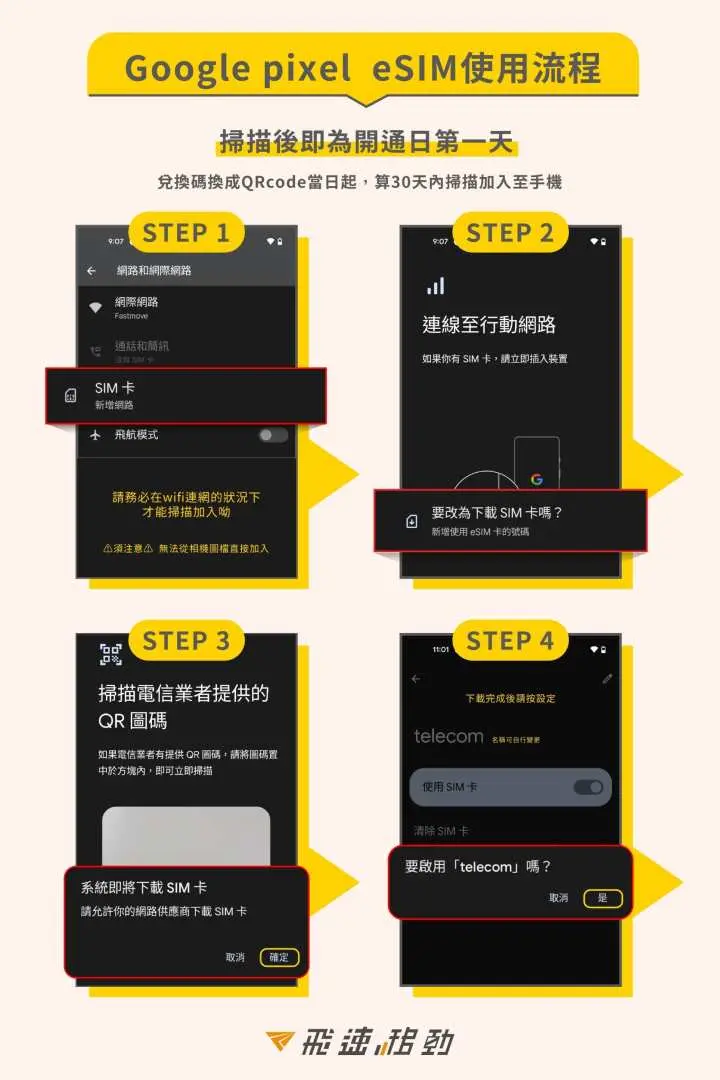
eSIM android installation instructions

Important Info
Reminders
Please install it before departure or after arriving at your destination to avoid premature activation which may affect your rights and interests.
Support iOS one-click installation: Update to the latest iOS App version and iOS 17.4 or above, you can install eSIM in one click on the KKday App
Before installing the eSIM, please make sure you are connected to WiFi or mobile network to scan the QR code or enter manually to join the mobile plan (if you need to enter manually, please contact customer service to obtain the activation code)
Please be sure to save the QR code. Once scanned, it will be considered as binding. Please follow the instructions to install it. Do not exit the screen during the process to avoid the phone misjudging and causing the eSIM plan to be deleted.
Once a QR code is bound, it can only be scanned again using the same mobile phone. It cannot be reissued or manually input to another mobile phone.
If the eSIM plan is not fully used or deleted without the approval of customer service staff, resulting in an abnormal plan, we will not be able to reissue or refund
The quality of telecommunications networks in different countries varies. The base station construction is not as dense as that in Taiwan. The regionality and telecommunications construction of each country are different. We are sorry that we cannot request a refund due to the signal conditions in a few areas.
How to Use
- When joining an eSIM mobile plan, please make sure you are connected to WiFi first
- Installation steps:
1. Settings -> Mobile Services -> Join Mobile Plan -> Use Mobile Barcode
2. Scan the QR Code above, or enter the address and confirmation code manually, then click "Next"
3. Click to confirm "Certification Action Plan"
4. After the addition is completed, the eSIM plan label (secondary) will appear and you can change the name yourself
5. After arriving at the destination, open the newly added plan label
- Steps to enable:
1. Please activate the newly added eSIM plan service after arriving at your destination
2. Change the label name in "Action Data" to the added label scheme
3. Turn on "Data Roaming" and you will be able to access the Internet in about 3 to 5 minutes
Cancellation Policy
- Once the order has been completed, it cannot be canceled, modified, or refunded
- Due to time zone differences, the confirmed cancellation date is based on the supplier’s local time. Please allow 2–5 business days to process your cancellation request, after which the cancellation fee will be charged according to the product’s cancellation policy. Once the cancellation is confirmed, you will receive your refund within 14 working days.
FAQ
To utilize the one-click installation feature, your device must be an iPhone updated to the latest iOS App version and running iOS 17.4 or above. Additionally, your mobile device needs to be eSIM compatible. Most newer smartphone models support eSIM functionality; it's recommended to verify your device's compatibility before purchase.
The Korean eSIM card leverages dual telecom roaming resources from major Korean providers, SKT and LG. This ensures stable 5G/4G internet quality across various locations in South Korea, allowing for reliable connectivity whether you're in urban areas or traveling between cities.
Generally, data-only eSIM cards for travel, including many Korean eSIM products, do not come with a local South Korean phone number. Their primary function is to provide mobile data for internet access. If you require a local number for calls or SMS, consider alternative options like a physical SIM card or VoIP services.
For users with an iPhone running iOS 17.4 or above and the latest version of the associated app, the Korean eSIM card supports a convenient one-click installation process. After ordering, you can directly install the eSIM profile onto your device through the application, simplifying the setup without manual configuration.
After successful one-click installation, the activation of the Korean eSIM card is typically instantaneous or takes only a few minutes. Ensure your device's mobile data settings are configured to use the newly installed eSIM, and that data roaming is enabled if required by the plan. Connectivity should begin automatically upon arrival in South Korea.
A Korean eSIM card generally offers a more cost-effective solution compared to traditional international roaming. It provides dedicated local data plans, often with higher data allowances or unlimited options, at a predictable upfront cost. Roaming can incur unpredictable, higher per-megabyte charges, especially for extensive internet use during your travels.
Yes, the Korean eSIM card offers flexibility with various data plans to suit different travel needs. Options typically include "all you can eat" (unlimited data) for heavy users and daily plans for those with shorter trips or moderate data consumption. You can select the plan that best matches your duration of stay and data requirements.
First, ensure your device's mobile data is enabled for the eSIM and that data roaming is turned on in your settings. Check your network selection (it should be automatic or set to SKT/LG). If problems persist, try restarting your phone. If still unresolved, contact customer support for troubleshooting assistance, providing details of your device and location.
Get Help


