

USA, Canada, Mexico eSIM | 5G/4G Network 1-30 Days Daily High-Speed/Total Data | Supports all AI apps and TikTok | USA, Canada, Mexico
- No card swapping, zero consumables. eSIM is ready to use upon arrival, allowing you to enjoy 5G internet quickly, saving time and being eco-friendly.
- One-tap installation supported on iOS 17.4 and above.
- Recommended for internet in the USA, Canada, and Mexico. Uses networks from multiple carriers like AT&T, Rogers, and T-Mobile for stable and guaranteed signals. Easily travel across the three North American countries (automatically selects the best network signal; carrier cannot be specified).
- Supports commonly used apps such as TikTok, ChatGPT, Instagram, Google Maps, Facebook, etc.
- Supports hotspot sharing, 5G/4G high-speed internet, simple operation, and smooth usage.
- 24-hour customer service provides you with the most immediate assistance.
Your satisfaction is our top priority! If there is anything unsatisfactory about the product, please contact us immediately, and we will do our best to provide assistance so you can purchase with peace of mind!
Package Options
Product Info
No card swapping, zero consumables. eSIM is ready to use upon arrival, allowing you to enjoy 5G internet quickly, saving time and being eco-friendly.
One-tap installation supported on iOS 17.4 and above.
Recommended for internet in the USA, Canada, and Mexico. Uses networks from multiple carriers like AT&T, Rogers, and T-Mobile for stable and guaranteed signals. Easily travel across the three North American countries (automatically selects the best network signal; carrier cannot be specified).
Supports commonly used apps such as TikTok, ChatGPT, Instagram, Google Maps, Facebook, etc.
Supports hotspot sharing, 5G/4G high-speed internet, simple operation, and smooth usage.
24-hour customer service provides you with the most immediate assistance.
Your satisfaction is our top priority! If there is anything unsatisfactory about the product, please contact us immediately, and we will do our best to provide assistance so you can purchase with peace of mind!

Please check if your device is eSIM compatible before purchasing
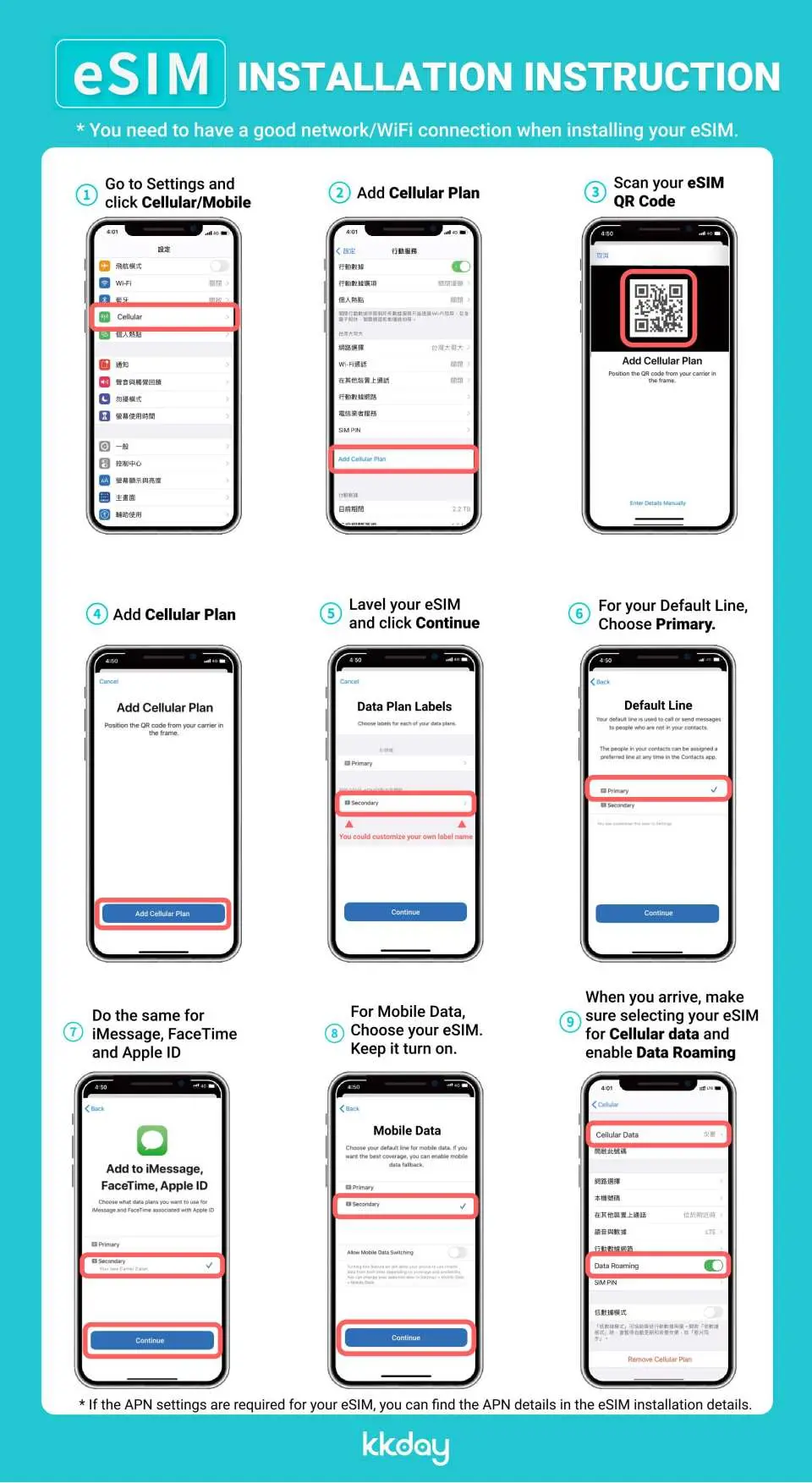
eSIM Installation Guide

Supported Apps
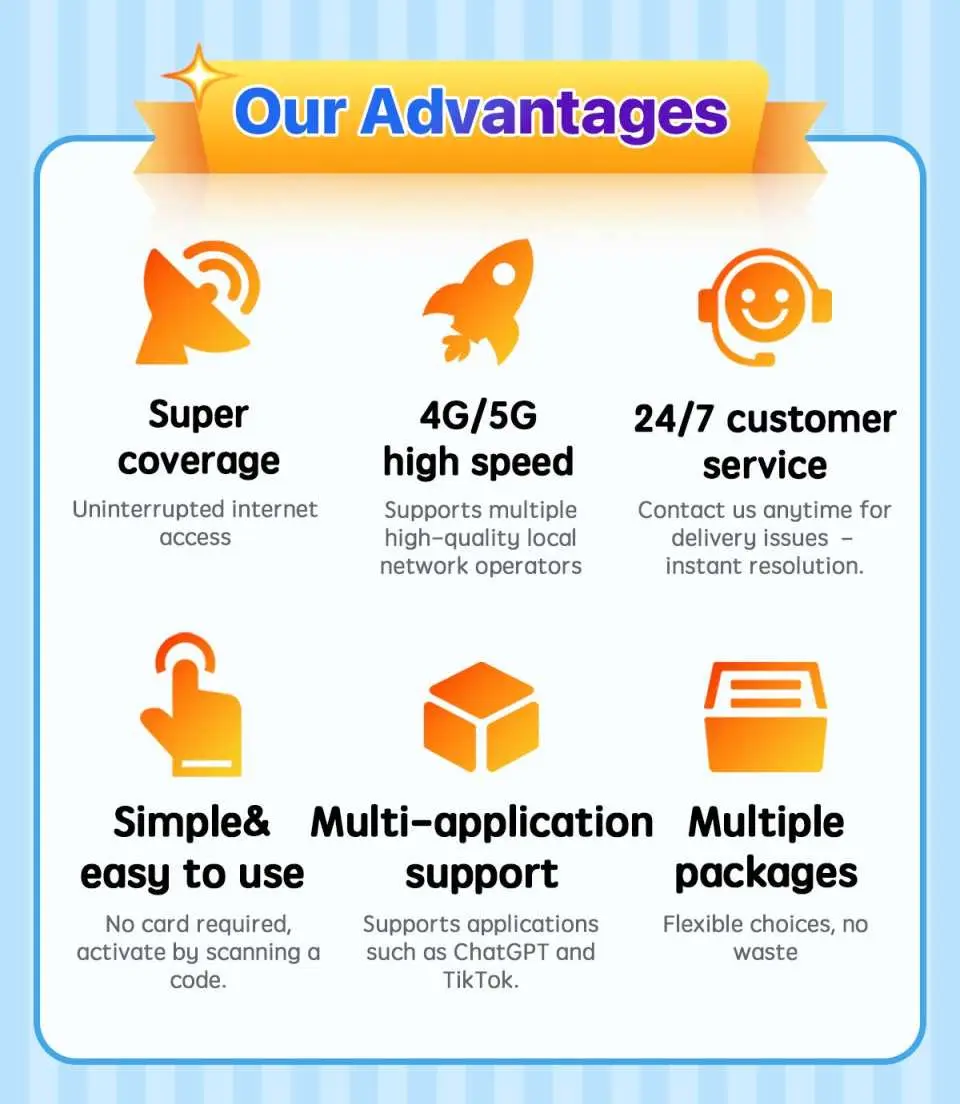
Product Advantages

Purchase Notice
- Mobile data only; voice calls and SMS are not supported.
- Supports apps such as TikTok, ChatGPT, Instagram, Google Maps, Facebook, etc.
- Please dial *#06# on your phone to check for eSIM support. If an EID is displayed, it is supported; if not, the device does not support eSIM.
- Please be aware that signal quality may be affected by location, terrain, building obstruction, number of users, and weather conditions.
- If your location or device does not support 5G, it will automatically switch to 4G/3G signals. Actual network speeds depend on local signal availability.
- This eSIM product supports local 5G network access. Mobile network signals (5G/4G/LTE) depend on local carrier base station coverage. In remote areas, indoors, basements, suburbs, etc., you may only receive 4G/LTE/3G signals. This is normal and not an issue with the eSIM card itself, so please use it with confidence.
- To maintain network connection quality and adhere to the Fair Usage Policy (FUP), telecom companies worldwide may impose traffic controls on users who consume large amounts of data in a short period, which may result in loss of internet access or slower speeds. To ensure normal internet usage, please avoid long-term video streaming or downloading, software updates, sharing hotspots with others, or other activities that consume large amounts of data.
Reminders
Once the eSIM is successfully installed by scanning the QR code, the order cannot be cancelled or refunded.
eSIM installation requires an internet connection. Please ensure you are connected to stable Wi-Fi or mobile data during installation (some airport Wi-Fi may cause installation failure).
Each QR code can be scanned once. The same device can be scanned repeatedly. Once bound, the device cannot be changed or deleted.
Please use within 90 days of receiving the eSIM; it will expire after this period.
Please scan and install the eSIM only after arriving at your destination to avoid starting the validity period early.
Before using the eSIM, please ensure you turn off data roaming for your home SIM card to avoid high international roaming charges caused by accidental usage of your home mobile data network. You are responsible for any related charges, and no additional subsidies will be provided, including roaming fees, overseas SIM/eSIM purchase costs, transportation costs, etc.
Please dial *#06# on your phone to check for eSIM support. If an EID is displayed, it is supported; if not, the device does not support eSIM.
iOS 12.1 or later is required; please note that iPhones sold in mainland China do not support eSIM. In Hong Kong and Macau, only iPhone 13 mini, iPhone 12 mini, iPhone SE 2020, and iPhone XS have eSIM functionality.
Samsung phone versions vary by country. Samsung phones purchased in Taiwan do not support eSIM. For other regions, please check with the official Samsung website first.
This eSIM product supports local 5G network access. Mobile network signals (5G/4G/LTE) depend on local carrier base station coverage. In remote areas, indoors, basements, suburbs, etc., you may only receive 4G/LTE signals. This is normal and not an issue with the eSIM card itself, so please use it with confidence.
To maintain network connection quality and adhere to the Fair Usage Policy (FUP), telecom companies worldwide may impose traffic controls on users who consume large amounts of data in a short period, which may result in loss of internet access or slower speeds. To ensure normal internet usage, please avoid long-term video streaming or downloading, software updates, sharing hotspots with others, or other activities that consume large amounts of data.
How to Use
How to install:
iOS: Settings > Cellular > Add Cellular Plan > Scan QR code > Add Cellular Plan
Android: Settings > Internet (Connections) > SIM Card Manager > Add SIM Card (Add Cellular Plan) > Scan QR code
Activation steps:
1. After arriving at your destination, turn off other SIM cards and only enable the eSIM and its data roaming.
2. Set the eSIM APN (usually identified automatically; if not, manual configuration is required).
Cancellation Policy
- Once the order has been completed, it cannot be canceled, modified, or refunded
- Due to time zone differences, the confirmed cancellation date is based on the supplier’s local time. Please allow 2–5 business days to process your cancellation request, after which the cancellation fee will be charged according to the product’s cancellation policy. Once your refund request is confirmed, KKday will initiate the refund to your original payment method within 15 days. The actual refund timing depends on your card-issuing bank’s policy.


