

Airalo Korea eSIM: 1-20GB unlimited data eSIM for Korea
- A new choice for Internet access, no need to change SIM cards, enjoy 4G Internet access quickly and smoothly without any hassle
- Once you receive the voucher, you can scan it and install it, without having to go back and forth to get the physical card or wait for it to be delivered.
- Environmentally friendly, no consumables, free shipping, zero risk of loss
Package Options
Product Info
The content of this product is provided by machine translation and may not reflect the actual information, please take this into consideration before booking.
- eSIM Installation Process
For iOS devices, please refer to this link or the pictures and videos below. For Android devices, please refer to this link or the pictures below.
- Supported eSIM device models
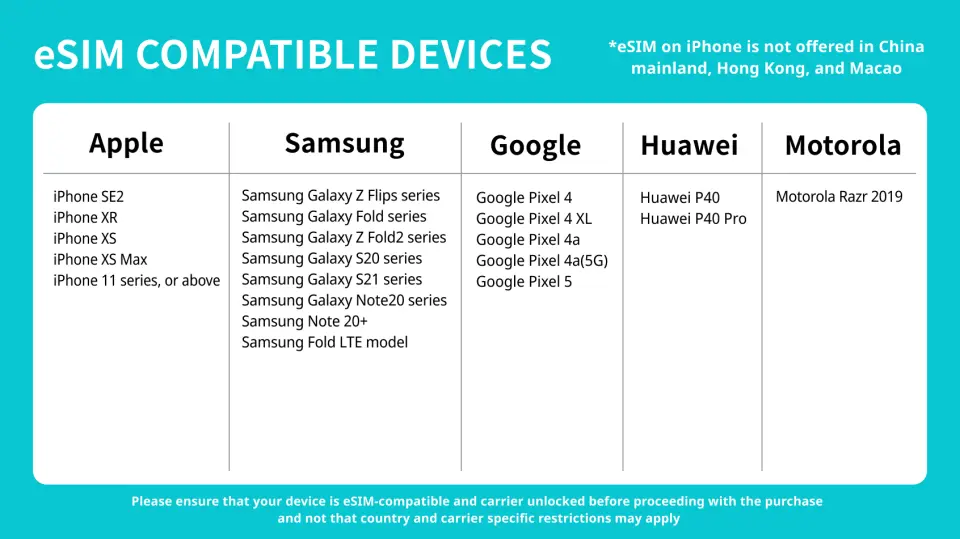
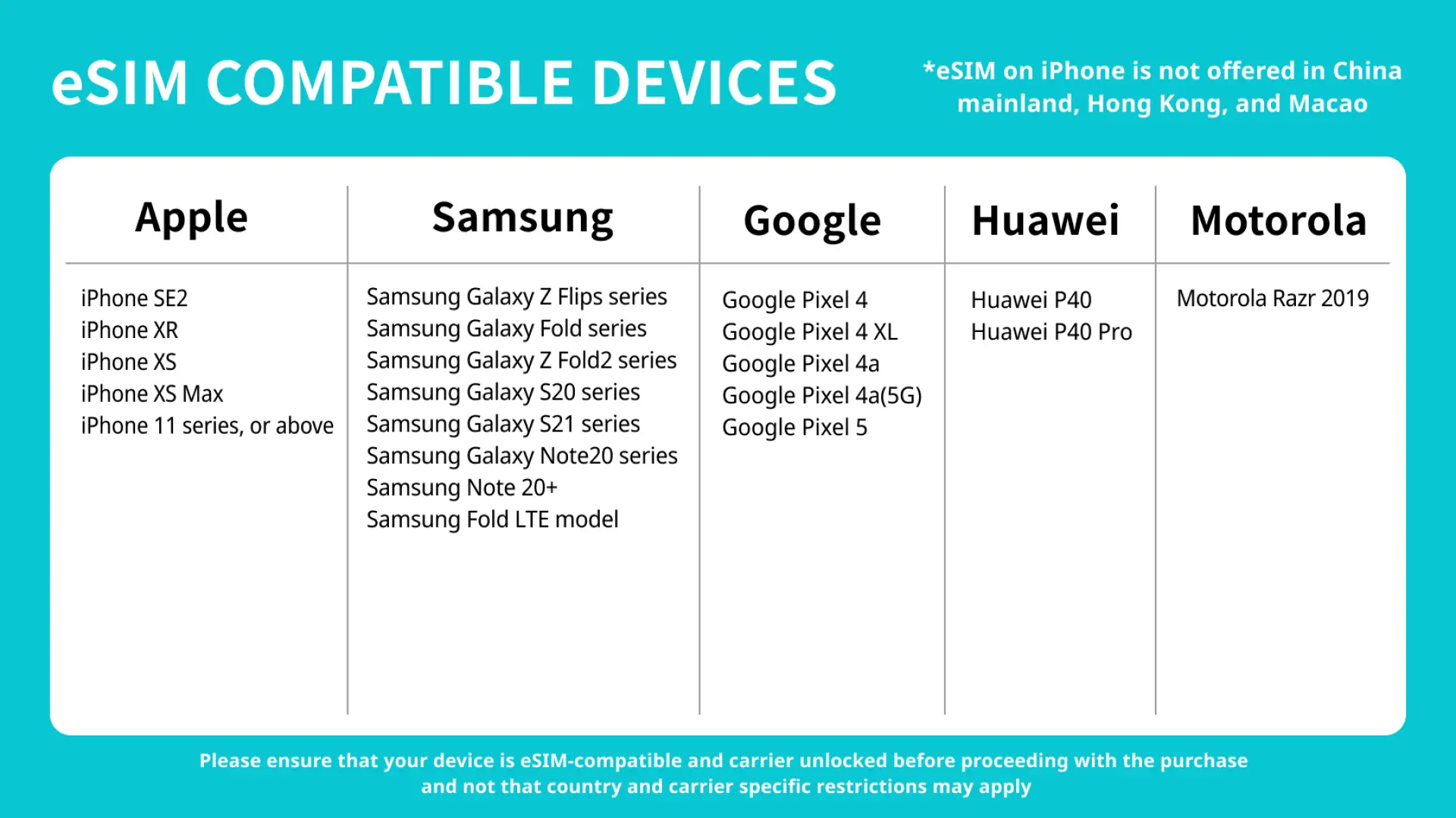
Please refer to this link for a complete list of eSIM-supported device models. Please also refer to the tutorial steps ( iOS / Android ) to test whether your phone supports the eSIM function before placing an order.
- Precautions
- iPhones purchased in China do not support the eSIM function. In Hong Kong and Macau, only iPhone 12 mini, iPhone SE2 and iPhone XS support the eSIM function. Other models do not support it. Please confirm the place where the phone was purchased before placing an order.
- Samsung S20 Series, Samsung Galaxy S21 5G Series, Samsung Galaxy Z Flip 5G, Samsung Note 20 Ultr, Samsung Galaxy Z Fold 2 purchased in the United States do not support eSIM function
- Samsung Note 20 Ultra and Samsung Galaxy Z Fold 2 purchased in Hong Kong do not support eSIM function
- Samsung Note 20 purchased in South Korea does not support eSIM function
- Although Samsung Galaxy Z Flip3 has developed eSIM function, it is not stable yet and is not recommended for customers to buy
eSIM compatible mobile phone models
eSIM installation and activation process
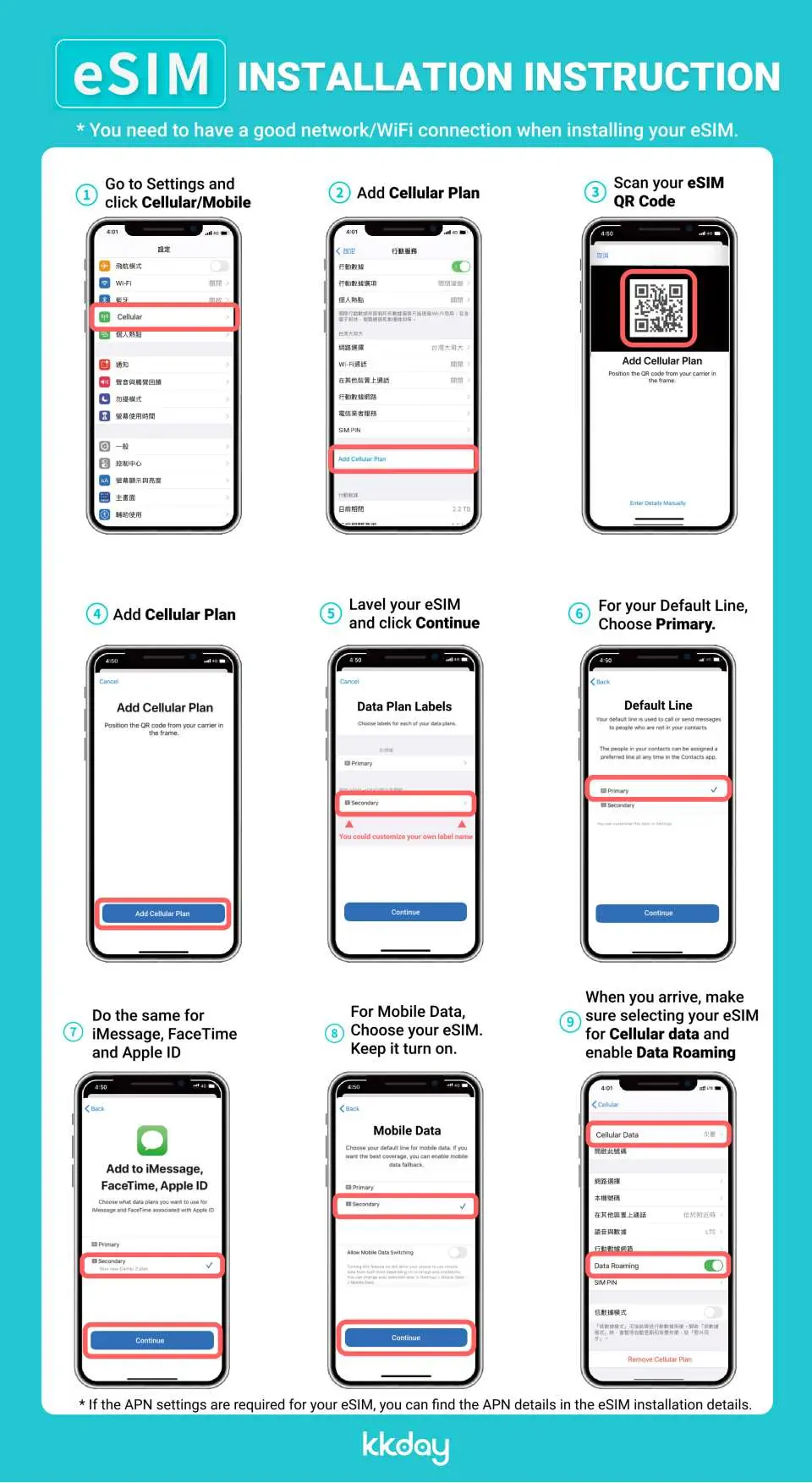

iOS system: eSIM installation and activation process
Purchase Notice
- Please pay attention to whether the mobile phone version and model are suitable for this product. If it cannot be used due to non-confirmation, no refund will be given.
- Samsung phones have different versions depending on the country of purchase. Please check the list of countries that support eSIM before purchasing.
- iOS version 12.1 or above is required. iPhones sold in China do not support the eSIM function, and some mobile phones in Hong Kong and Macau do not support the eSIM function.
Reminders
A QR code can only be scanned once with one mobile phone. Please do not change or delete it after binding.
When you finish using the eSIM plan in your phone, click [Remove Action Plan] at the bottom to remove it.
Internet usage must comply with the Fair Usage Policy (FUP). If excessive usage in a short period of time causes a surge in traffic, telecom operators have the right to regulate it, which will cause a short-term speed reduction or network disconnection. It is recommended to turn off automatic app updates and automatic video playback on your phone.
International Fair Use Terms To ensure that all users have fair access to mobile network services at all times, each telecom operator has its own fair use agreement to regulate fair network usage. When a user uses too much data in a busy network area within a short period of time, causing other users to be unable to use the network normally, the telecommunications company may temporarily limit the speed. Our company will not be able to intervene and your mobile network may be temporarily affected. To ensure normal use, please try to avoid watching videos for a long time or updating software and other tools that consume a lot of data.
Please be aware that the quality of Internet access may be affected by factors such as location, terrain, building shielding, number of users and weather.
Please remember to turn off data roaming on the original SIM card to avoid using the mobile network of the original SIM card and incurring high roaming charges.
Cancellation Policy
- Once the order has been completed, it cannot be canceled, modified, or refunded
- Due to time zone differences, the confirmed cancellation date is based on the supplier’s local time. Please allow 2–5 business days to process your cancellation request, after which the cancellation fee will be charged according to the product’s cancellation policy. Once the cancellation is confirmed, you will receive your refund within 14 working days.
FAQ
Absolutely. Most newer smartphones now support eSIM functionality, allowing you to connect to the local network in South Korea without needing to swap your physical SIM card. With eSIM, you can quickly activate network services and enjoy a smooth 4G internet experience, making it convenient to search for information, navigate, or stay in touch with friends and family, significantly enhancing your travel convenience.
The setup process for an Airalo South Korea eSIM is very simple. After purchase, you'll receive a voucher containing a QR Code. Simply scan this QR Code with your eSIM-compatible phone and follow the on-screen instructions to install the eSIM onto your device. Activation typically requires enabling data roaming, but within the eSIM settings, this doesn't incur extra roaming charges; it simply enables the eSIM's network connection. We recommend completing the setup before your departure so you can activate internet service immediately upon arrival in South Korea.
When selecting a South Korea eSIM data plan, consider your usage habits and the length of your trip. If you primarily use it for map navigation, messaging, and light social media browsing, a data allowance of around 1-2GB per day might be sufficient. If you frequently watch videos, make video calls, or need to handle more work-related tasks, it's advisable to choose a plan with a larger data capacity, such as 5GB or more. Airalo South Korea eSIM offers various tiered plans from 1GB to 20GB, allowing you to choose the most suitable option based on your individual needs and avoid running out of data or overpaying.
The Airalo South Korea eSIM currently offers tiered data plans, ranging from 1GB to 20GB, rather than unlimited data plans. This means you need to select a fixed total data amount at the time of purchase, which you will use throughout your trip. Once your data allowance is used up, your internet service will be interrupted or throttled. Therefore, we recommend carefully selecting a suitable data plan based on your anticipated usage to ensure uninterrupted internet access during your trip.
Using a South Korea eSIM offers several significant advantages. Firstly, you don't need to swap physical cards, eliminating the hassle of carrying a SIM ejector tool and worrying about losing your SIM card. Secondly, after purchase, eSIM can be installed immediately by scanning a QR Code, without waiting for a physical card to be shipped or visiting a specific location for pickup. This also means it's environmentally friendly with no consumables and allows for quick and seamless 4G internet access. Additionally, you can manage multiple eSIM profiles on the same phone, making it convenient to switch between different countries.
The Airalo South Korea eSIM can be set up in your home country, but the data service typically activates once you arrive in South Korea and connect to the local telecom network. This means you can scan the QR Code to install it before your departure, and then follow the voucher instructions to activate the eSIM line upon arriving in South Korea. This allows you to connect to the internet immediately after landing, without needing to find Wi-Fi or spend time setting it up locally, which is very convenient.
Yes, after purchasing a South Korea eSIM, you do need to enable your phone's 'Data Roaming' function to use the eSIM's internet service normally. However, this is different from the concept of traditional roaming services. Since you are using a local telecom's eSIM plan, enabling data roaming is just a necessary step to activate the eSIM data connection and will not incur additional international roaming charges. Please feel free to enable it.
Purchasing a South Korea eSIM through an online platform is very convenient. You can choose to order online through travel e-commerce platforms like KKday. When you buy an eSIM from KKday, you can enjoy the convenience of instant booking and receive your voucher and QR Code immediately after placing your order, saving you the time of waiting for a physical card to be shipped. Furthermore, the KKday platform offers a variety of plan options and clear setup guides, allowing you to easily complete the installation and ensure your internet service is ready before your trip.
Get Help


