

【50% Off】Laos eSIM | High-Speed Data Plan with ETL Roaming
- KKday Laos eSIM uses ETL roaming resources, providing high-speed data plans.
- eSIM functionality is not available for mobile phones purchased in China, Hong Kong, or Macau. Please verify before purchasing. If you are unable to set up the eSIM on your iPhone, please refer to the Apple Official Website for instructions.
Package Options
What You Can Expect

Please confirm that the mobile phone can support eSIM before purchasing. The order cannot be canceled and refunded after ordering.

Before enabling eSIM, please update iOS to the latest version and connect to a stable WiFi. Older versions of iOS and unstable network are common reasons for eSIM activation failure.

Turn on the camera to scan the eSIM and click "Action Plan"

It takes about 2-3 minutes to activate. The activation screen will pop up and the installation may fail.
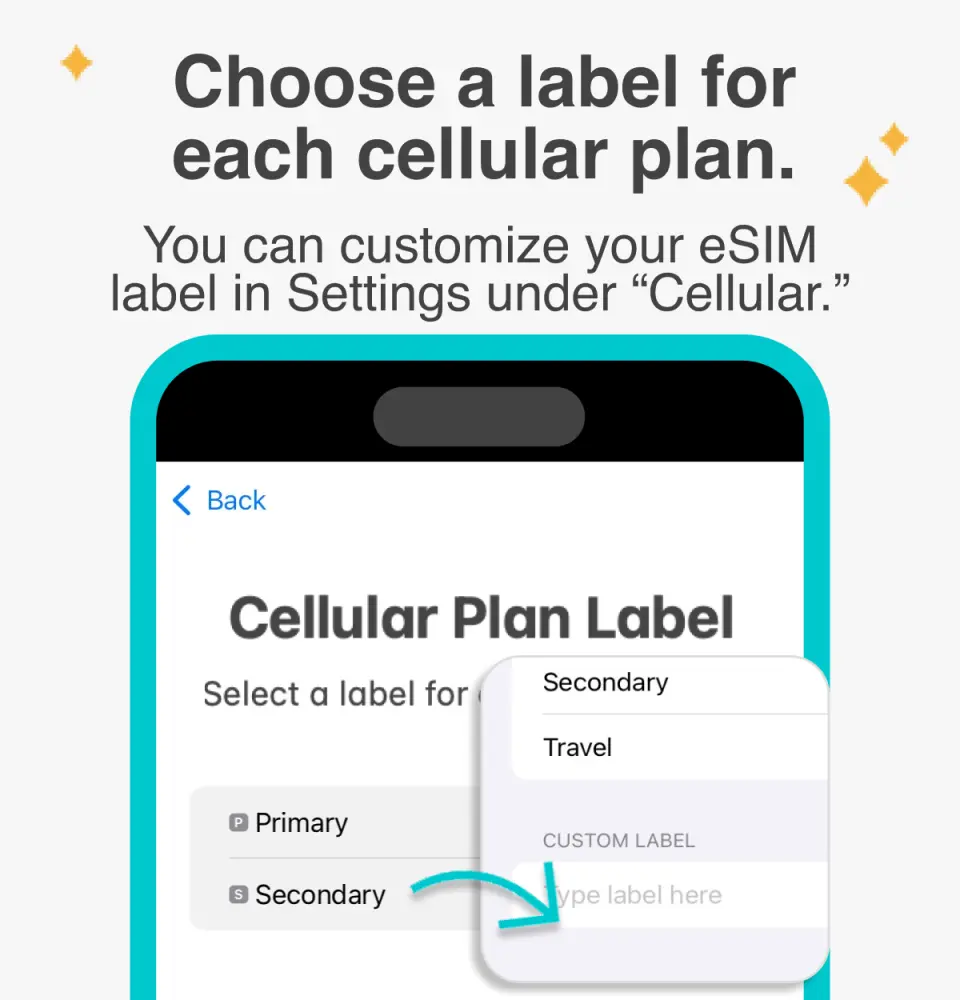
Customizable eSIM names to facilitate management of multiple eSIMs

Select the default number to specify the original main phone number to receive messages (you must first apply to the original telecom operator to activate the main phone number for international roaming before you can receive text messages)

You can specify the main phone number to use iMessage and Facetime functions

Choose to use eSIM mobile data. "eSIM mobile data is not turned on" is a common reason for being unable to access the Internet.

You can also manually join eSIM when you cannot scan the QR Code

After copying the eSIM activation code, please follow the steps to manually add the eSIM information.
Purchase Notice
- The order cannot be canceled and refunded after sending the eSIM. Please first confirm that the mobile phone can use eSIM (iPhone and Android mobile phones sold in China, Hong Kong, and Macau do not support the eSIM function; most Android mobile phones sold in Taiwan do not support eSIM).
- For Android phones that can use eSIM, please refer toFigure 1 andFigure 2 for the steps to manually enter the activation code.
Reminders
Before purchasing, please enter "*#06#" on the mobile phone dial pad. If the EID serial number is displayed, you can use eSIM.
When activating eSIM, please connect to a stable WiFi first to avoid activation failure caused by network instability. After the eSIM expires, it cannot be reissued.
Cancellation Policy
- Once the order has been completed, it cannot be canceled, modified, or refunded
- Due to time zone differences, the confirmed cancellation date is based on the supplier’s local time. Please allow 2–5 business days to process your cancellation request, after which the cancellation fee will be charged according to the product’s cancellation policy. Once your refund request is confirmed, KKday will initiate the refund to your original payment method within 15 days. The actual refund timing depends on your card-issuing bank’s policy.
FAQ
1. What communication features, including calls and messages, are included with the Laos eSIM card?
The Laos eSIM card provides comprehensive communication features. It includes a local number, allowing you to receive free text messages and incoming calls. Additionally, it offers 10 minutes of local outgoing calls, ensuring you stay connected with local contacts or services during your trip to Laos.
2. What kind of internet access and data service does the Laos eSIM card provide?
The Laos eSIM card offers high-speed total internet access, utilizing Unitel’s native telecommunications resources. This ensures a reliable and fast data connection throughout Laos, allowing you to browse, stream, navigate, and stay connected online without interruption during your travels.
3. How do I install and activate the Laos eSIM card on my device?
To install and activate the Laos eSIM card, you will typically receive a QR code or activation details after purchase. You'll need to scan this code through your phone's settings (usually in 'Cellular' or 'Mobile Data' settings). Ensure your device is connected to Wi-Fi during installation. Follow the on-screen prompts for a smooth setup process.
4. Does the Laos eSIM card support Wi-Fi calling features?
While the Laos eSIM card provides local call minutes and a local number, Wi-Fi calling support primarily depends on your mobile device and your home carrier's specific Wi-Fi calling service. The eSIM itself facilitates data and standard cellular calls, but Wi-Fi calling functionality is typically managed through your phone's native settings and original carrier.
5. What network resources and connection quality does the Laos eSIM card utilize in Laos?
The Laos eSIM card exclusively uses Unitel's native telecommunications resources. Unitel is a major local provider, guaranteeing high-speed total internet access and a reliable connection quality across Laos. This ensures stable data and communication services for travelers.
6. Are there any specific device compatibility requirements for using the Laos eSIM card?
Yes, it's crucial to ensure your mobile phone supports eSIM functionality before purchasing. Some devices, particularly certain models from China, Hong Kong, and Macao, may not have eSIM enabled. You should confirm your phone's eSIM compatibility, possibly by checking your device manufacturer's specifications or support pages.
7. What are the main differences between the Laos eSIM card and a traditional physical SIM card for travelers?
The Laos eSIM card is digital, eliminating the need to physically swap cards. This means easier installation via QR code and no risk of losing a tiny SIM. It allows you to maintain your home SIM for incoming calls while using the eSIM for local data and calls in Laos, offering greater convenience compared to a physical SIM card.
8. Can I receive free text messages and incoming calls using the Laos eSIM card?
Yes, the Laos eSIM card includes a local phone number that allows you to receive free text messages. You can also receive incoming calls without incurring additional charges, which is very convenient for staying in touch with travel companions or local contacts while traveling in Laos.


