

Japan eSIM Card | Japan eSIM with 4-30 day internet access | Softbank / Docomo | 40% Off% off | Supports ChatGPT
- Multiple day options, choose the number of days you need according to your travel plan
- After purchase, the QR Code will be sent to you by email. No physical card is needed, so you don’t have to worry about losing any card.
- Quick and easy setup for easy travel in Japan
- You can open a hotspot and share it with travel companions instantly if needed.
Package Options
Product Info
The content of this product is provided by machine translation and may not reflect the actual information, please take this into consideration before booking.
*Please dial *#06# on your mobile phone and check if there is an EID barcode. If EID is displayed, it means your phone supports ESIM function*
eSIM compatible mobile phone models


eSIM installation and activation process (iPhone)
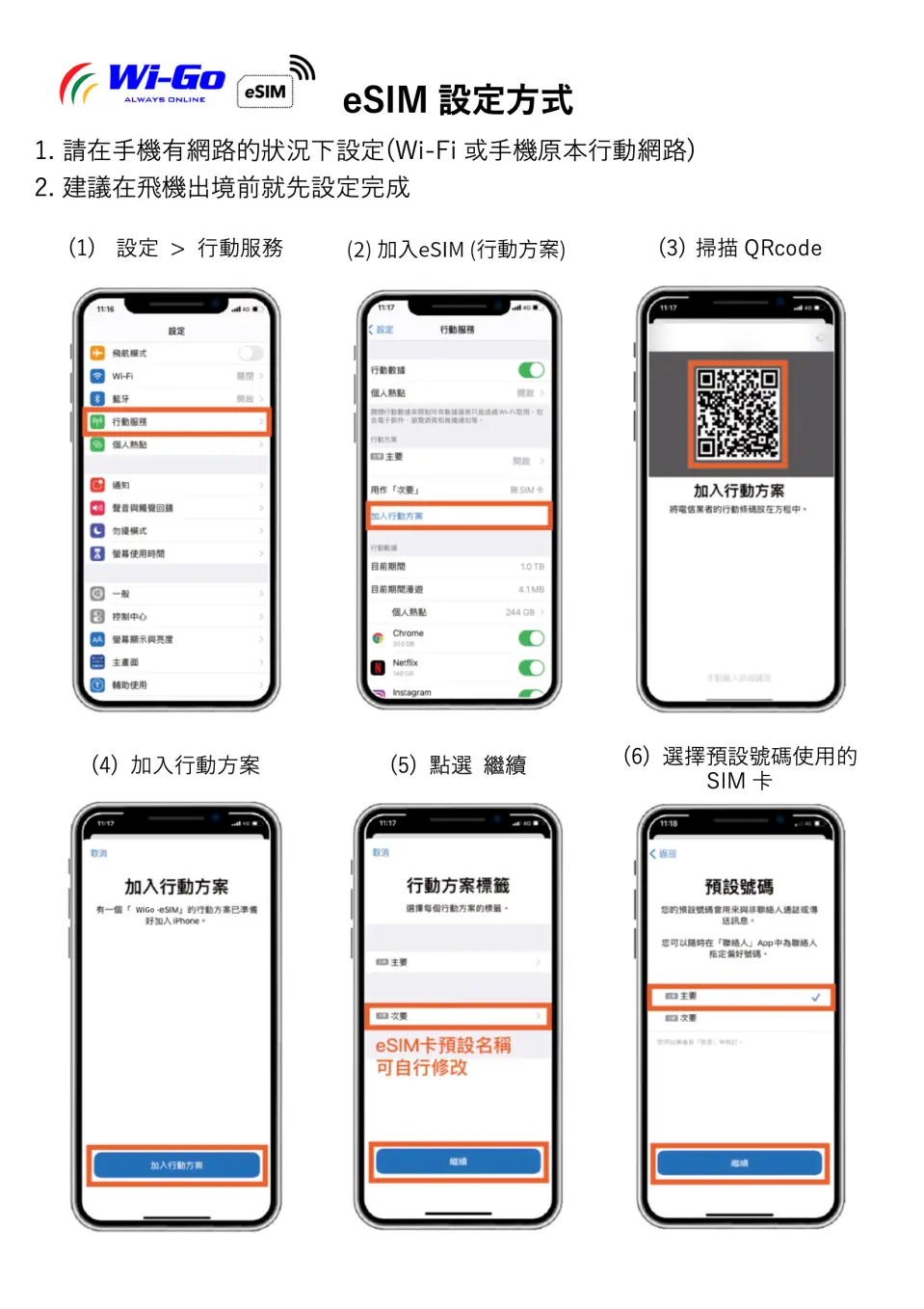
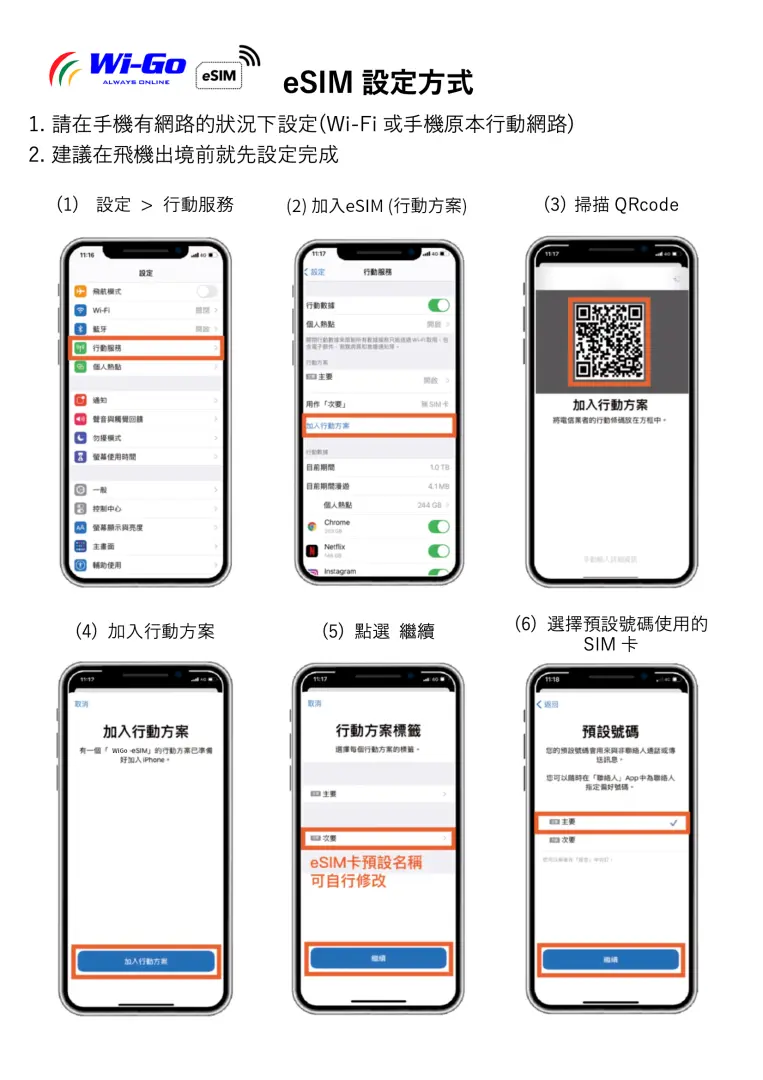
.


eSIM installation and activation process (Android)
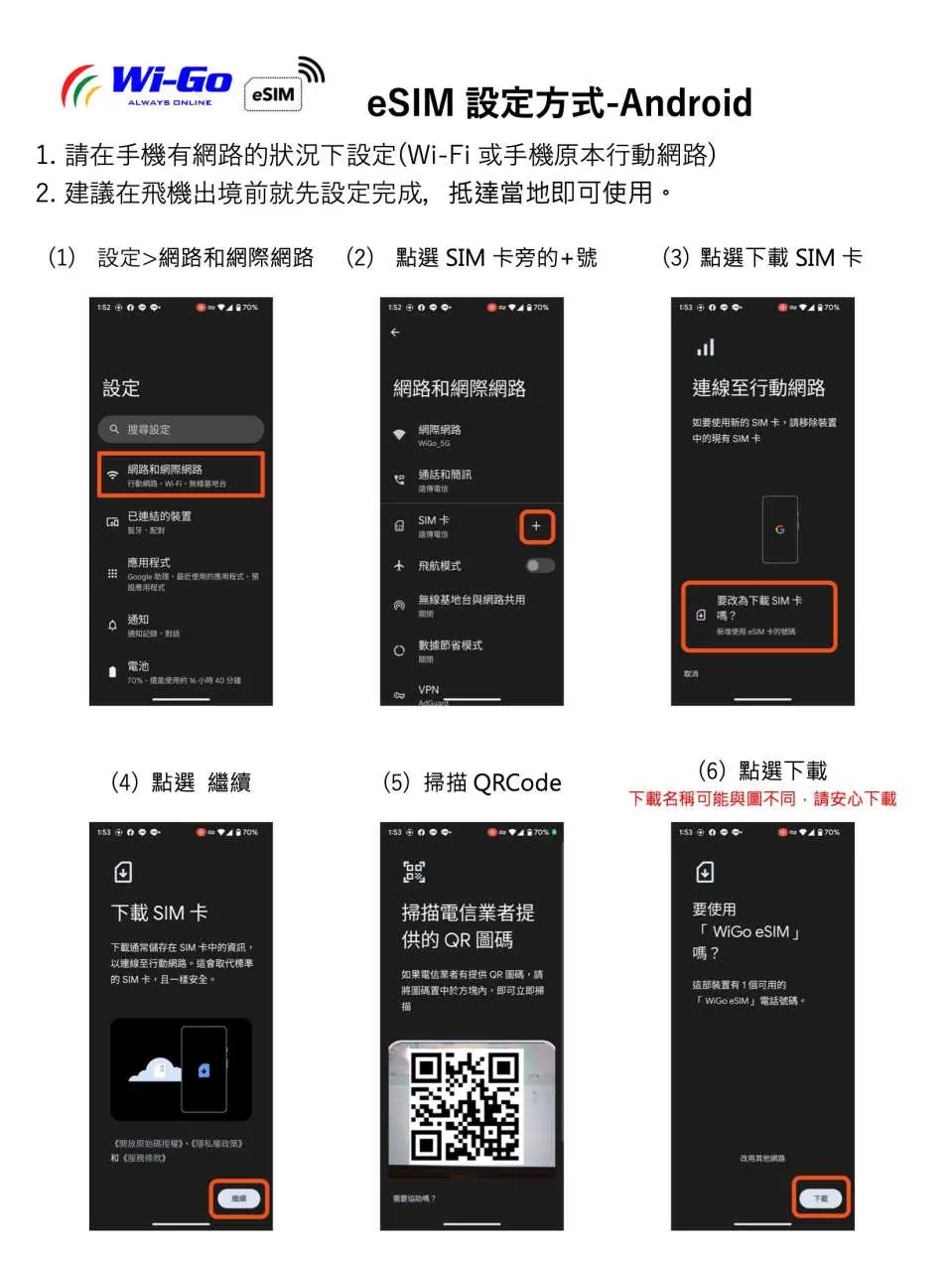

.


.


SIM Card Specifications
| Data Usage Specifications | Unlimited data, 1GB, 2GB, 5GB, 10GB, 20GB |
| Transmission Specifications | 4G |
| Signal Coverage Area | Japan |
| Mobile Carrier | Softbank / Docomo |
| Supported Sizes | eSIM |
| Hotspot Sharing | Available |
| Supported Frequencies(4G) | B3(1800 MHz), B1(2100 MHz), B18(800 MHz), B12(700 MHz), B11 (1500 MHz) |
| Top-Up Availability | Top-up unavailable |
| Excludes | Voice calls, Texts |
| Not Supported | SIM-locked device, Carrier-customized device, Mobile hotspot, translators, iPhone models below iPhoneXR, iPhone models sold in China, Hong Kong and Macau, Samsung phones purchased in Taiwan |
| Reminders | Once the QR Code is sent via email, it cannot be returned or exchanged. If the order is cancelled, all actual costs will be charged. |
| Network Type | Roaming |
Purchase Notice
- Daily high-speed data allowance of 500MB/1GB/2GB (depending on the data plan purchased). After exceeding this limit, the speed will be reduced by 5Mbps. After exceeding this limit, you can still send text messages and open web pages. There is no limit to the amount of data you can use.
- Total data allowance: 5GB/10GB/20GB (depending on the selected data plan). After exceeding this limit, the data speed will be reduced to 128kbps. After exceeding this limit, you can still send text messages and open web pages. There is no limit to the amount of data you can use.
- Hotspot sharing will consume bandwidth, and network speed may vary depending on the base station and geographical location. Therefore, a minimum network speed cannot be guaranteed. Please confirm before placing an order.
- Please check if your phone version and model are compatible with this product. If you are unable to use the product due to failure to confirm compatibility, a refund will not be issued.
- Customers who are unable to use eSIM due to settings/device model/personal factors are not eligible for a refund.
Reminders
Each QRCode can only be downloaded and installed once
Apple phones can download multiple eSIMs at once, but can only use up to 2 at a time
It is recommended to download and install it on the day of departure
If the original telecom operator cannot deliver the device normally, the system will automatically send an eSIM with the same plan from another telecom operator, which will not affect the usage rights. For detailed settings, please refer to the file content description
Please confirm whether the phone is the applicable phone model and version before placing an order. If the phone cannot be used due to failure to confirm before purchase, no refund will be given.
Samsung phones purchased in Taiwan do not support eSIM. For other countries, please check with the official website first.
iOS version 12.1 or above is required. In Hong Kong and Macau, only iPhone 13 mini, iPhone 12 mini, iPhone SE (2nd and 3rd generation) or iPhone XS have eSIM function. Other models are not supported.
In order to maintain the quality of Internet use, please comply with the local Fair Usage Policy (FUP) of each country. If you use unlimited products to upload and download a large amount of content in a short period of time, watch videos or broadcast live, etc., the telecom operator may detect abnormal use and limit the speed. Please be aware that the signal may affect the quality of Internet access due to factors such as location, terrain, building shielding, number of users and weather.
Please remember to turn off the data roaming of the original SIM card to avoid using the mobile network of the original SIM card and incurring high roaming charges
Once the QR Code is sent via email, it cannot be returned or exchanged. If the order is cancelled, all actual costs will be charged.
The data flow is calculated from 00:00 to 23:59 (Japan time) every day. It is recommended to confirm whether your device is applicable before purchasing and install the eSim Internet plan before leaving the country.
The usage period of this esim product plan is calculated from the actual activation day as the first day until 23:59 on the last day
The QR Code and instructions will be sent within 1 hour after placing the order and confirming the payment. Please make sure that the email address you left when ordering is filled in correctly. If you have any questions or do not receive the QR Code and related information within 90 minutes, please contact customer service immediately
How to Use
- After placing the order and completing the payment, you will receive an email with the eSIM QR Code and activation information within 1 hour)
- Please fill in the correct email to ensure that you can receive the eSIM activation content
- An internet connection is required to install eSIM. It is recommended to install it before going abroad.
- Scan the QR code with your mobile phone and complete the installation (please refer to the picture above for detailed installation process)
- Installation steps:
1. Settings -> Mobile Services -> Add Mobile Plan
2. Scan the QR code received in the email, or manually enter the address and confirmation code, then click "Next"
3. Click to confirm the "Certification Action Plan" window
4. After the addition is completed, the eSIM plan label (secondary) will appear, and you can change the name yourself
5. Turn on your newly added plan service after arriving at your destination
- Enabling steps
1. Please activate the eSIM service upon arrival at your destination
2. Change the label name scheme in "Action Data"
3. Turn on "Data Roaming"
4. If your phone cannot connect to the Internet directly, please follow the APN settings above (Settings - Mobile Services - Mobile Data Network)
5. If you encounter any technical problems, please contact Line customer service (ID: @wigo) immediately. We will do our best to provide the best service.
Cancellation Policy
- Once the order has been completed, it cannot be canceled, modified, or refunded
- Due to time zone differences, the confirmed cancellation date is based on the supplier’s local time. Please allow 2–5 business days to process your cancellation request, after which the cancellation fee will be charged according to the product’s cancellation policy. Once the cancellation is confirmed, you will receive your refund within 14 working days.
FAQ
Yes, eSIM cards are widely available and supported for travelers visiting Japan. They offer a convenient way to get internet access without needing a physical SIM card. Many modern smartphones support eSIM technology, making it a popular choice for quick setup and seamless connectivity upon arrival. This allows you to stay connected for navigation, communication, and information throughout your trip.
Using a Japan eSIM card offers several benefits over traditional physical SIM cards. You don't need to handle a physical card, eliminating the risk of losing it or needing a card removal tool. Setup is quick and easy via a QR code, so you can activate it without a physical exchange. This provides instant internet access upon arrival, letting you start your journey connected without delays. eSIMs also allow you to keep your home SIM active for calls and texts while using the eSIM for data.
For a 3-week trip to Japan, data needs vary based on usage habits. A typical traveler primarily using data for navigation, social media, messaging, and occasional streaming might use 10-20 GB. If you plan extensive video streaming, online gaming, or frequent hot-spotting, you might need 30 GB or more. Consider your daily habits and choose an eSIM plan with sufficient data to avoid running out, as multiple day options and varying data allowances are often available.
Generally, a Japan eSIM data plan is significantly more cost-effective than relying on international roaming services from your home carrier. Roaming charges can accumulate quickly, often with higher per-megabyte rates. eSIM plans are specifically designed for travel, offering dedicated data packages for a fixed period, which provides predictable costs and better value for high-volume data usage. This allows travelers to enjoy seamless internet access without worrying about unexpectedly high bills upon returning home.
Yes, most Japan eSIM cards for tourists, including this product, are offered as data-only plans. This means they provide internet access for browsing, messaging apps, navigation, and streaming, but typically do not include local call minutes or SMS text messaging services. You can use apps like WhatsApp or Line for communication over data. This setup is ideal for travelers who primarily need internet connectivity and wish to keep their existing phone number active for calls and texts.
While convenient, eSIMs do have some limitations. Not all older smartphone models support eSIM technology, so device compatibility must be checked beforehand. Transferring an eSIM to a new device can sometimes be complex, unlike a physical SIM. Additionally, if you encounter technical issues with your device, diagnosing network problems might be slightly more involved than simply swapping a physical SIM card. It's also important to have a stable internet connection initially to download the eSIM profile.
Japan eSIM cards typically utilize major network providers like Softbank and Docomo, which are known for their extensive and stable coverage across Japan. Both offer reliable 4G/5G connectivity in urban areas and good coverage in most rural and tourist regions. This ensures fast internet for navigation, streaming, and staying in touch. When choosing an eSIM, knowing which network it uses can help you anticipate coverage quality, especially if you plan to visit specific remote locations.
Activating a Japan eSIM data plan is a straightforward process. After purchase, you will receive an email containing a QR code. To set up, simply go to your phone's settings, select "Add Cellular Plan" or "Add eSIM," and scan the QR code. Your device will then download and install the eSIM profile. Ensure you have an internet connection during this initial setup. Once installed, you can activate the eSIM plan, often just before or upon arrival in Japan, eliminating the need for physical card changes.
Get Help


