

Philippines eSIM card|All you can eat every day/500MB/1GB|Globe Telecom
- Supports iOS one-click installation: Update to the latest version of the iOS App and iOS 17.4 or above to install eSIM with one click in the KKday App.
- Enjoy 4G connection while traveling in Philippines with a prepaid eSIM
- Use the cost-effective eSIM to surf the internet while traveling in Philippines
- Alleviate SIM Card pin needle and installation trivialities with the help of eSIM
- Delight in the easy-to-use design and stay connected throughout your trip
Package Options
Product Info
The content of this product is provided by machine translation and may not reflect the actual information, please take this into consideration before booking.
eSIM-Compatible Devices


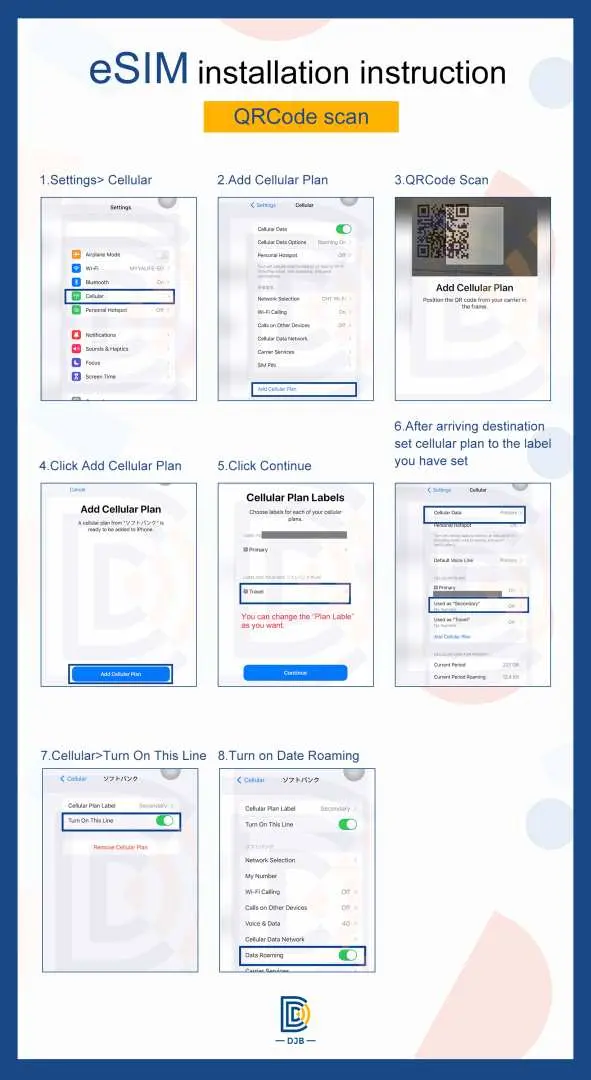
eSIM installation guideline(QRCode)

SIM Card Specifications
| Data Usage Specifications | Unlimited data, 500MB, 1GB |
| Transmission Specifications | 4G |
| Signal Coverage Area | Philippines |
| Mobile Carrier | Globe |
| Supported Sizes | eSIM |
| Hotspot Sharing | Available |
| Supported Frequencies(4G) | B1(2100 MHz) |
| Top-Up Availability | Top-up unavailable |
| Excludes | Voice calls, Texts |
| Not Supported | SIM-locked device, Carrier-customized device, Mobile hotspot, modified machine, 3G mobile phone, translation machine |
Purchase Notice
- Hotspot sharing will occupy bandwidth, and the network speed will also vary depending on the terminal device and geographical location, so the minimum network speed is not guaranteed. Please confirm before placing an order.
- In order to maintain network quality, telecommunications companies strictly abide by the principle of fair use of network communications. Controls heavy network traffic usage in a short period of time, which may result in inability to access the Internet or slower network speeds
- Users with abnormal traffic will be controlled (2~5GB per day may trigger this regulation), which may result in inability to access the Internet or slower network speeds
- Detailed traffic calculations are based on data provided by the telecom operator's backend. In order to avoid violating the principle of fair use, it is recommended that if large-traffic network activities are required, it should be carried out in a wifi environment. Please refer to the following:
- Mass transfer of files (uploading/downloading), watching videos, (watching) live broadcasts, playing mobile games, and social networking software are mainly composed of videos and photos. When used to a certain extent, it is equivalent to watching a large number of videos.
- It is also recommended to turn off the automatic update and backup functions, the automatic playback function of social software, the satellite map navigation mode (normal mode navigation can be used) and the cloud hard drive data transfer function.
Includes/Excludes
Reminders
Please activate your eSIM within 90 days of receiving it.
Before installing eSIM, please connect to WiFi or mobile network, scan the QR Code or install manually, and join the mobile plan
Please save this QR Code. Once scanned, it will be invalid and cannot be reissued. Please install it according to the instructions. Do not jump out of the screen during the process to avoid the eSIM plan being deleted due to misjudgment by the mobile phone.
Each QRCode can only be scanned once, and no changes can be made once the QRCode is scanned
Please delete the description file for iPhone (check steps: Settings -> General, pull to the bottom, if there is no description file, it means normal), so as not to cause trouble to use smoothly
If there is any problem with the installation and activation, please add Line (ID : @djbcard) to seek technical customer service.
Validity Period Calculation: from the activation time to 11:59pm of the activation day is considered 1 day
The quality of the telecommunications network varies from country to country, and the base station construction is not as dense as that in Taiwan. The regional and telecommunications construction of each country are different. It is not possible to request a refund due to the signal conditions in a few areas.
Users with abnormal traffic will be controlled (2~5GB per day may trigger this regulation), which may result in inability to access the Internet or slower network speeds
In order to avoid violating the principle of fair use, it is recommended that if large-traffic network activities are required, it should be carried out in a WiFi environment. Please refer to the following:
Transferring large amounts of files (uploading/downloading), watching videos, (watching) live broadcasts, playing mobile games, and social networking software are mainly composed of videos and photos. When used to a certain extent, it is equivalent to watching a large number of videos. It is also recommended to turn off automatic updates and backups. Functions, social software auto-play function, satellite map navigation mode (normal mode navigation can be used) cloud hard drive data transfer function
Fair Usage Policy is a standard implemented by governments and telecommunications companies to protect the rights and interests of local users in using the Internet. If you have concerns about FUP control, please choose a daily fixed traffic plan.
How to Use
- For technical issues, please contact DJB online customer service with your order number. We provide 24/7 support.
- After placing your order and completing payment, you will receive an eSIM QR code email and activation information within 1 hour.
- Please enter a valid email address to ensure you receive eSIM activation content.
- Please ensure you are connected to WiFi before joining the eSIM mobile plan.
- Installation steps:
- Settings -> Mobile Services -> Join the Mobile Plan
- Scan the QR code above, or manually enter the address and verification code, then click "Next".
- After clicking to confirm the "Authentication Action Plan" window, an eSIM plan tab (secondary) will appear, which you can change the name of.
- Activate your newly added service plan after arriving at your destination.
- Activation steps
- Please activate your eSIM service upon arrival at your destination.
- Change the tag naming scheme in "Motion Data"
- Enable "Data Roaming"
- If your phone cannot connect to the internet directly, please follow the APN settings above (Settings - Mobile Services - Mobile Data Network).
Cancellation Policy
- Once the order has been completed, it cannot be canceled, modified, or refunded
- Due to time zone differences, the confirmed cancellation date is based on the supplier’s local time. Please allow 2–5 business days to process your cancellation request, after which the cancellation fee will be charged according to the product’s cancellation policy. Once the cancellation is confirmed, you will receive your refund within 14 working days.
FAQ
Yes, eSIMs for the Philippines are increasingly available and offer a convenient connectivity solution for tourists. Major telecommunication providers, including Globe Telecom, now offer eSIM plans, allowing travelers to access mobile data without needing a physical SIM card. This makes staying connected upon arrival in the Philippines much simpler and more efficient.
Globe Telecom's Philippines eSIM data plans typically offer flexible options, including daily unlimited data (all-you-can-eat) or fixed daily allowances like 500MB or 1GB, providing a 4G connection. These prepaid eSIMs are designed for ease of use, eliminating the need for a physical SIM card, and often support quick installation processes, especially for compatible iOS devices updated to iOS 17.4 or above.
Globe Telecom is one of the leading mobile networks in the Philippines and generally provides reliable 4G LTE coverage across major cities and popular tourist destinations. While network performance can vary in remote or less populated areas, an eSIM utilizing the Globe Telecom network typically ensures stable internet access for navigation, communication, and browsing throughout your trip.
Using a Philippines eSIM often proves to be more cost-effective and convenient than traditional international roaming services. eSIMs allow travelers to avoid high roaming charges for data, offer flexibility to switch plans, and enable you to keep your home number active for calls/SMS while using the eSIM for data. This eliminates the hassle of physical SIM card changes or carrying multiple devices.
To install and activate a Philippines eSIM, first ensure your device is eSIM compatible and connected to Wi-Fi. After purchasing, you will typically receive a QR code or activation code. Go to your phone's settings (e.g., Cellular or Mobile Data settings), select 'Add eSIM,' and either scan the QR code or manually enter the details. Follow the on-screen prompts to complete the setup. The eSIM usually activates automatically upon arrival in the Philippines.
Tourist-oriented Philippines eSIMs, like those offered by Globe Telecom for travelers, are typically provided as new data profiles, not as a conversion service for an existing local physical SIM number. If you have an existing local Globe Telecom physical SIM number in the Philippines and wish to convert it to an eSIM, you would generally need to contact Globe Telecom directly through their local service channels to inquire about their specific conversion policies.
Travelers should consider a few potential drawbacks when using a Philippines eSIM. It requires an eSIM-compatible device, and once installed, the eSIM profile is typically tied to that specific device and cannot be easily transferred to another. Initial setup requires a stable internet connection, and troubleshooting can sometimes be more complex compared to a physical SIM. Users also need to be mindful of managing their primary SIM and eSIM profiles correctly on their device.
The process for purchasing a Globe Telecom Philippines eSIM is straightforward and digital. You can conveniently purchase the eSIM through KKday, which offers immediate ordering and quick voucher confirmation, simplifying your preparation for the trip. After purchase, you will receive an eSIM QR code or activation details via email. There's no need for physical pick-up or redemption, as the installation is done by scanning the provided QR code directly onto your compatible device.
Get Help


