


Purchase and Use Immediately | 7-ELEVEN Digital Gift Voucher | Uni-President Group Universal
- Purchase and Use Immediately, and earn KKday Points!
- Available at numerous chain stores across Taiwan with flexible location options and cross-store redemption.
- Once registered to the OPENPOINT APP, 7-ELEVEN Digital Gift Vouchers have no expiration date and can be used in multiple transactions.
- Save up to $900! For limited-time offers on accommodation + HSR tickets across Taiwan, please visit the HSR Go website and book now!
Package options
Product Info
- Brand Introduction -
Uni-President Group is a leader in Taiwan's food and retail industries. Its brands include 7-ELEVEN, Starbucks (Uni-President), Uni-Resort, Mister Donut, Cosmed, 21 Century, Dream Mall, DUSKIN, Uni-Ustyle Department Store, Cold Stone Creamery, Semeur, Santa Cruz, BEING spa, and Smile Gas Station. We provide consumers with more diverse and efficient products and services, adding variety to life and helping families enjoy a higher quality of living.
- Instructions -
To use this voucher, you must first download the OPENPOINT app and complete registration (OPENPOINT is for use in Taiwan only and requires a Taiwan mobile number for registration). You can then link your 7-ELEVEN Digital Gift Voucher to the OPENPOINT app and use it for purchases.
Serial Number Entry Page: https://systexticket.azurewebsites.net/
OPENPOINT App Linking Process
> Click the URL in the pre-departure reminder > Copy the 16-digit ticket serial number below the barcode and paste it into the serial number entry page: https://systexticket.azurewebsites.net/. (The barcode on this page cannot be used at the store.)
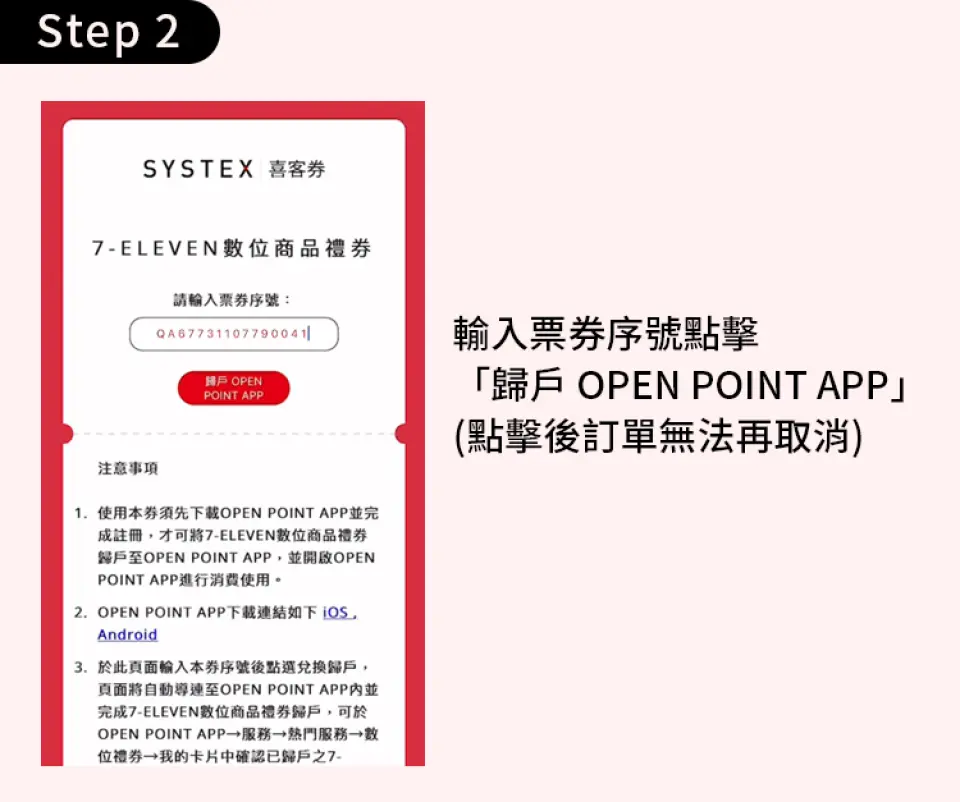
STEP 2: Enter the voucher serial number and the email address where you wish to receive the verification code, then click
STEP 3: You will be redirected to the OPENPOINT app. Enter the verification code received to complete the linking of your digital gift voucher.
STEP 4: Open the OPENPOINT app > Services (button at the bottom) > Popular Services > Digital Vouchers. Open the linked digital voucher and present the barcode at designated stores to use it.
It is recommended to copy the serial number entry page URL: https://systexticket.azurewebsites.net/, open a web browser, paste the URL, and proceed to use it.
If you encounter any issues after multiple attempts to link the voucher or during redemption, please contact the Systex Corporation Customer Support line at (02)8798-6963.
The linking service undergoes routine system maintenance daily from 23:30 to 00:30 the next day. Linking and related services will be unavailable during this time. Please avoid using the service during these hours to prevent any impact on your rights.
Please copy the 16-digit electronic voucher serial number before going to the entry page to use it.
To use this voucher, you must first download the OPENPOINT app and complete registration before you can link the digital gift voucher to the OPENPOINT app and use it for purchases.
Serial Number Entry Page: https://systexticket.azurewebsites.net/Enter or paste your voucher serial number on the entry page and click
7-ELEVEN Digital Gift Vouchers can be redeemed for products or equivalent services at the following locations: 7-ELEVEN, Starbucks, Mister Donut, Cosmed, 21Plus, Dream Mall, Uni-Ustyle Department Store, Cold Stone Creamery, Semeur, Santa Cruz, Uni-Resort, BEING spa, and Smile Gas Station.
When redeeming products or equivalent services at a store, please present the digital voucher found in the OPENPOINT app under
This voucher cannot be used for transactions that do not issue a unified invoice from 7-ELEVEN or the participating brands, nor for collection services or other specific business items.
7-ELEVEN Digital Gift Vouchers cannot be exchanged for cash. In accordance with the Tobacco Hazards Prevention Act, these vouchers cannot be used to purchase tobacco products at stores.
In compliance with IFRS (International Financial Reporting Standards) and tax regulations, the following four categories of business are considered commissioned sales (payments are collected on behalf of others): game point cards (including virtual points and InComm gift cards), home delivery (Takkyubin), telecommunications top-up cards (non-7-ELEVEN brands), and international courier services (DHL). Additionally,
7-ELEVEN Digital Gift Vouchers have no expiration date and can be used in multiple transactions or combined, but they cannot be reloaded.
7-ELEVEN Digital Gift Vouchers are issued as bearer instruments. In cases where the barcode or card number cannot be identified due to use, theft, unauthorized use, loss, or mobile phone malfunction, the voucher cannot be refunded, reported as lost, or reissued.
Once this voucher is linked, all related responsibilities and rights are transferred to President Chain Store Corporation and Q-WARE Systems & Services Corp. The amount stated on this voucher is covered by a full performance guarantee provided by the Taipei Branch of MUFG Bank, Ltd. Upon the expiration of the guarantee period, all guarantee responsibilities are automatically released. Voucher holders may check the validity of the performance guarantee on the MUFG Bank website using their voucher serial number. However, the issuer remains responsible for performance even after the guarantee period expires.
A unified invoice is issued when the 7-ELEVEN Digital Gift Voucher is sold. When redeeming products at a store, a transaction receipt with a zero value will be issued.
Any forgery, alteration, or other illegal use of this voucher will be subject to legal action by the relevant authorities.
If you have any questions regarding redemption, please contact the Systex Corporation Customer Support line at (02)8798-6963 (Service hours: Monday to Friday, 09:00-18:00, excluding national holidays and days when government offices are closed).
Inapplicable Store Inquiry: https://www.7-11.com.tw/service/isharinggift.aspx
* This voucher redemption page is currently accessible only via an Internet connection within Taiwan. Please open it after arriving in Taiwan or use a Taiwanese network environment.
Issuer Information:
Company Name: SYSTEX Corporation
Company Address: No. 318, Ruiguang Rd., Taipei City
Tax ID Number: 97311466
Representative: Lin, Lung-Fen
Paid-in Capital: NT$2,693,933,040 (as of January 5, 2021)
Customer Support Phone: 02-8798-6963
Customer Support Email: [email protected]
Customer Support Hours: [SYSTEX Customer Support] Monday to Friday, 09:00-18:00, excluding national holidays and days when government offices are closed.

OPENPOINT APP Registration Process | Step 1
OPENPOINT APP Registration Process | Step 2

OPENPOINT APP Registration Process | Step 3

OPENPOINT APP Registration Process | Step 4
Know before you book
Reminders
The redemption period for this voucher is 90 days from the date of purchase. If not redeemed within this period, it will not be valid for redemption.
Once this voucher is credited to your account, the relevant responsibilities, rights, and obligations are transferred to President Chain Store Corporation and Q-WARE Systems & Services Corp. The amount stated on the 7-ELEVEN digital gift voucher is covered by a full performance guarantee provided by Australia and New Zealand Banking Group Limited, Taipei Branch. Upon the expiration of the guarantee period, all guarantee liabilities are automatically released. However, the issuer remains responsible for performance after the guarantee period expires.
If this voucher is unused or exceeds the specified supply period (serial number validity), the original purchaser may apply for a return through the online channel where it was purchased by providing the invoice. If a return is confirmed, please contact KKday customer service. Please be aware that a 3% handling fee will be charged for the refund.
Each member is limited to purchasing 40 vouchers within a 2-month period. Please be aware that KKday reserves the right to cancel and refund orders that exceed this limit.
Please note that if KKday discovers any malicious or improper use of KKday discount coupons or promo codes (such as nationality-restricted offers where users change their nationality to use the discount, or bank-card-holder-exclusive offers where one person creates multiple member accounts to repeatedly enjoy the discount), KKday reserves the right, at our sole discretion, to cancel any orders made using such malicious or improper coupons or codes, and may remove your KKday member account at any time without prior notice. We may also seek compensation from you. Travelers are advised to review the relevant activity rules before using discount coupons or promo codes to avoid affecting your rights.
This voucher redemption page is currently only accessible within Taiwan. Please open it after arriving in Taiwan or connect to a Taiwan-based network to use it.
How to Redeem Your Voucher
How to Use Your Voucher
- Please present the e-voucher on-site
Voucher Redemption Period
- Valid for redemption within 90day(s) from the date of issue; Invalid after expiration
Cancellation Policy
- Free cancellation!
- Due to time zone differences, the confirmed cancellation date is based on the supplier’s local time. Please allow 2–5 business days to process your cancellation request, after which the cancellation fee will be charged according to the product’s cancellation policy. Once your refund request is confirmed, KKday will initiate the refund to your original payment method within 15 days. The actual refund timing depends on your card-issuing bank’s policy.


