

[Buy One Get One Free / 50% Off] Australia & New Zealand eSIM Daily High-Speed Roaming Plan
- With KKday Australia and New Zealand eSIM cards, you can enjoy 4G/5G services.
- KKday Australia and New Zealand eSIM cards offer stable and smooth roaming access with Australian Optus and New Zealand TNZ Spark!
- KKday Australia and New Zealand eSIM cards offer real customer service replies, ensuring a reliable experience!
- If eSIM is unavailable, please refer to the SIMCard plans in Australia and New Zealand.
- Supports one-click installation on iOS: Update to the latest version of the iOS App and iOS 17.4 or later to install eSIM with one click in the KKday App.
Package Options
Product Info
The content of this product is provided by machine translation and may not reflect the actual information, please take this into consideration before booking.
eSIM Installation Precautions
During eSIM installation, interrupting or exiting the installation process will cause the eSIM installation to fail and you will not be able to reissue the eSIM.
Installing the eSIM requires a stable network connection (WiFi or mobile data). It is recommended to complete the installation before boarding the flight and turn on the phone before arriving at your destination.
The eSIM usage period begins after installation. If you are taking a long-haul or overnight flight, it is recommended to purchase an extra day of usage. You can install the eSIM before boarding to get the best user experience.
Please confirm that your device is compatible with eSIM before purchasing. After sending the eSIM QR code, this product is non-refundable.


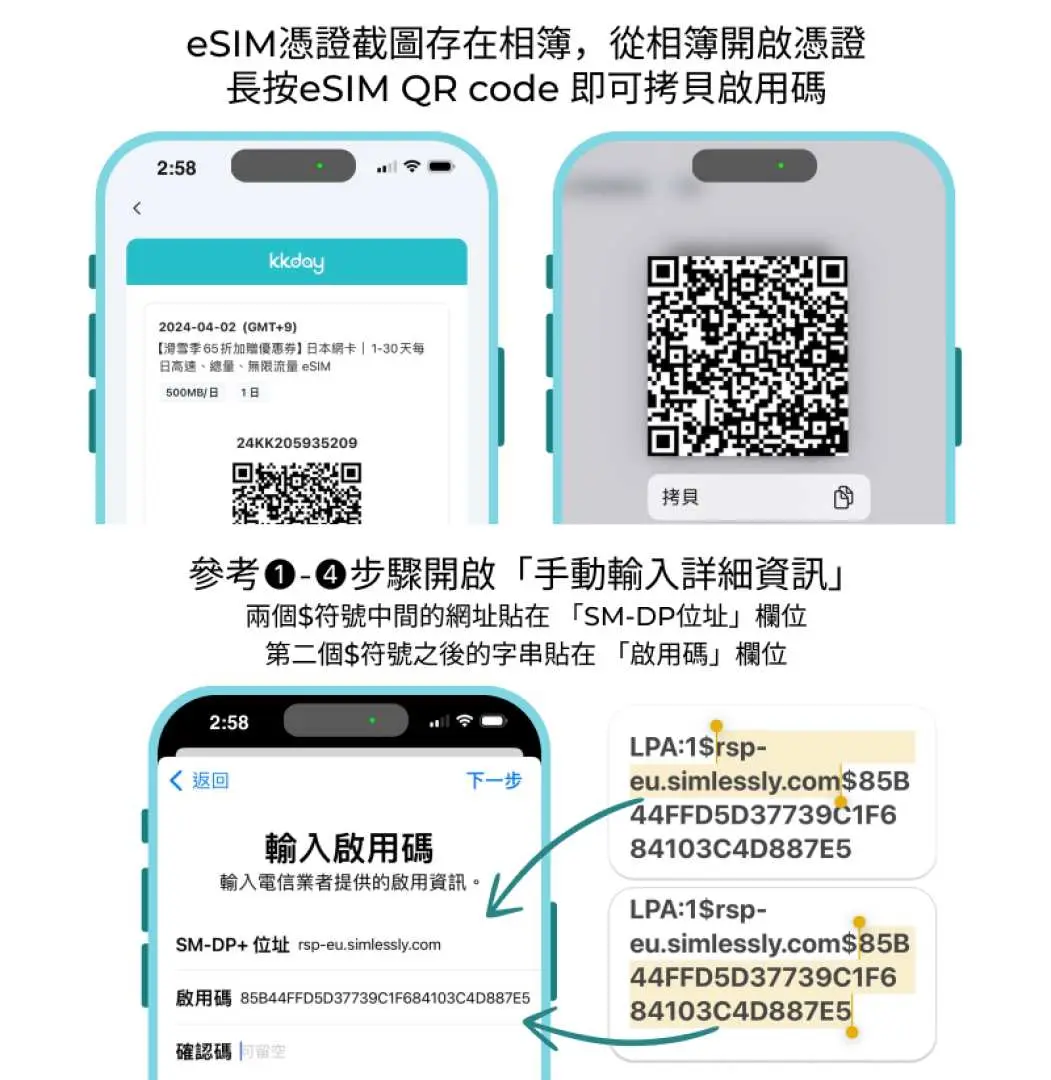
eSIM installation and activation process


How to manually enter the enabler code

Purchase Notice
⚠Please scan the QR code on the day of departure. Once the QR code is scanned and installed on your phone, the number of days will be calculated in calendar days. (If you purchase a 3-day internet plan and install and activate it at 10:00 AM on September 1st, that day will be considered the first day of your usage. After 00:00, it will be the second day. The card will expire at 12:00 PM on September 3rd.) Time calculations are based on Taiwan time (GMT +8).
⚠ This eSIM must be activated within 90 days of issuance. It is recommended to activate it as soon as possible after arriving at your destination to ensure your usage rights.
⚠ We are not responsible for refunds if the service is not used in the designated area and therefore cannot be used.
Reminders
A QR code can only be scanned once with one mobile phone and cannot be changed after binding
Please follow the installation instructions. Do not exit the screen during the installation process to avoid misidentification by the phone and deletion of the eSIM plan.
eSIM supports the models shown in the image below. Before purchasing, you can dial *#06# on your mobile phone to check if you have an EID (not MEID).
The network may change with factors such as the number of users, climate, building shadows, and location. If the reception is unstable, please be sure to contact technical customer service.
Due to Australia's policy of shutting down 3G networks, some models may not be able to use Australian network SIM cards. You need to dial *#06# with your device and confirm with AMTA (Australia's official website) that AMTA identifies the brand and model of your mobile device to confirm whether all three Australian mobile networks support it once 3G is shut down (see How to use for details).
How to Use
- Australia's new policy on November 14 requires you to check whether your phone model is on the eligible list on the AMTA official website. Only those on the list can use Australian data cards.
- Dial *#06#
- Open the AMTA official website https://amta.org.au/3g-closure-old/check-my-device/
- Enter IMEI
*Tip: CHECK. Please contact your service provider or handset vendor, as your device may not be fully supported when 3G closes" is not supported
* If the prompt reads: “OK – you don’t need to do anything. Your device will work normally after the 3G closure.”, it is supported. Once you arrive in Australia, set up the device normally and enable the Volte function.
Voucher Redemption Period
- Valid for redemption within 30day(s) from the date of issue; Invalid after expiration
Cancellation Policy
- Once the order has been completed, it cannot be canceled, modified, or refunded
- Due to time zone differences, the confirmed cancellation date is based on the supplier’s local time. Please allow 2–5 business days to process your cancellation request, after which the cancellation fee will be charged according to the product’s cancellation policy. Once the cancellation is confirmed, you will receive your refund within 14 working days.
FAQ
An eSIM is compatible with many newer smartphone models, including iPhones (typically XS, XR, and later), Google Pixels, and various Samsung Galaxy devices. For travel in Australia and New Zealand, ensure your specific device supports eSIM technology. It's recommended to check your phone's specifications or consult your device manufacturer's website for confirmation before purchasing an eSIM.
Activating an eSIM for Australia and New Zealand typically involves scanning a QR code provided after purchase or manually entering activation details. For iOS users, specifically those with the latest iOS App and iOS 17.4 or later, a convenient one-click installation is supported directly within the KKday App, simplifying the setup process significantly. After installation, you'll need to enable the eSIM line in your phone settings and ensure data roaming is turned on.
With an eSIM for Australia and New Zealand, you can expect reliable 4G/5G internet access. This service utilizes the robust roaming resources of Optus in Australia and TNZ Spark in New Zealand, ensuring stable and smooth connectivity across various regions. Coverage may vary based on location, especially in remote areas, but in major cities and popular tourist spots, high-speed internet is generally available.
The primary differences include convenience and flexibility. An eSIM is digitally embedded, eliminating the need for a physical card swap, which is ideal for dual SIM functionality (keeping your home number active). It's also easier to switch plans or providers digitally. A physical SIM requires insertion and removal, and if lost or damaged, it can disrupt connectivity. eSIMs are generally more environmentally friendly as well.
Using an eSIM often offers greater flexibility and potentially more cost-effective data plans compared to traditional international roaming from home providers. Roaming plans can sometimes be expensive and offer limited data allowances. An eSIM provides dedicated local data access in Australia and New Zealand, giving you more control over your data usage and helping avoid unexpected high charges, ensuring a smoother travel experience.
When selecting an eSIM for Australia and New Zealand, consider your data needs, the duration of your trip, and your device's compatibility. Check the supported network providers to ensure wide coverage in the areas you plan to visit. Also, look for providers that offer reliable customer service in case you encounter any issues. Planning these aspects will help you choose an eSIM that best suits your travel requirements.
An eSIM offers several practical advantages for international travelers to Australia and New Zealand. It provides immediate connectivity upon arrival, without needing to find a local store or physically swap SIM cards. Travelers can maintain their home number for calls and texts while using the eSIM for data, enabling dual connectivity. This also minimizes the risk of losing your primary SIM card and offers a hassle-free digital experience.
Yes, for iOS users, the Australia and New Zealand eSIM offers a convenient one-click installation feature. To utilize this, you need to update to the latest version of the iOS App and ensure your device runs iOS 17.4 or later. This feature allows for seamless eSIM installation directly within the KKday App, significantly streamlining the setup process and getting you connected faster.
Get Help


