

Airalo United Kingdom Data/Unlimited 5G eSIM
- A new way to stay connected: no card swapping required. Enjoy fast 4G internet without any hassle.
- Once you receive your voucher, you can scan it to install and use it immediately, saving you the trip to pick up a physical card or waiting for delivery.
- Eco-friendly with no consumables, free shipping, and zero risk of loss.
Package Options
Product Info
- eSIM Installation Process
For iOS devices, please refer to this link or the images and videos below. For Android devices, please refer to this link or the images below.
- Supported eSIM Device Models
For a complete list of eSIM-supported devices, please refer to this link. Before placing your order, please also follow the tutorial steps (iOS / Android) to check if your phone supports eSIM functionality.
- Important Notes
- iPhones purchased in mainland China do not support eSIM. For iPhones purchased in Hong Kong and Macau, only iPhone 12 mini, iPhone SE2, and iPhone XS support eSIM; other models do not. Please confirm the region where your phone was purchased before ordering.
- Samsung S20 Series, Samsung Galaxy S21 5G Series, Samsung Galaxy Z Flip 5G, Samsung Note 20 Ultra, and Samsung Galaxy Z Fold 2 purchased in the United States do not support eSIM.
- Samsung Note 20 Ultra and Samsung Galaxy Z Fold 2 purchased in Hong Kong do not support eSIM.
- Samsung Note 20 purchased in South Korea does not support eSIM.
- Although the Samsung Galaxy Z Flip3 has eSIM functionality, it is currently unstable, and we do not recommend purchasing it for this service.

eSIM compatible mobile phone models
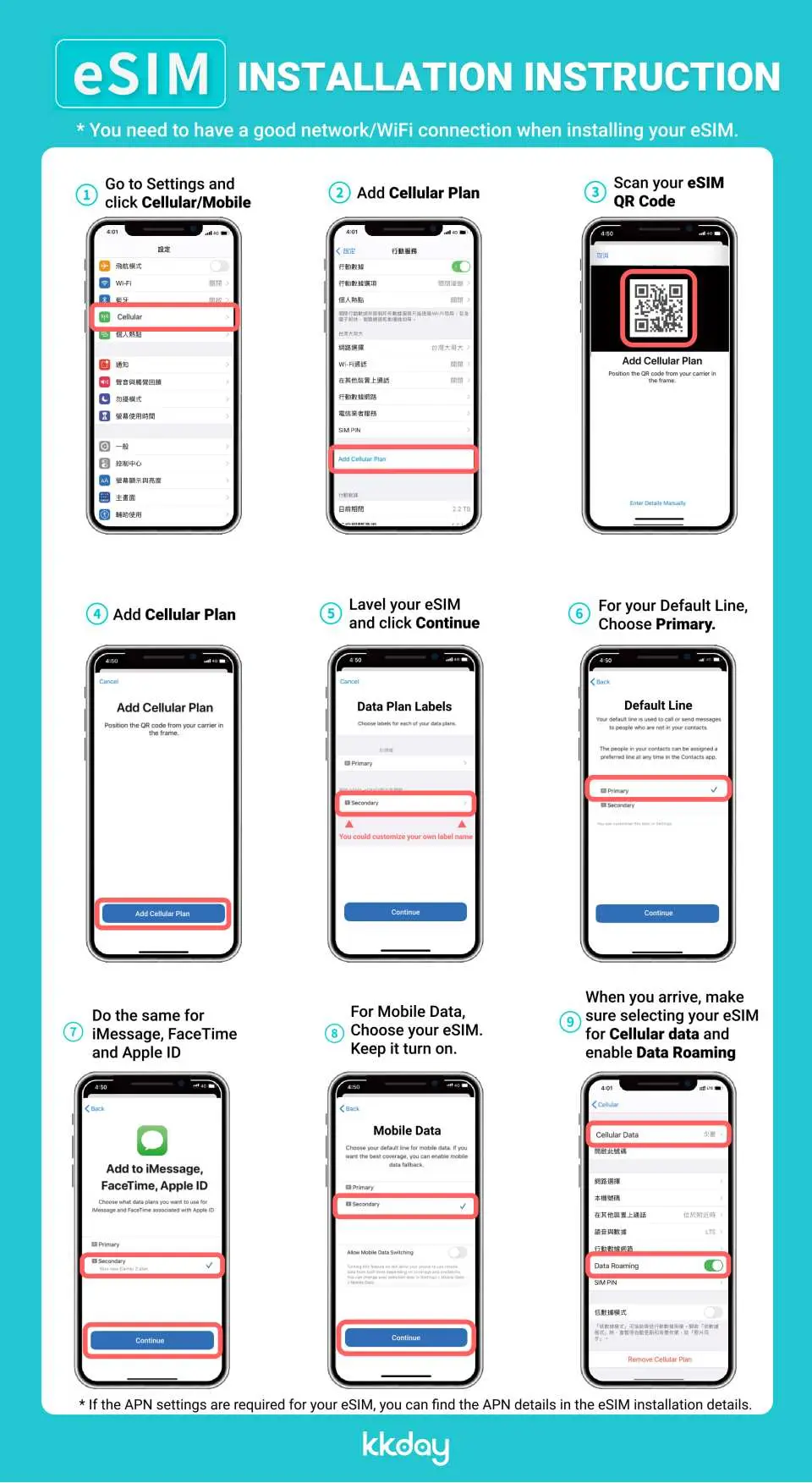
eSIM installation and activation process
iOS system: eSIM installation and activation process
Purchase Notice
- Please pay attention to whether the mobile phone version and model are suitable for this product. If it cannot be used due to non-confirmation, no refund will be given.
- Samsung phones have different versions depending on the country of purchase. Please check the list of countries that support eSIM before purchasing.
- iOS version 12.1 or above is required. iPhones sold in China do not support the eSIM function, and some mobile phones in Hong Kong and Macau do not support the eSIM function.
Reminders
A QR code can only be scanned once with one mobile phone. Please do not change or delete it after binding.
When you finish using the eSIM plan in your phone, click [Remove Action Plan] at the bottom to remove it.
Internet usage must comply with the Fair Usage Policy (FUP). If excessive usage in a short period of time causes a surge in traffic, telecom operators have the right to regulate it, which will cause a short-term speed reduction or network disconnection. It is recommended to turn off automatic app updates and automatic video playback on your phone.
International Fair Use Terms To ensure that all users have fair access to mobile network services at all times, each telecom operator has its own fair use agreement to regulate fair network usage. When a user uses too much data in a busy network area within a short period of time, causing other users to be unable to use the network normally, the telecommunications company may temporarily limit the speed. Our company will not be able to intervene and your mobile network may be temporarily affected. To ensure normal use, please try to avoid watching videos for a long time or updating software and other tools that consume a lot of data.
Please be aware that the quality of Internet access may be affected by factors such as location, terrain, building shielding, number of users and weather.
Please remember to turn off data roaming on the original SIM card to avoid using the mobile network of the original SIM card and incurring high roaming charges.
Cancellation Policy
- Once the order has been completed, it cannot be canceled, modified, or refunded
- Due to time zone differences, the confirmed cancellation date is based on the supplier’s local time. Please allow 2–5 business days to process your cancellation request, after which the cancellation fee will be charged according to the product’s cancellation policy. Once your refund request is confirmed, KKday will initiate the refund to your original payment method within 15 days. The actual refund timing depends on your card-issuing bank’s policy.
FAQ
1. Does the Airalo UK eSIM provide reliable network coverage across the United Kingdom?
The Airalo UK eSIM utilizes local network infrastructure to provide robust 4G internet access throughout the United Kingdom. Coverage reliability generally mirrors that of major local carriers, ensuring connectivity in most urban, suburban, and well-trafficked tourist areas. Performance may vary in extremely remote regions, as with any mobile network.
2. What distinct features does the Airalo UK eSIM offer compared to traditional physical SIM cards for UK internet access?
The Airalo UK eSIM offers several distinct features, including instant digital delivery via QR code, eliminating the need for physical card swaps or waiting for shipping. It's environmentally friendly with no consumables and removes the risk of losing a small physical SIM card. Users can activate it quickly upon arrival, enjoying seamless 4G internet access without carrying an ejection tool.
3. Are there any specific limitations or potential disadvantages to consider when using an Airalo UK eSIM for internet access?
One limitation is that an eSIM requires a compatible device, which not all older phone models support. While generally reliable, internet speed and coverage can be influenced by local network conditions and your device's capabilities, similar to physical SIM cards. Also, if you lose or reset your device, re-installation might be necessary, though activation is straightforward with the QR code.
4. How reliable is the 4G internet access provided by the Airalo UK eSIM for travelers?
The Airalo UK eSIM delivers generally reliable 4G internet access by partnering with reputable local network providers in the UK. This ensures consistent connectivity for browsing, navigation, and communication in most populated areas. While speeds can be affected by network congestion or location, the service is designed for smooth and fast data experiences for travelers.
5. What are the step-by-step instructions for properly setting up and activating an Airalo UK eSIM on a mobile device?
To set up your Airalo UK eSIM, first ensure your device is eSIM compatible and unlocked. Scan the provided QR code or manually enter the details in your phone's cellular settings (usually under 'Add Cellular Plan'). Follow the on-screen prompts to download and install the eSIM profile. Once installed, select the Airalo eSIM as your primary data line and enable data roaming for that line if necessary, then restart your phone to activate.
6. Should data roaming be enabled or disabled on my device when using an Airalo UK eSIM in the UK?
When using an Airalo UK eSIM, you typically need to enable data roaming specifically for the Airalo eSIM profile in your device settings. This allows the eSIM to connect to local networks in the UK. Ensure your primary SIM card (if you have one) has data roaming disabled if you wish to avoid charges from your home carrier.
7. What devices are compatible with the Airalo UK eSIM, and how can I check my phone's eSIM support?
The Airalo UK eSIM is compatible with most newer smartphone models, including recent iPhones (XR and later), Google Pixels (3a and later), and Samsung Galaxy S20 series and newer, along with other selected Android and iPad models. To check your phone's eSIM support, look in your device's cellular settings for an option to 'Add Cellular Plan' or 'Add eSIM.' You can also consult your phone manufacturer's specifications.
8. How can users monitor their data usage and manage their Airalo UK eSIM plan while traveling?
Users can monitor their data usage for the Airalo UK eSIM primarily through the Airalo mobile application. The app provides a clear overview of remaining data, expiry dates, and options for topping up or purchasing new plans if needed. Additionally, most smartphones also display data usage per cellular plan in their device settings, allowing for real-time tracking.


