

Malaysia eSIM | Daily Data eSIM
- No need to change cards, enjoy 4G Internet access quickly and neatly, no need to rush around
- Once you receive the eSIM QRcode, you can scan, install and use it. There is no need to run back and forth to pick up the physical card or wait for physical delivery.
- Environmentally friendly, no consumables, free shipping, zero risk of loss
Package Options
Product Info
The content of this product is provided by machine translation and may not reflect the actual information, please take this into consideration before booking.
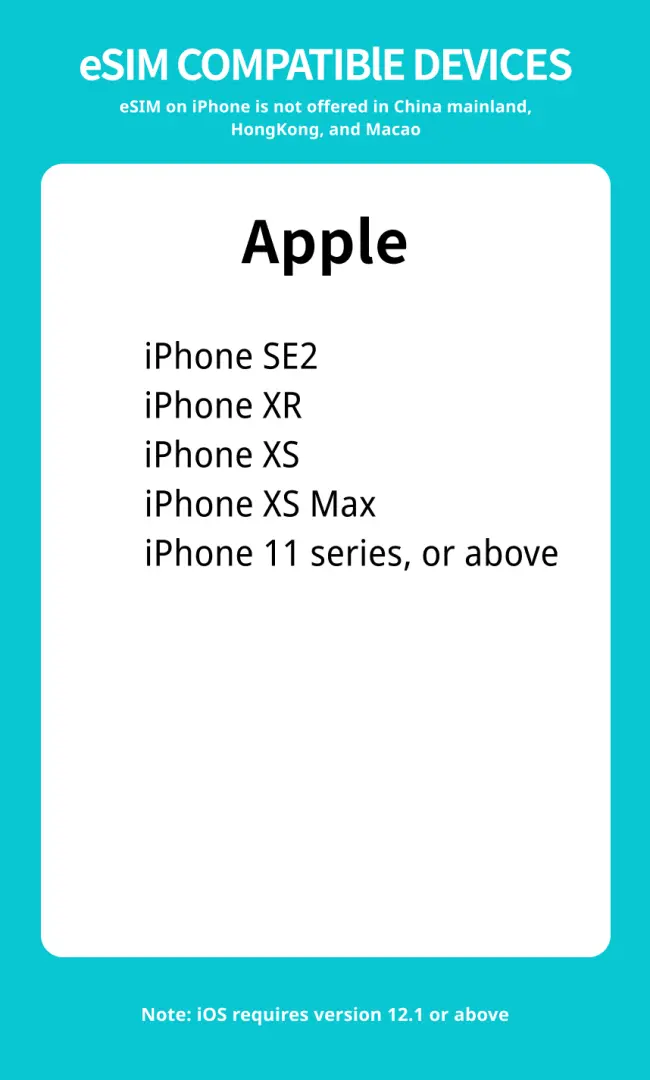
Applicable models

eSIM installation instructions (ios)


SIM Card Specifications
| Data Usage Specifications | Unlimited data, 500MB, 1GB, 2GB, 3GB |
| Transmission Specifications | 4G |
| Signal Coverage Area | Malaysia |
| Mobile Carrier | maxis |
| Supported Sizes | eSIM |
| Hotspot Sharing | Unavailable |
| Supported Frequencies(4G) | B1(2100 MHz) |
| Excludes | Voice calls, Texts |
| Not Supported | SIM-locked device, Carrier-customized device, Mobile hotspot, Modified phones, 3G mobile phones, translators, mobile phones without eSIM function |
| Network Type | Roaming |
Purchase Notice
- Before purchasing, please ensure that your phone and its operating system support the eSIM function. If the order is cancelled due to device incompatibility, no refund will be given.
- eSIM applicable models: iPhone XR and above, Google Pixel 6 and above
- After placing an order and completing payment, the QR code will be sent by email within 24 hours.
- eSIM is an online service that is finalized upon provision. It will only be provided to you via email in the form of a QR Code with your consent. In accordance with the Consumer Protection Act and the Guidelines for Reasonable Exceptions to the Right to Cancel Telecommunications Transactions, etc., once you receive the email containing the eSIM QR Code, you cannot cancel or modify your order, nor can you request a return or refund. Please note that this is not possible due to the restrictions set forth in the Consumer Protection Act.
Reminders
Please make sure that your mobile phone and its operating system support the eSIM function before purchasing. No refunds will be issued if the order is canceled due to incompatibility of the device.
iOS requires version 12.1 or higher; please note that iPhones sold in mainland China do not support eSIM. In Hong Kong and Macau, only iPhone 13 mini, iPhone 12 mini, iPhone SE 2020 and iPhone XS have eSIM functionality.
The versions of Samsung mobile phones vary from country to country. Samsung mobile phones purchased in Taiwan do not support eSIM. For other regions, please check with Samsung’s official website first.
After placing an order and completing payment, the QR code will be sent by email within 24 hours.
Each OR code can only be scanned once. After binding, the device cannot be changed or deleted. Once deleted, it cannot be rescanned and installed.
Installing eSIM requires an Internet connection. Please confirm that there is available WiFi or available mobile data in the environment before installation.
Please install the eSIM after arriving at your destination to avoid activating it in advance to calculate the validity period.
The eSIM must be installed and activated at the destination within 30 days of ordering, otherwise it will become invalid and unusable.
Please remember to turn off data roaming on the original SIM card to avoid using the mobile network of the original SIM card and incurring high roaming charges.
To end using the eSIM plan available on your phone, click [Remove Action Plan] at the bottom to remove it.
Please be aware that the signal may affect the quality of the Internet depending on factors such as location, terrain, building coverage, number of users, weather, etc.
eSIM is an online service that is finalized upon provision. It will only be provided to you via email in the form of a QR Code with your consent. In accordance with the Consumer Protection Act and the Guidelines for Reasonable Exceptions to the Right to Cancel Telecommunications Transactions, etc., once you receive the email containing the eSIM QR Code, you cannot cancel or modify your order, nor can you request a return or refund. Please note that this is not possible due to the restrictions set forth in the Consumer Protection Act.
How to Use
- Before purchasing, please ensure that your phone and its operating system support the eSIM function. If the order is cancelled due to device incompatibility, no refund will be given.
- After placing an order and completing payment, the QR code will be sent by email within 24 hours.
- Please fill in the correct email address to ensure you can receive the eSIM activation information.
- Please confirm that you are connected to WiFi when joining the eSIM mobile plan
- Installation steps:
Settings -> Mobile Services -> Join Mobile Plan -> Scan eSIM QR Code - If you have any questions, please contact customer service and we will serve you wholeheartedly.
Cancellation Policy
- Once the order has been completed, it cannot be canceled, modified, or refunded
- Due to time zone differences, the confirmed cancellation date is based on the supplier’s local time. Please allow 2–5 business days to process your cancellation request, after which the cancellation fee will be charged according to the product’s cancellation policy. Once your refund request is confirmed, KKday will initiate the refund to your original payment method within 15 days. The actual refund timing depends on your card-issuing bank’s policy.
FAQ
1. How can tourists easily obtain and activate a Malaysia eSIM for their travel?
Tourists can conveniently purchase a Malaysia eSIM online before their trip. After ordering, you will typically receive a QR code via email. Simply scan this QR code with your compatible smartphone, follow the on-screen prompts to install the eSIM profile, and activate your data plan. Booking through KKday allows for a seamless process, providing immediate QR code delivery, which eliminates the need to queue for a physical SIM card or wait for delivery, ensuring you're connected right upon arrival.
2. What unique features does a Malaysia eSIM offer for convenient travel internet?
A Malaysia eSIM provides several convenient features for travelers. You won't need to physically change SIM cards, ensuring quick and clean 4G internet access. The eSIM is activated by simply scanning a QR code, which means no waiting for physical delivery and no risk of losing a tiny physical card. It's also an environmentally friendly option with no consumables, offering a hassle-free and efficient way to stay connected.
3. What are some potential downsides of choosing a Malaysia eSIM over a traditional physical SIM card?
While highly convenient, a Malaysia eSIM does have a few potential limitations. Not all smartphone models support eSIM technology, so device compatibility is a crucial factor. Additionally, initial eSIM activation often requires an existing internet connection to download the profile. If your device is locked to a specific carrier, it might not be able to use an eSIM from another provider, requiring it to be unlocked first.
4. Can travelers acquire a Malaysia eSIM that offers data-only services?
Yes, many Malaysia eSIM options are designed primarily for data-only services. These plans are ideal for travelers who need reliable internet access for navigation, messaging apps, social media, and staying in touch via internet calls, without needing a local phone number for traditional calls and SMS. Your existing primary SIM can remain active for calls and texts while the eSIM handles data.
5. How does the Malaysia eSIM activate on a mobile device to provide immediate internet access?
The activation process for a Malaysia eSIM is straightforward. Once you receive your eSIM QR code, navigate to your phone's cellular settings. Select the option to 'Add Cellular Plan' or 'Add Data Plan' and use your device's camera to scan the provided QR code. Your phone will then guide you through the installation of the eSIM profile. After installation, you can set it as your primary data line to gain immediate internet access.
6. What are the practical steps to ensure seamless internet usage with a Malaysia eSIM during a trip?
To ensure seamless internet usage with your Malaysia eSIM, first confirm that your eSIM profile is successfully installed and active in your phone's settings. Make sure data roaming is enabled for the eSIM (if required by your plan) and that the eSIM is set as your default line for mobile data. Regularly check your data usage through your phone settings to manage your allowance effectively. If you encounter issues, restart your device or verify network settings.
7. Are there various types of Malaysia eSIM data plans suitable for different travel durations or usage needs?
Yes, Malaysia eSIM data plans typically come in a variety of options to cater to diverse travel requirements. These plans often differ in their validity period, ranging from a few days to several weeks, and the amount of data provided, such as daily high-speed data allowances or a total gigabyte allocation. This flexibility allows travelers to choose a plan that best matches their trip length and anticipated data consumption.
8. Is a Malaysia eSIM compatible with all smartphone models and network providers?
A Malaysia eSIM is not universally compatible with all smartphone models. Generally, eSIM functionality is available on newer smartphone models from major manufacturers like Apple, Samsung, Google, and Huawei. It's crucial to check your specific device's specifications to confirm eSIM support before purchasing. Additionally, your phone should be unlocked from any previous network provider to ensure it can freely connect to new eSIM networks.
Get Help


