

Philippines eSIM | 4G high-speed Internet Total, daily high-speed data eSIM (sent via e-mail)
- No need to change cards, enjoy 4G Internet access quickly and neatly, no need to rush around
- Once you receive the eSIM QRcode, you can scan, install and use it. There is no need to run back and forth to pick up the physical card or wait for physical delivery.
- Environmentally friendly, no consumables, free shipping, zero risk of loss
- Supports Apple and multiple Android phones. Please be sure to confirm whether the phone supports eSIM before purchasing.
- eSIM QR code is sent via e-mail, convenient and fast
Package Options
Product Info
The content of this product is provided by machine translation and may not reflect the actual information, please take this into consideration before booking.
Please confirm whether the phone has eSIM function before purchasing
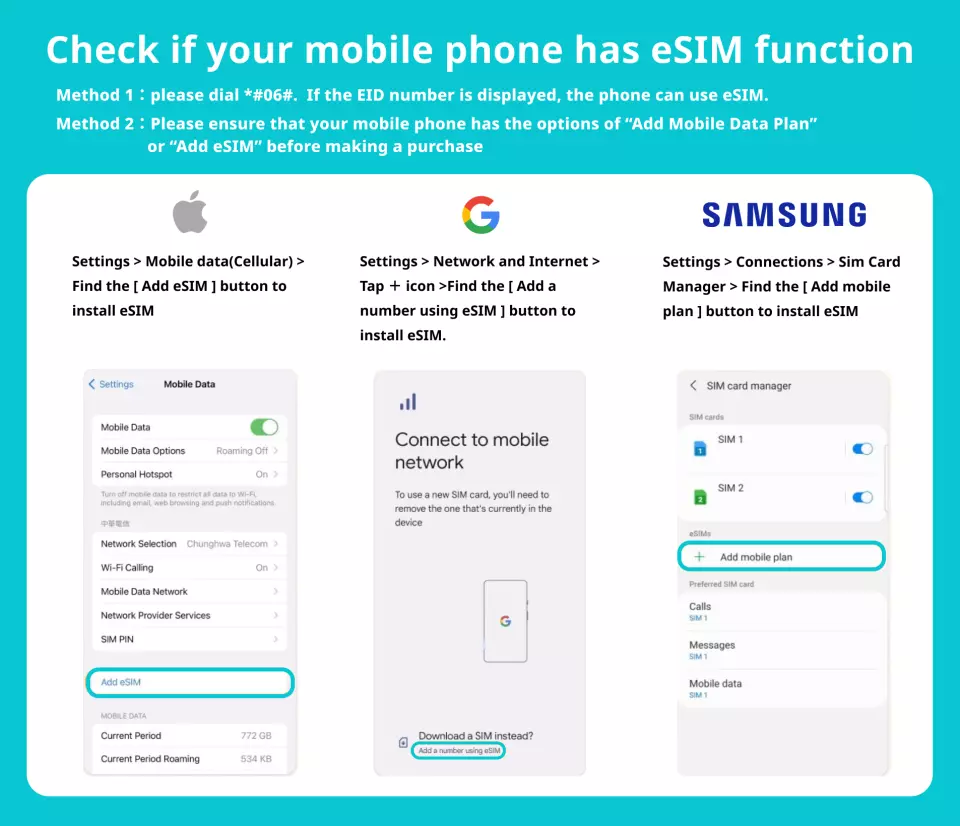

eSIM applicable models


eSIM installation steps (ios)
eSIM installation steps (Android)
Important Info
Reminders
The eSIM will be sent via email, if you do not receive an email with the eSIM attached, please check your spam or contact customer service via message.
Installing eSIM requires an Internet connection. Please confirm that there is available WiFi or available mobile data in the environment before installation.
Each QRcode can only be scanned once, and the device cannot be changed or deleted after binding.
Please use the eSIM within 180 days after receiving it. It will expire after the expiration date.
Please scan and install the eSIM after arriving at your destination to avoid starting the validity period calculation early.
iOS requires version 12.1 or higher; please note that iPhones sold in mainland China do not support eSIM. In Hong Kong and Macau, only iPhone 13 mini, iPhone 12 mini, iPhone SE 2020 and iPhone XS have eSIM functionality.
Samsung mobile phone versions vary from country to country. Please check with Samsung's official website first to confirm whether it supports esIM. (Samsung mobile phones purchased in Taiwan do not support eSIM)
Please be aware that the signal may affect the quality of the Internet depending on factors such as location, terrain, building coverage, number of users, weather, etc.
In accordance with the International Data Communications Fair Utilization Policy, it is recommended to turn off the automatic Facebook video browsing function, automatic APP program update or automatic synchronization function to avoid excessive use of data. If you watch online TV or videos for a long time or download large data files or network Please note that due to the slowdown in Internet speed or inability to access the Internet due to mobile games, etc., you cannot apply for refund or compensation.
How to Use
- The eSIM will be sent via email. If you do not receive an email with the eSIM attached, please check your spam or contact customer service via message.
- Provide customer service in Chinese, English, Japanese, French, Korean, Vietnamese, Spanish and Malay
- Please refer to the help link for activation steps.
- iOS
- Android
Cancellation Policy
- Once the order has been completed, it cannot be canceled, modified, or refunded
- Due to time zone differences, the confirmed cancellation date is based on the supplier’s local time. Please allow 2–5 business days to process your cancellation request, after which the cancellation fee will be charged according to the product’s cancellation policy. Once the cancellation is confirmed, you will receive your refund within 14 working days.
FAQ
Yes, tourists can definitely use eSIM in the Philippines. This digital SIM allows for immediate internet access upon arrival by simply scanning a QR code, eliminating the need to search for local physical SIM cards. It’s a convenient option for maintaining connectivity throughout your trip.
When selecting an eSIM for the Philippines, consider the data allowance (total data vs. daily high-speed limits), the duration of your trip, and network coverage. Some eSIMs offer a total high-speed data amount, while others provide a daily allocation before a speed reduction. Ensure your chosen plan aligns with your expected usage and travel itinerary.
Yes, using an eSIM in the Philippines often offers significant advantages over international roaming. eSIMs typically provide more cost-effective data plans and offer immediate internet access without incurring high roaming charges. They also eliminate the hassle of switching physical SIM cards, allowing for a seamless transition upon arrival.
The pricing structure for a Philippines eSIM usually depends on the data package and validity period. Options typically include various data amounts (e.g., total gigabytes or daily high-speed allocations) and durations (e.g., 5, 7, 10, or 30 days). The chosen plan determines the overall value, focusing on the convenience of instant connectivity and avoiding physical card hassles.
Yes, prepaid eSIM options are readily available for travelers visiting the Philippines. These plans allow you to pay upfront for a set amount of data and a specific validity period, providing clear control over your spending without contract commitments. They are ideal for short-term travel, offering flexibility and convenience.
Using a Philippines eSIM offers several advantages over a physical SIM card. You avoid the need to physically swap cards, making activation quick and seamless via a QR code. It's also environmentally friendly, eliminates the risk of losing a tiny physical card, and allows you to keep your primary SIM card active for calls and texts while using the eSIM for data.
Setting up a Philippines eSIM is straightforward. After receiving your eSIM QR code via email, simply scan it using your compatible smartphone's settings. Follow the on-screen prompts to install the profile, and then activate the eSIM line in your phone's cellular settings. This process allows for immediate 4G high-speed internet access upon arrival.
The Philippines eSIM supports a wide range of devices, including most recent Apple iPhone models (XR and newer) and various Android smartphones from brands like Samsung, Google Pixel, and Huawei that feature eSIM capability. It is crucial to verify your specific phone model's eSIM compatibility before purchasing to ensure smooth activation and use.
Get Help


