

Maldives SIM Card | Total 20GB 10 days + calls and SMS eSIM
- Support iOS one-click installation: Update to the latest iOS App version and iOS 17.4 or above, you can install eSIM in one click on the KKday App
- No need to change SIM cards, enjoy 4G Internet quickly and smoothly without any hassle
- Once you receive the eSIM QR code, you can scan and install it, without having to go back and forth to pick up the physical card or wait for it to be delivered.
- Environmentally friendly, no consumables, free shipping, zero risk of loss
- Supports Apple and multiple Android phones. * Samsung phones have different versions purchased in different countries. Before purchasing, you must confirm whether they support eSIM (Samsung phones purchased in Taiwan do not support eSIM function)
Product Info
The content of this product is provided by machine translation and may not reflect the actual information, please take this into consideration before booking.
Please confirm that your device is compatible with eSIM before purchasing


Applicable models of eSIM


eSIM Installation Instructions (ios)


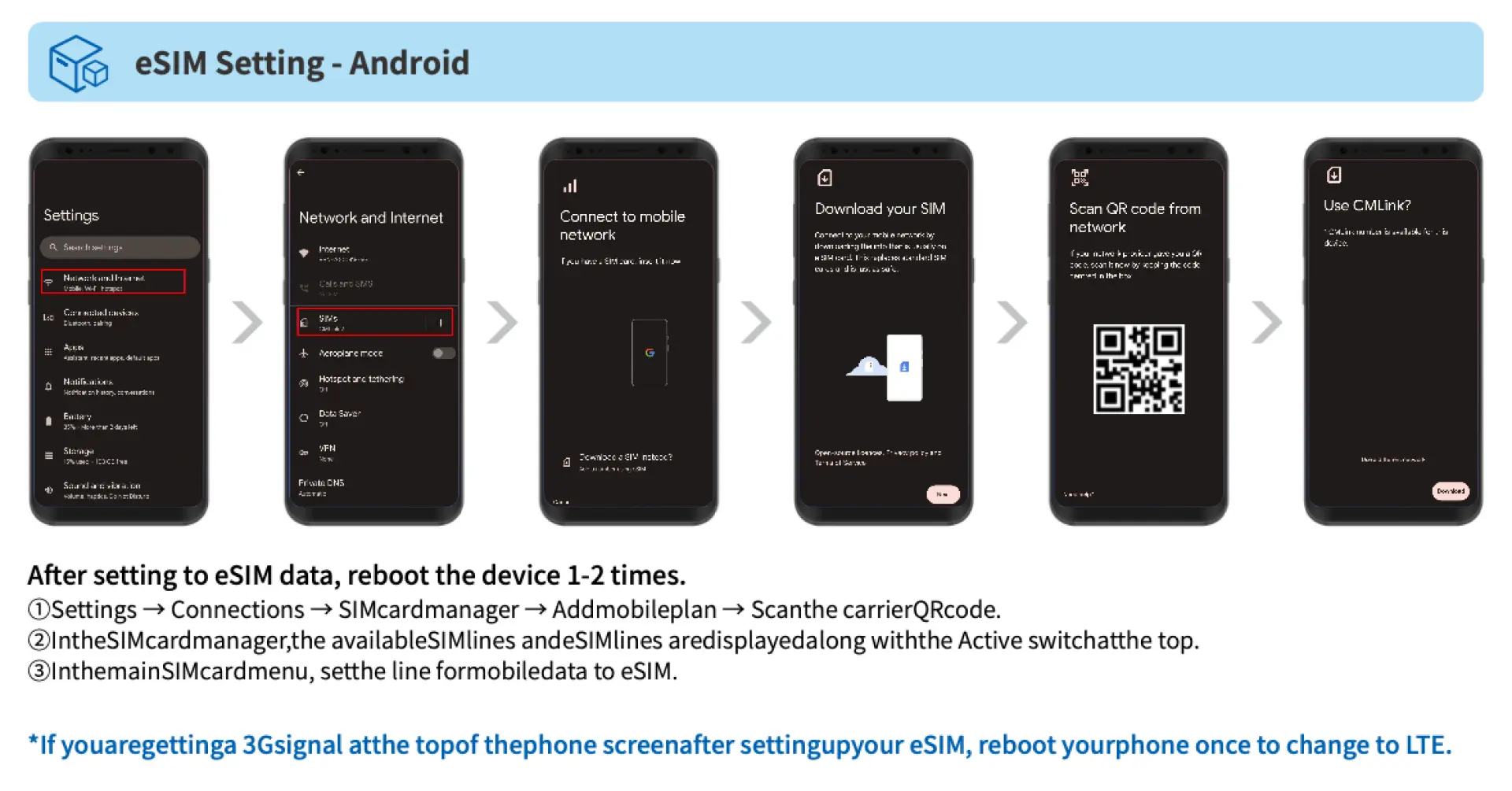
eSIM Installation Instructions (Android)

SIM Card Specifications
| Data Usage Specifications | 20GB |
| Transmission Specifications | 4G |
| Signal Coverage Area | Maldives |
| Mobile Carrier | Ooredoo |
| Supported Sizes | eSIM |
| Hotspot Sharing | Available |
| Supported Frequencies(4G) | B1(2100 MHz), B8(900 MHz), B3(1800 MHz), B7(2600 MHz) |
| Top-Up Availability | Top-up unavailable |
| Not Supported | SIM-locked device, Carrier-customized device, Mobile hotspot, modified phones, 3G phones, translation machines, phones without eSIM function |
Important Info
Reminders
After you scan the QR code and download the order successfully, you cannot cancel the order or refund the money.
An Internet connection is required to install the eSIM. Please make sure there is available WiFi or mobile data before installation.
Each QR code can only be scanned and installed once. Once bound, the device cannot be changed or deleted.
Please use the eSIM within 60 days of receiving it, otherwise it will become invalid.
Please scan and install the eSIM after arriving at your destination to avoid premature validity calculation.
iOS version 12.1 or later is required; Please note that iPhones sold in Mainland China do not support eSIM. In Hong Kong and Macau, only iPhone 13 mini, iPhone 12 mini, iPhone SE 2020 and iPhone XS have eSIM functionality.
Samsung phones vary in different countries. Samsung phones purchased in Taiwan do not support eSIM. Please confirm with Samsung's official website for other regions first.
Please be aware that the quality of Internet access may be affected by factors such as location, terrain, building shielding, number of users and weather.
In accordance with the fair use policy of international data communications, it is recommended to turn off the automatic browsing function of Facebook videos, automatic update or automatic synchronization function of APP programs to avoid excessive use of data. If the Internet speed slows down or you cannot access the Internet for a long time due to watching online TV, videos, downloading large-volume files, playing online games, etc., you will not be able to apply for a refund or compensation. Please be aware.
You can make 150 minutes of free calls and send 150 text messages.
Please dial [*200#] to check remaining data, calls and text messages.
How to Use
- How to install:
iOS: Settings > Mobile Services > Join Mobile Plan > Scan QR code > Join Mobile Plan Android: Settings > Internet (Connections) > SIM Card Manager > Add SIM Card (Join Mobile Plan) > Scan QR code - To set the APN for eSIM:
Usually the APN will be automatically identified. If it cannot be identified automatically, you need to set it manually.
APN: OoredooData
Cancellation Policy
- Once the order has been completed, it cannot be canceled, modified, or refunded
- Due to time zone differences, the confirmed cancellation date is based on the supplier’s local time. Please allow 2–5 business days to process your cancellation request, after which the cancellation fee will be charged according to the product’s cancellation policy. Once the cancellation is confirmed, you will receive your refund within 14 working days.
FAQ
Using a Maldives eSIM offers several benefits for travelers, primarily providing seamless 4G internet access without the need for a physical SIM card. This eliminates the hassle of changing cards or picking one up upon arrival. eSIMs are installed quickly via a QR code, are environmentally friendly, and reduce the risk of loss. They ensure you have stable and convenient connectivity for navigation, communication, and sharing your travel experiences throughout your trip.
While not strictly mandatory, purchasing a Maldives eSIM is highly recommended for international travelers. It ensures reliable internet access for essential communication with resorts or tour operators, accessing maps, checking local information, and staying connected with family and friends. Relying solely on resort Wi-Fi can be restrictive and less secure, making a personal eSIM a convenient and practical solution for continuous connectivity.
You can conveniently acquire a Maldives eSIM by purchasing it online before your trip. For a smooth and hassle-free experience, consider booking through KKday. With KKday, you receive your eSIM QR code immediately after purchase, allowing for quick setup by scanning. For iOS users with the latest App version, there's even a one-click installation option directly through the KKday App, simplifying activation and ensuring you're connected right upon arrival, without the need for physical card delivery.
With a Maldives eSIM, you can expect fast and reliable 4G internet connectivity. This specific eSIM package offers a generous total of 20GB of data for 10 days, which is ample for typical travel needs like browsing, social media, and messaging. Coverage is generally good in major resort areas and inhabited islands, providing consistent internet access for navigation, communication, and sharing your experiences throughout your stay.
Installing your Maldives eSIM is a straightforward process. After your purchase, you will receive a QR code, typically via email. Simply scan this QR code using your compatible smartphone's settings to download and install the eSIM profile. For Apple users with an updated iOS App version (iOS 17.4 or above), an even simpler one-click installation is available directly through the App. Once installed, activate the eSIM line in your phone settings upon arriving in the Maldives to begin using your data and services.
The Maldives eSIM is compatible with most modern Apple iPhones and a wide range of Android smartphones that support eSIM functionality. For Apple devices, ensure your iOS is updated to the latest version to utilize features like one-click installation. For Samsung phones, device compatibility can vary by the country of purchase, so it's important to confirm if your specific model supports eSIM before your trip, as certain regional versions do not.
Yes, this Maldives eSIM package is designed to provide comprehensive communication solutions, including local calling minutes and SMS services in addition to data. It offers a total of 20GB of 4G data over 10 days, allowing you to not only access the internet but also make essential calls and send messages within the Maldives. This ensures you have full communication capabilities throughout your travels.
Maldives eSIMs generally operate on major local network providers such as Dhiraagu and Ooredoo, ensuring wide coverage across the islands. You can expect reliable 4G connectivity in most populated areas, resorts, and major tourist destinations. While signal strength might vary slightly in extremely remote or isolated areas, overall, the coverage is robust enough to provide consistent internet access and communication for travelers.
Get Help


