

New Zealand and Australia Network Card | New Zealand and Australia Internet access on October 15th eSIM
- Use the cost-effective eSIM to surf the internet while traveling in New Zealand & Australia
- Alleviate SIM Card pin needle and installation trivialities with the help of eSIM
- Delight in the easy-to-use design and stay connected throughout your trip
Product Info
The content of this product is provided by machine translation and may not reflect the actual information, please take this into consideration before booking.
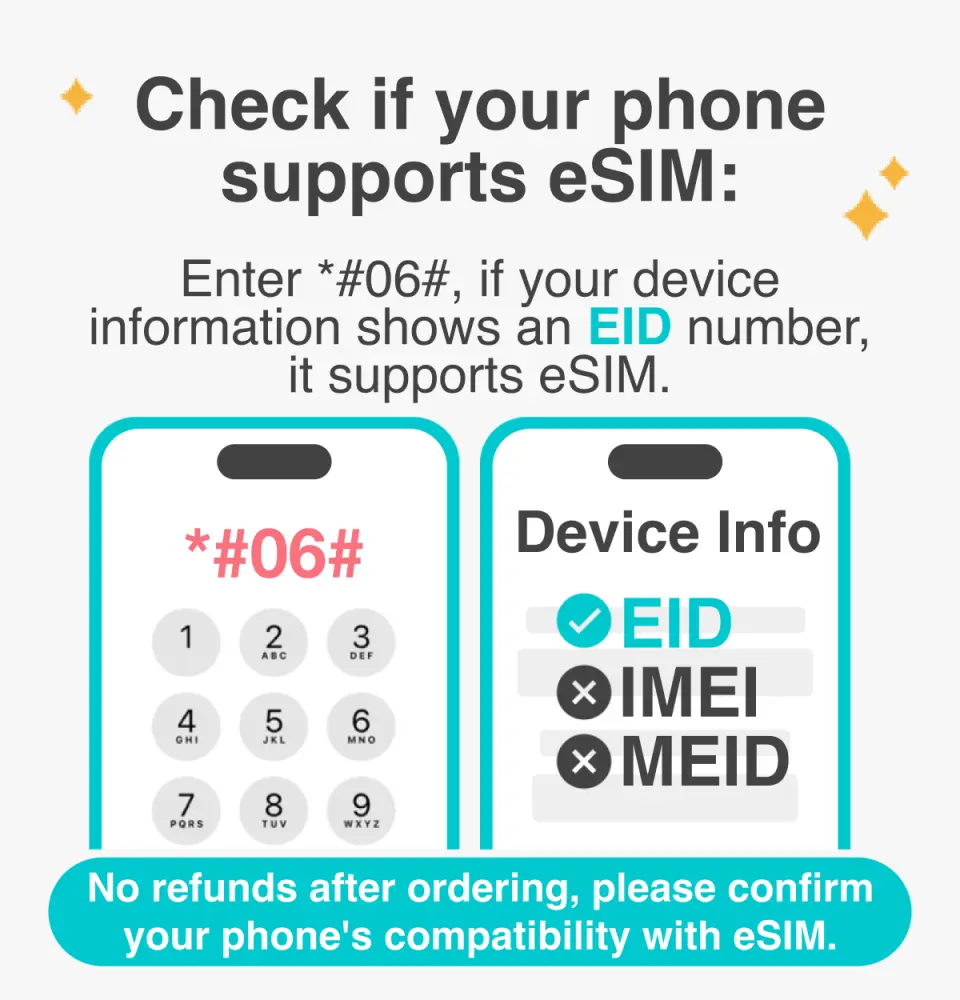
eSIM Compatible Devices

eSIM Installation Instruction


SIM Card Specifications
| Data Usage Specifications | 1GB, 10GB |
| Transmission Specifications | 4G |
| Signal Coverage Area | Australia, New Zealand |
| Mobile Carrier | Australia: Telstra, New Zealand: TNZ |
| Supported Sizes | eSIM |
| Hotspot Sharing | Available |
| Supported Frequencies(4G) | B8(900 MHz), B3(1800 MHz), B1(2100 MHz), B7(2600 MHz), B12(700 MHz) |
| Top-Up Availability | Top-up unavailable |
| Excludes | Voice calls, Texts |
| Not Supported | SIM-locked device, Carrier-customized device, Mobile hotspot, iPhone XR or prior iPhone models |
| Network Type | Roaming |
| Mobile Virtual Network Operator (MVNO) | SmarTone Telecommunications Holdings Limited |
Purchase Notice
- Please pay attention to whether the mobile phone version and model are compatible with this product. If you cannot use it due to non-confirmation, no refund will be given.
- Samsung phones have different versions depending on the country of purchase. Please check the list of countries that support eSIM before purchasing:
https://www.samsung.com/tw/support/newsalert/117223/ - iOS version 12.1 or above is required. iPhones sold in China do not support the eSIM function, and some mobile phones in Hong Kong and Macau do not support the eSIM function.
Includes/Excludes
Reminders
Each QRcode can only be scanned once, and no changes can be made once the QRcode is scanned
To end the eSIM function, please tap "Remove Cellular Plan"
In accordance with the Fair Usage Policy, excessive video streaming or data consumption may cause slower or weaker signal reception
In order to ensure all users' accessibility to the internet, each telecom carrier implements their fair usage policy to monitor data consumption. If a user's data consumption negatively affects other users' internet connections, the telecom carrier may enforce speed restrictions temporarily. Please note that under such circumstances, KKday has no right to intervene
The quality of communication may be affected by outside conditions; surrounding landforms (e.g. mountains), weather, obstruction by buildings, the number of users, or locations may affect the speed and quality of the internet
Please turn off the data roaming function of the original SIM Card to avoid high roaming fees
You can choose to activate the eSIM at home or after arriving at your destination. Data will not be counted when eSIM is activated in your country but will be counted after arriving at your destination and connecting your device to the eSIM service.
The eSIM is for foreign use only. If it is activated domestically, you will be unable to use the internet in your country. In this case, please turn off the eSIM service to switch back to the original telecom service, and connect to the eSIM service after arriving at the destination.
iPhone needs to be connected to a Wi-Fi network.「Settings」-「Cellular / Mobile Data」-「Add Cellular Plan / Add eSIM 」-「Scan QR code」
「Settings」-「Cellular / Mobile Data」-「eSIM(Travel、Business)」-「Data Roaming」TURN ON
「Settings」-「Cellular / Mobile Data」-「Cellular Data / Mobile Data」-「Convert to eSIM(Travel、Business)」
「Settings」-「Cellular / Mobile Data」-「eSIM(Travel、Business)」-「Voice & Data」-「Convert to LTE or 4G」
How to Use
- Open the voucher and receive the eSIM QRcode
- Scan the QRcode with your phone and complete the installation procedures (please refer to the pictures above)
* Internet connection is required for eSIM installation, please make sure that you can access Wi-Fi or mobile data
* Please activate roaming before using eSIM
- If you are using an iPhone, please click here for instructions. For Android users, please visit the official website of your phone for instructions
- Once the installation process is completed (after QRcode scanning), the eSIM cannot be transferred to a different mobile phone
Cancellation Policy
- Once the order has been completed, it cannot be canceled, modified, or refunded
- Due to time zone differences, the confirmed cancellation date is based on the supplier’s local time. Please allow 2–5 business days to process your cancellation request, after which the cancellation fee will be charged according to the product’s cancellation policy. Once the cancellation is confirmed, you will receive your refund within 14 working days.
FAQ
Yes, a dual-country eSIM is specifically designed for seamless use across both New Zealand and Australia. Once activated, it automatically connects to local networks in each country, providing continuous internet access without needing to switch plans or purchase separate SIM cards. This ensures you stay connected throughout your travels, whether you are exploring cities or natural landscapes in either nation.
When selecting an eSIM, consider the data allowance to match your usage, validity period to cover your trip duration, and network coverage in your planned destinations. Look for providers with a strong reputation for stable connections and clear activation instructions. An eSIM that offers robust network performance in both urban and rural areas of New Zealand and Australia is ideal for a hassle-free experience.
In New Zealand, major cities and popular tourist areas generally have excellent internet quality and 4G/5G coverage, ensuring smooth browsing and streaming. Rural and remote regions, especially national parks or mountainous areas, may have more limited or intermittent coverage. An eSIM utilizes local partner networks, often major carriers, to provide the best available signal, but it's wise to download maps or information offline for remote excursions.
While data roaming is an option, an eSIM often provides a more reliable and cost-effective solution for internet access in New Zealand compared to international roaming from Australian providers. Roaming plans can be expensive and may have speed limitations. An eSIM offers a dedicated local data plan, ensuring stable, high-speed connectivity specifically for your travel needs without incurring unexpected roaming charges.
You can acquire a dual-country eSIM or SIM card conveniently through online travel platforms. For instance, you can book through KKday, which offers a straightforward process. After booking, you receive a QR code via email for eSIM activation, eliminating the need for physical SIM card handling or waiting in line at airports. This method provides ease of setup and immediate connectivity upon arrival.
Using an eSIM offers several advantages for New Zealand and Australia travel. It eliminates the need for physical installation with a SIM card pin, preventing loss or damage to your home SIM. Activation is quick and easy by scanning a QR code, allowing for immediate internet access. This streamlines the process of staying connected, especially for travelers with multiple devices or those who prefer a hassle-free setup.
The setup process for an eSIM is generally simple. After purchasing, you will receive a QR code via email. To activate, go to your phone's settings, select "Add Cellular Plan" or "Add eSIM," and then scan the provided QR code. Follow the on-screen prompts to complete the installation. Ensure your device is unlocked and compatible with eSIM technology before your trip for a smooth activation.
Most travel eSIMs primarily provide data-only services, meaning they are designed for internet access rather than traditional voice calls or SMS. However, you can use internet-based calling and messaging apps like WhatsApp, FaceTime, or Skype through your eSIM's data connection. This allows you to communicate effectively without relying on conventional phone services, making it convenient for international travel.
Get Help


