

Japan 5G eSIM | Native IP Line | Available from Docomo, Softbank, and KDDI | Supports all AI applications (ChatGPT, Gemini, Claude, etc.)
- [iOS users' top choice: One-click installation, say goodbye to manual input!]
Update to iOS 17.4 or later and use the latest version of the KKday App to quickly install your eSIM, saving you the trouble of manual input and making internet access abroad easier. ⚠️ Android users whose phones support eSIM can contact customer service for a dedicated one-click installation link.
- Local resources from Japan's three major telecom operators offer a more complete one-stop selection.
Integrating solutions from three major telecom operators—Docomo, KDDI, and SoftBank—and using local Japanese IP addresses and native lines, it offers a rare multi-carrier option, resulting in more stable connections and lower latency.
- Instant redemption, no waiting
A QR code will be sent after order confirmation. No mailing or physical SIM card ejector tool is required. Buy anytime, go anytime.
- Do not miss calls from the original number
eSIM coexists with your original physical SIM card, allowing you to retain your original number and receive important text messages and calls without changing your card.
Package Options
What You Can Expect


Purchase Notice
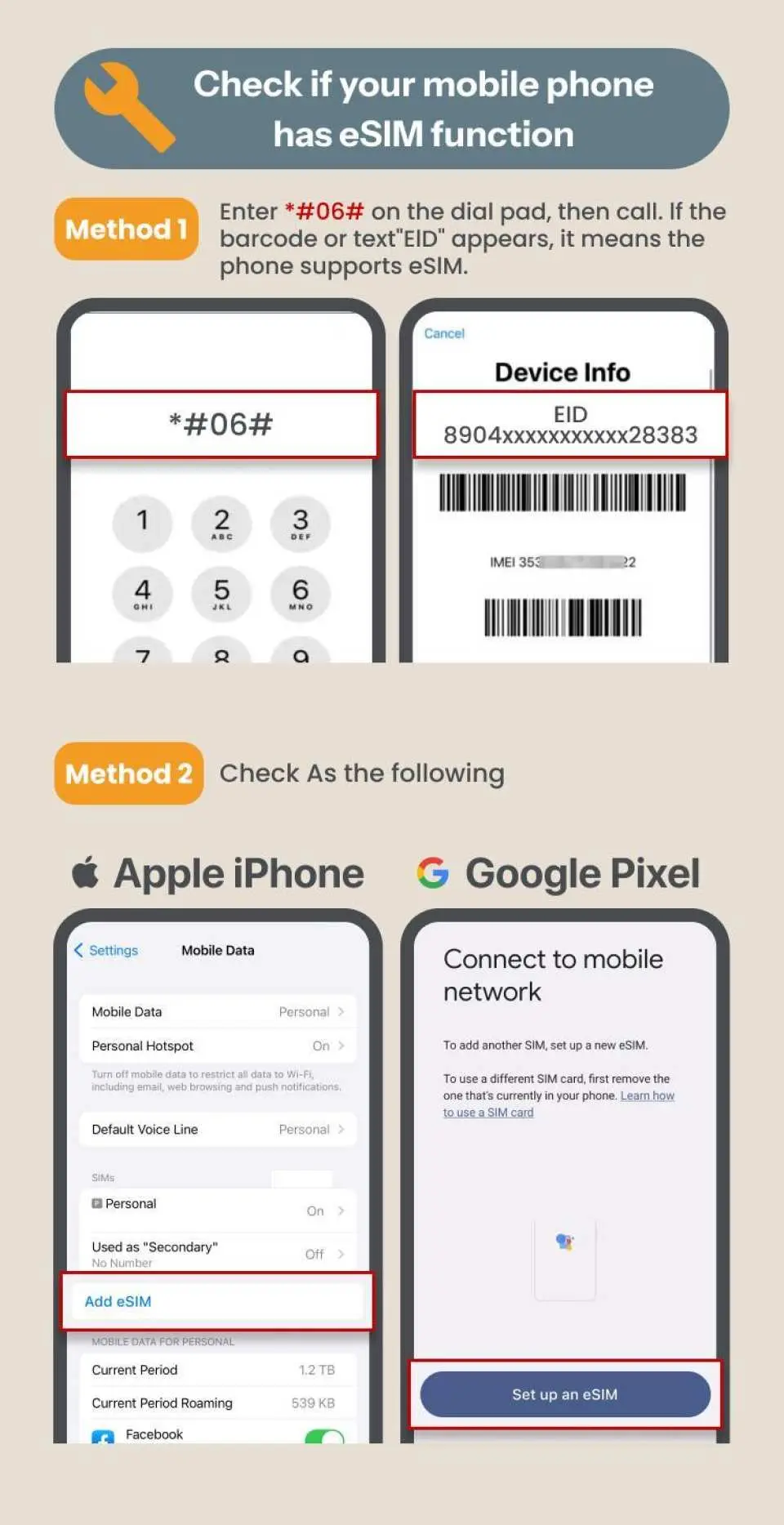
- Once an order is placed, cancellations and refunds are not accepted. Please ensure your phone supports eSIM functionality before purchasing to avoid affecting your usage rights.
- eSIM can be activated within 90 days from the order date. The date selected when placing the order is for system reference only; you can actually use it any day within the validity period according to your schedule.
- Installing an eSIM requires a Wi-Fi or wireless network connection. It is recommended to complete the installation before departure or use the free Wi-Fi at the airport upon arrival.
- Telecom operators in different countries have varying base station distributions, and signal fluctuations may occur due to factors such as signal coverage, terrain, and peak traffic. If you experience unstable connections, we suggest you try moving to a different location or switching to airplane mode to regain a signal. If the problem persists, please feel free to contact our online customer service for assistance.
- For frequently asked questions about eSIM, please refer to the Help Center .
Includes/Excludes
- eSIM
Reminders
Installing an eSIM requires a Wi-Fi or other network connection. The Docomo IIJ plan starts timing immediately after installation, so it is recommended to install it just before use; SoftBank and KDDI plans support pre-installation without affecting the validity period.
The QR code can only be scanned once and cannot be used repeatedly. Do not delete the eSIM after installation to avoid affecting subsequent use.
When installing by scanning the QR code, please print the voucher before departure, or prepare another device that can display the voucher.
To manually add an eSIM, please refer to the eSIM details in the "Pre-trip Reminder," copy and paste the <SM-DP_Address> and <Activation Code>. The <Confirmation Code> is not required.
This eSIM uses native network services from KDDI, Docomo, and SoftBank in Japan, and is not for international roaming. Data roaming does not need to be enabled during use.
Supports hotspot sharing; please refer to the respective solution's documentation for relevant rules and settings.
How to Use
【Docomo IIJ Solution】
This plan requires manual APN configuration. If you encounter issues connecting to the internet or being unable to use hotspot sharing, please enter vmobile.jp in the APN field.
- iPhone: Settings → Mobile Services → Select eSIM → Mobile Data Network → Enter "vmobile.jp" in the APN field → Return
- Android: Settings → Network & Internet → SIM card → Select eSIM → Access Point Names (APN) → Add → Enter "vmobile.jp" → Save
Enter your KKday order number to check your usage.
https://search.t-sim.hk/dataplan/order
* KDDI plans do not currently support usage tracking; usage updates for other plans may be slightly delayed, and some (such as IIJ) will only display usage data after a certain usage threshold has been reached; please contact customer service if you have any questions.
Cancellation Policy
- Once the order has been completed, it cannot be canceled, modified, or refunded
- Due to time zone differences, the confirmed cancellation date is based on the supplier’s local time. Please allow 2–5 business days to process your cancellation request, after which the cancellation fee will be charged according to the product’s cancellation policy. Once your refund request is confirmed, KKday will initiate the refund to your original payment method within 15 days. The actual refund timing depends on your card-issuing bank’s policy.
FAQ
1. What makes a Japan 4G/5G eSIM a distinct choice for internet connectivity in Japan?
This Japan 4G/5G eSIM offers local IP and native lines from major carriers like Docomo, KDDI, and SoftBank, ensuring stable, low-latency connections. Its instant QR code delivery and one-click installation for iOS users eliminate the need for physical SIM cards, making activation quick and hassle-free. It also uniquely allows users to retain their original phone number for calls and SMS while enjoying high-speed data.
2. Which major Japanese telecommunication providers are supported by this Japan 4G/5G eSIM service?
This Japan 4G/5G eSIM service integrates solutions from Japan's three major telecommunication providers: Docomo, KDDI, and SoftBank. This comprehensive selection ensures diverse network options and stable connectivity through local IP and native lines, offering flexibility and reliable performance across various regions in Japan.
3. How much data is generally sufficient for travelers using a Japan 4G/5G eSIM during their trip?
The amount of data needed for a Japan trip varies based on individual usage. For typical travelers, activities like map navigation, social media browsing, messaging, and occasional video streaming can consume a moderate amount of data. Consider your daily habits and the length of your trip to choose a plan that provides ample data volume to ensure uninterrupted connectivity throughout your stay.
4. Can popular messaging applications, such as LINE, be used effectively with a Japan eSIM?
Yes, popular messaging applications like LINE will function seamlessly with your Japan eSIM. This eSIM utilizes local IP and native lines from major Japanese carriers, ensuring a stable and reliable internet connection for all your communication needs, including video calls and sending multimedia. You can stay connected with friends and family without interruption.
5. How does the Japan eSIM simplify the process of getting online compared to traditional physical SIM cards?
The Japan eSIM significantly simplifies getting online by eliminating the need for physical card swaps, SIM pins, or waiting for mail delivery. After ordering, you instantly receive a QR code. For iOS 17.4+ users, installation is a quick one-click process via the app. This means you can activate your internet service immediately upon arrival, saving time and hassle.
6. Who would benefit most from choosing a Japan 4G/5G eSIM for their travel internet needs?
The Japan 4G/5G eSIM is ideal for travelers seeking immediate, hassle-free internet access without physical SIM card changes. It's perfect for those who want to keep their original phone number active for calls and SMS, require stable connections from multiple top carriers, and need robust support for data-intensive activities, including advanced AI applications.
7. What is the streamlined installation process for the Japan 4G/5G eSIM, particularly for iOS users?
For iOS users with devices updated to 17.4 or above, and the latest version of the app, the Japan 4G/5G eSIM offers a one-click installation feature, significantly simplifying the setup. After receiving the QR code instantly upon order confirmation, you can quickly complete the eSIM installation without manual input. Android users whose phones support eSIM can contact customer service for an exclusive one-click installation link.
8. Does the Japan 4G/5G eSIM offer full support for advanced AI applications like ChatGPT?
Yes, the Japan 4G/5G eSIM is designed to support all advanced AI applications, including popular platforms like ChatGPT, Gemini, and Claude. Its use of local IP and native lines from major Japanese carriers provides large bandwidth and a smooth, uncongested internet experience, ensuring optimal performance for all your AI-powered tasks and applications.


