
![[50% Off] Australia & New Zealand eSIM Card | Universal in Australia, New Zealand & New Zealand | Daily/Total Plans | Supports ChatGPT](https://image.kkday.com/v2/image/get/c_fill%2Ch_800%2Cq_55%2Ct_webp%2Cw_2280/s1.kkday.com/product_578557/20260904083224_urSkJ/jpg)
[50% Off] Australia & New Zealand eSIM Card | Universal in Australia, New Zealand & New Zealand | Daily/Total Plans | Supports ChatGPT
- KKday Australia & New Zealand eSIM offers 5G/4G/LTE services and hotspot sharing.
- KKday's New Zealand and Australia eSIM card offers network roaming with New Zealand's TNZ (Spark) and Australia's Telstra. It provides high-speed internet access from New Zealand and Australia's largest telecom providers; simply scan the credentials to install and use the service.
- Some mobile phones from mainland China, Hong Kong, and Macau do not support eSIM functionality. Please check this before purchasing. If you are unable to set up eSIM on your iPhone, please refer to the instructions on the Apple website .
Package Options
What You Can Expect

Please confirm your phone is compatible with eSIM before purchasing. Orders cannot be cancelled or refunded after purchase.

Before enabling eSIM, please update your iOS to the latest version and connect to a stable Wi-Fi network. Older iOS versions and unstable networks are common reasons for eSIM activation failure.

Open your camera to scan for the eSIM, then tap "Action Plan".

The startup time is about 2-3 minutes, and the installation may fail if the startup screen pops up.

You can customize the eSIM name for easy management of multiple eSIMs.
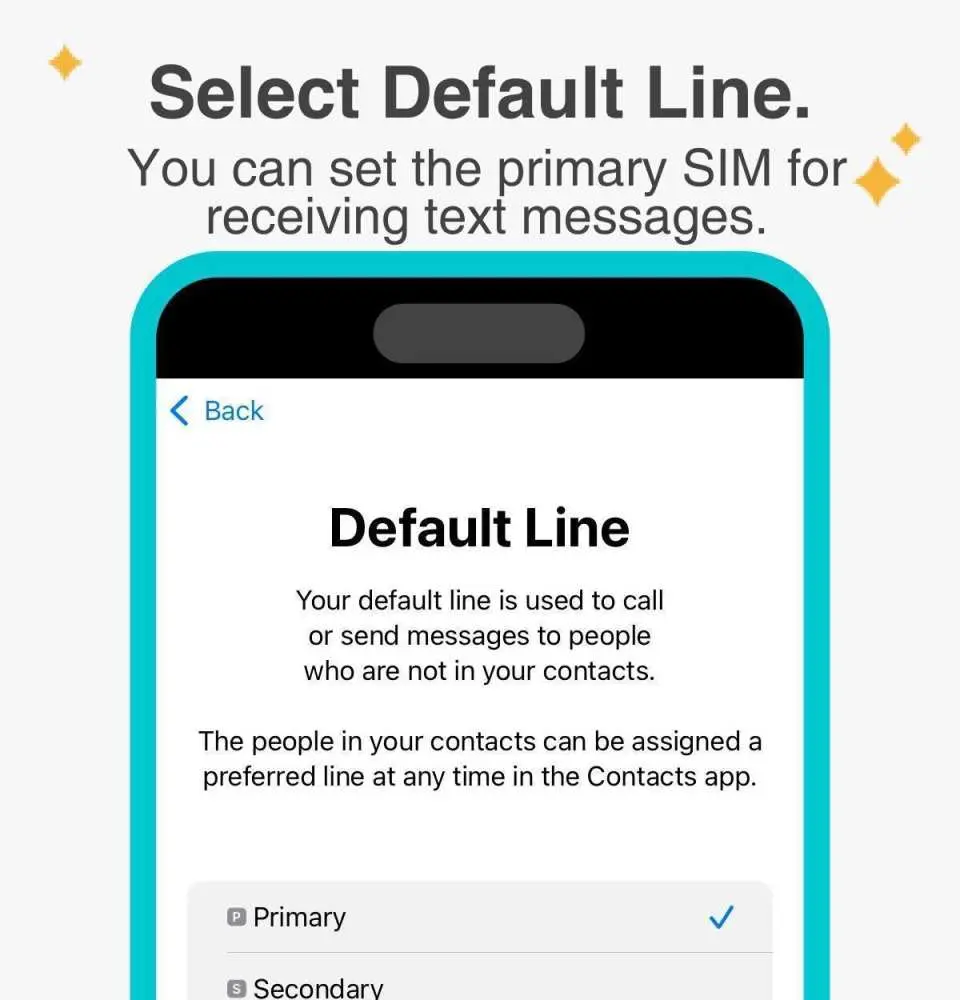
Selecting a preset number allows you to specify your primary mobile number to receive messages (you need to apply to your original telecom operator to activate international roaming for your primary mobile number before you can receive SMS messages).

You can specify the primary phone number to use iMessage and FaceTime features.

Choosing to use eSIM mobile data, "eSIM mobile data is not enabled" is a common reason for being unable to access the internet.
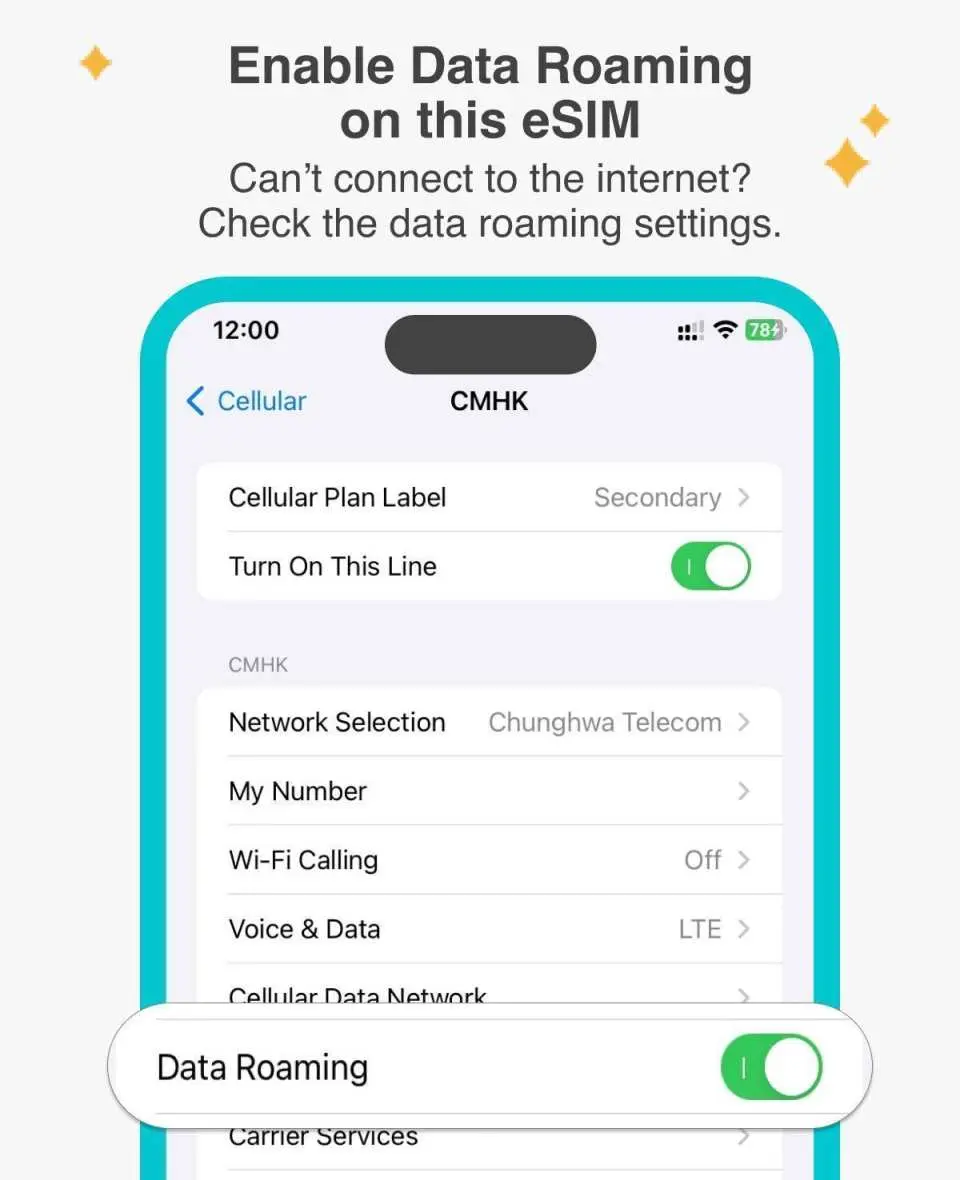
The roaming plan requires data roaming to be enabled.
Purchase Notice
- Orders cannot be cancelled and refunds cannot be issued after an eSIM is sent. Please ensure your phone supports eSIM (iPhones and Android phones sold in China, Hong Kong, and Macau do not support eSIM; most Android phones sold in Taiwan do not support eSIM).
- For Android phones that support eSIM, please refer toFigures 1 and2 for the steps to manually enter the activation code.
- Australia's latest policy requires SIM card and eSIM holders using Australian data plans to check if their phone model is listed on the AMTA website. If the phone is not listed, there may be no service and no internet access. For example, most Apple and Samsung models are supported, but some Chinese brands will have no service. Click this link to confirm your phone model.
Cancellation Policy
- Once the order has been completed, it cannot be canceled, modified, or refunded
- Due to time zone differences, the confirmed cancellation date is based on the supplier’s local time. Please allow 2–5 business days to process your cancellation request, after which the cancellation fee will be charged according to the product’s cancellation policy. Once your refund request is confirmed, KKday will initiate the refund to your original payment method within 15 days. The actual refund timing depends on your card-issuing bank’s policy.
FAQ
1. What devices are compatible with the Australia & New Zealand eSIM?
Most modern smartphones, including iPhone XS/XR and newer models, Google Pixel 3 and newer, and Samsung Galaxy S20 and newer, typically support eSIM. However, it is crucial to verify your specific device model's eSIM support directly with its manufacturer, as compatibility can vary by region and phone version, ensuring it meets the system requirements.
2. What are the common issues encountered when setting up an Australia & New Zealand eSIM?
Common setup issues for an eSIM can include ensuring a stable internet connection during installation, correctly scanning the provided QR code, or verifying your device's software is up to date. Some users, particularly with certain iPhone models, might face specific setup difficulties, in which case consulting the device manufacturer's official support for troubleshooting is advisable.
3. Are there any potential downsides or limitations to using an Australia & New Zealand eSIM?
One significant limitation is device compatibility; certain phone models, especially those from regions like China, Hong Kong, or Macau, may not support eSIM functionality. Additionally, an eSIM is embedded in your device, which can make it less straightforward to transfer your data plan to a different phone compared to swapping a physical SIM card.
4. What network providers and services are utilized by the Australia & New Zealand eSIM?
The Australia & New Zealand eSIM utilizes roaming services from TNZ (Spark) in New Zealand and Telstra in Australia. These are prominent telecommunication providers in their respective countries, ensuring high-speed internet access and reliable connectivity across 5G/4G/LTE networks throughout your travel in the region.
5. Does the Australia & New Zealand eSIM support hotspot sharing and 5G/4G/LTE speeds?
Yes, the Australia & New Zealand eSIM fully supports hotspot sharing, enabling you to share your internet connection with other devices. It also provides high-speed 5G/4G/LTE internet service, ensuring fast and stable connectivity for all your online activities while traveling across Australia and New Zealand.
6. How can travelers verify if their phone, particularly from certain regions, supports the Australia & New Zealand eSIM?
Travelers should verify eSIM compatibility by checking their device's settings or consulting the manufacturer's official website. It's particularly important to note that some phone models sold in regions like China, Hong Kong, or Macau may have limitations regarding eSIM functionality. Always confirm your specific device's capabilities before purchasing an eSIM.
7. What is the difference between daily and total data plans for the Australia & New Zealand eSIM?
Daily data plans typically offer a set amount of high-speed data that refreshes each day for the duration of your plan, often with reduced speeds after the daily limit is reached. Total data plans provide a single, cumulative amount of high-speed data for the entire validity period, which depletes as you use it. Your choice depends on your specific data consumption habits.
8. What is the installation and activation process for the Australia & New Zealand eSIM?
After purchasing the Australia & New Zealand eSIM, you will receive a digital voucher. The installation process primarily involves scanning a QR code provided on this voucher using your device's camera or through your phone's network settings. Once scanned, follow the on-screen prompts to set up and activate your eSIM profile, connecting you to the local network.


