
![[50% OFF] Vietnam 5G Data eSIM: 1-30 Days | Vinaphone/Viettel Native Network](https://image.kkday.com/v2/image/get/c_fill%2Ch_800%2Cq_55%2Ct_webp%2Cw_2280/s1.kkday.com/product_531447/20260609100205_OEH6A/jpg)
[50% OFF] Vietnam 5G Data eSIM: 1-30 Days | Vinaphone/Viettel Native Network
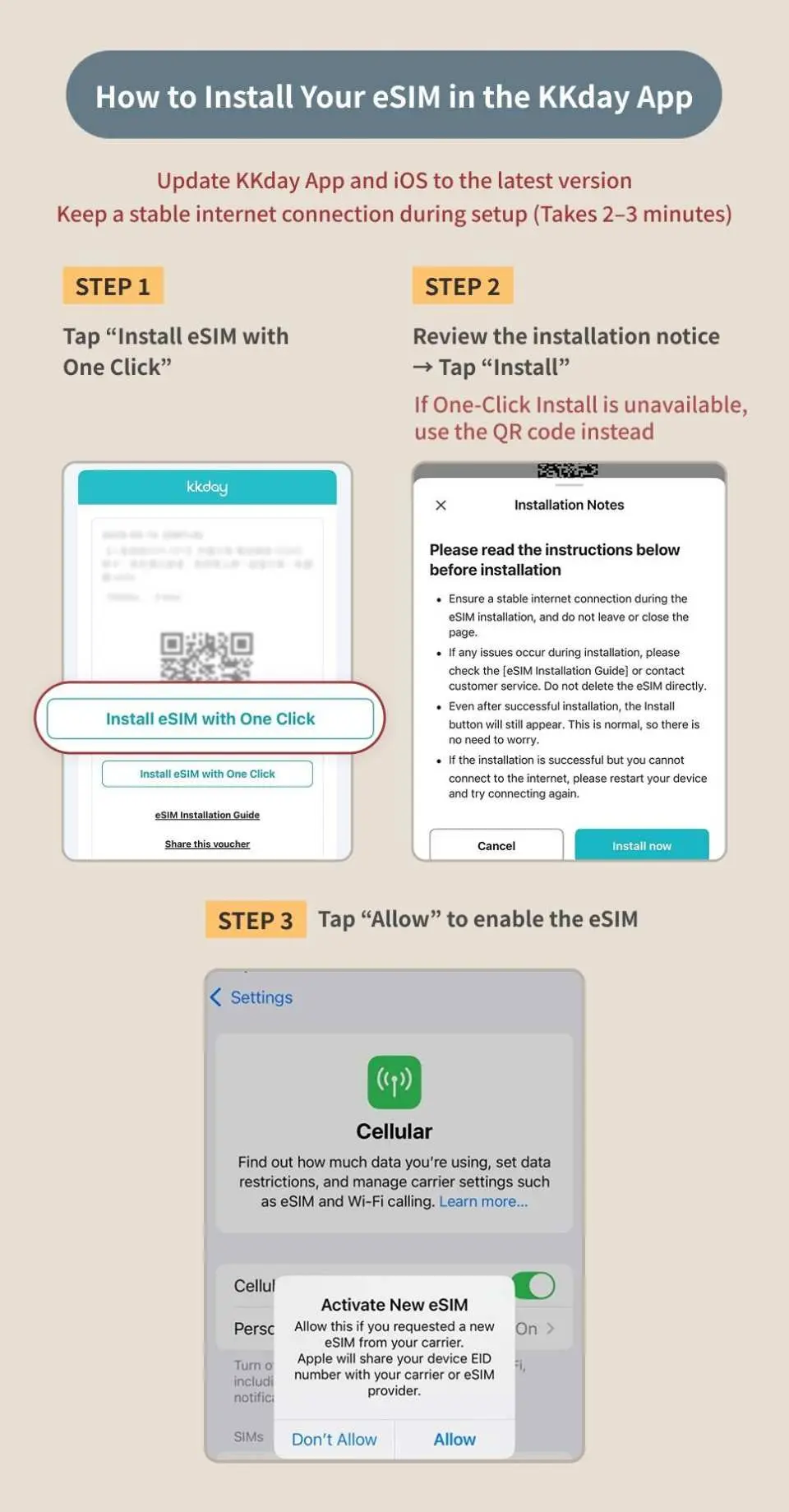
- Support iOS one-click installation: Update to iOS 17.4 or newer to install the eSIM in one click!
- Connect to Vinaphone/Viettel local network for stable signal and low latency
- Book and get online immediately! Get the eSIM QR code right after booking, no wait, no hassle
- Keep your original phone number, never miss important calls and texts
Package Options
Product Info
The content of this product is provided by machine translation and may not reflect the actual information, please take this into consideration before booking.
- eSIM (virtual SIM card) allows you to bind your eSIM to your phone by simply scanning the QR code on your voucher. Enjoy local internet access with fast, convenient, environmentally friendly, and zero consumables. It's your best choice for travel internet access.
- Please make sure that your phone has eSIM function and there are no SIM card restrictions. No refunds or cancellations will be accepted after placing an order for any reason.



SIM Card Specifications
| Data Usage Specifications | Unlimited data, 500MB, 1GB, 2GB, 3GB, 5GB, 10GB, 20GB, 30GB |
| Transmission Specifications | 5G/4G |
| Signal Coverage Area | Vietnam |
| Mobile Carrier | Vinaphone / Viettel |
| Supported Sizes | eSIM |
| Hotspot Sharing | Available |
| Supported Frequencies(4G) | B1(2100 MHz), B3(1800 MHz), B8(900 MHz), B28(700 APT) |
| Supported Frequencies(5G) | n7(2600 MHz) |
| Top-Up Availability | Top-up unavailable |
| Not Supported | SIM-locked device, Carrier-customized device, Pocket WiFi |
| Network Type | Local |
Purchase Notice
- Once an order is placed, cancellations and refunds are not possible. Please ensure your phone supports eSIM before purchasing
- eSIM can be activated within 30 days from the order date. The date selected when placing the order is for system reference only; you can use the eSIM any day within the validity period
- Wi-Fi/Mobile data is required for eSIM installation. It is recommended to complete the installation before departure or use the free Wi-Fi at the airport upon arrival
- Different countries have different base stations, signal coverage, terrain, and data traffic. If you experience unstable connections, we suggest you try moving to a different location or switching on and off airplane mode to regain a signal. If the situation persists, please contact online customer service for assistance
- eSIM FAQs
Includes/Excludes
- eSIM
Reminders
eSIMs must be activated within 30 days of issuance. It is recommended to activate them immediately upon arrival to ensure proper use. Or install in advance and turn on the eSIM after arriving at the destination
If you need to manually add an eSIM, please refer to the detailed information in the "Pre-departure Reminder" and copy and paste the SM-DP Address and Activation Code into the designated box. You do not need to enter the confirmation code.
If you install an eSIM before arriving at your destination and see "Activating" or "Unable to activate eSIM," do not delete the eSIM. Instead, temporarily disable the eSIM and then re-enable it after you arrive.
If an error message appears when scanning the QR Code, it does not mean that the eSIM has expired. Please go to "Settings → Mobile Services" to confirm whether another SIM card option appears.
No refund will be provided if some applications are unavailable due to device compatibility or regional restrictions; no additional compensation will be provided, including roaming fees, transportation fees, etc.
The Viettel eSIM QR Code is for single-use installation only. After installation, please do not delete the eSIM. If it becomes invalid due to deleting the eSIM, resetting the phone, or changing devices, it cannot be reinstalled or reissued.
How to check your data use:
Vinaphone: Enter your order number starting with 26KK on https://search.t-sim.hk/dataplan/order
Viettel: Send "KTTK" to 191
How to Use
Installing an eSIM
- iPhone: Settings → Mobile Services → Add eSIM
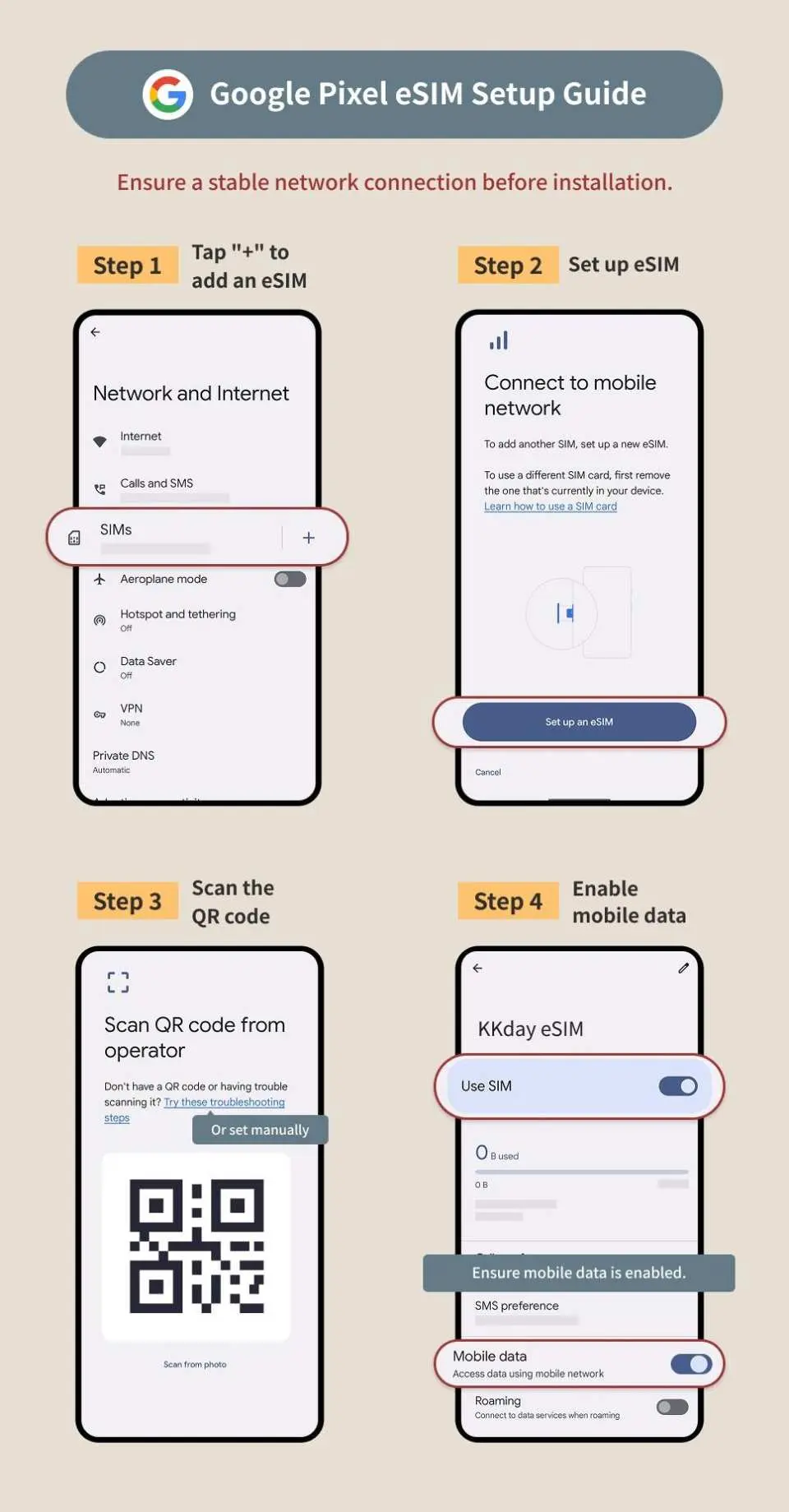
- Android: Settings → Network & Internet → SIM Card → Add eSIM (the operation path may vary slightly depending on the brand)
Using eSIM
- Turn off the mobile data of the original SIM card, confirm that the eSIM is enabled and set as the default card for mobile data
- If you cannot access the Internet or share the hotspot, please refer to the APN settings and restart your phone.
- If the connection is unstable or the speed is slow, it is recommended to turn on and off airplane mode, or turn off automatic network selection and manually select a supported telecom operator.
How to check your data use:
- Vinaphone: Go to this page and enter your order number starting with 26KK
- Viettel: Send "KTTK" to 191
Cancellation Policy
- Once the order has been completed, it cannot be canceled, modified, or refunded
- Due to time zone differences, the confirmed cancellation date is based on the supplier’s local time. Please allow 2–5 business days to process your cancellation request, after which the cancellation fee will be charged according to the product’s cancellation policy. Once your refund request is confirmed, KKday will initiate the refund to your original payment method within 15 days. The actual refund timing depends on your card-issuing bank’s policy.
FAQ
1. What are the advantages of choosing an eSIM over a physical SIM card for Vietnam travel?
An eSIM offers several conveniences for travelers. You can activate it instantly by scanning a QR code, eliminating the need to search for a physical SIM card upon arrival. This means no fumbling with card ejectors or worrying about accidentally losing your original SIM. It also provides flexibility, allowing you to manage multiple plans on a single device, ideal for international travel.
2. Is using an eSIM permitted for travelers in Vietnam, and what devices are compatible with the Vietnam 5G eSIM?
Yes, eSIM technology is widely permitted and supported for travelers in Vietnam. The Vietnam 5G eSIM is compatible with most modern smartphones and devices that support eSIM functionality. For iOS users, an update to the latest iOS App version and iOS 17.4 or above allows for one-click installation, simplifying the setup process significantly.
3. Does the Vietnam 5G eSIM provide access to 5G networks throughout Vietnam?
Yes, the Vietnam 5G eSIM is designed to leverage Vietnam's 5G network infrastructure. It operates on the local native Vinaphone network, which ensures stable signal and ultra-high bandwidth in areas where 5G coverage is available. This allows for a fast and reliable internet experience while traveling across Vietnam.
4. Can the Vietnam 5G eSIM be used exclusively for data, without voice or SMS services?
Yes, the Vietnam 5G eSIM functions primarily as a data-only solution. It provides seamless internet access for browsing, streaming, and using various applications. You can use internet-based calling and messaging apps like WhatsApp or Line without issues, relying solely on your data connection for communication needs.
5. How does the Vietnam 5G eSIM provide a seamless internet experience for travelers?
The Vietnam 5G eSIM offers a seamless experience through instant activation and a stable local network. After purchase, you receive a voucher immediately and can install it via QR code, or even one-click installation for compatible iOS devices. It operates on the Vinaphone native network, ensuring reliable connectivity and low latency, so you can enjoy uninterrupted internet access from the moment you arrive.
6. What kind of network coverage and stability can I expect with the Vietnam 5G eSIM?
The Vietnam 5G eSIM operates on the local Vinaphone native network, known for its extensive coverage and stability throughout Vietnam. Travelers can expect a reliable signal and low latency, enabling smooth browsing, streaming, and communication. This dedicated local line minimizes connectivity issues, providing a consistent internet experience.
7. What kind of data plans are available with the Vietnam 5G eSIM, and how flexible are they?
The Vietnam 5G eSIM offers flexible data plans tailored to various travel needs. You can choose from total data plans, daily data plans, or unlimited data plans. These options are available for durations ranging from 1 to 30 days, allowing travelers to select a plan that best fits their trip length and data consumption habits.
8. Can I use popular apps like ChatGPT and TikTok with the Vietnam 5G eSIM without issues?
Yes, the Vietnam 5G eSIM provides stable support for a wide range of popular applications. You can confidently use apps like ChatGPT, TikTok, social media platforms, navigation tools, and streaming services without encountering connectivity issues. The robust Vinaphone native network ensures smooth performance for all your digital needs.


