

[20% Off% Off] Malaysia WiFi Switch Rental | Daily High-Speed/Unlimited 4G Internet | Pick-up at China/Hong Kong Airports
- The WiFi device is easy to operate, making internet access effortless and hassle-free!
- Supports up to 5 people sharing, making it the top choice for family trips and outings with friends and relatives!
- Pick up at Shanghai and Hong Kong International Airports – quick and convenient!
- Uroaming offers services in over 120 countries worldwide, with affordable prices and stable connections, making it your top choice for internet access abroad!
Package Options
Product Info
The content of this product is provided by machine translation and may not reflect the actual information, please take this into consideration before booking.
-Place of Collection-
- Hong Kong International Airport (HKG) Terminal 1: Counter A16, Area A, Arrival Hall, Level 5 (Returnable)
Business hours: 07:00 - 23:00 daily
- Shanghai Pudong International Airport (PVG) T1: (After customs and security check) 3rd floor, opposite security checkpoint 22 in the international departure restricted area, "iTravel" service counter 1B-W1 (self-pickup only)
Business hours: Daily 00:00 - 23:59
- Shanghai Pudong International Airport (PVG) T1: (Outside the security checkpoint) 1D-W2 "iTravel" service counter opposite Gate 9 in the International Arrivals Public Area on the 1st floor (pickup and return available).
Business hours: Daily 00:00 - 23:59
- Shanghai Pudong International Airport (PVG) T2: (After customs and security check) 3rd floor, opposite gate D80 in the international departure restricted area, "iTravel" service counter 2B-W2 (self-pickup only)
Business hours: Daily 00:00 - 23:59




Purchase Notice
- You can connect up to 5 devices, and the connected devices will share the bandwidth. The more connected devices are, the slower the network speed will be.
- Rental charging method: charged on a daily basis, and based on the rental time on the day of pick-up and return of the device.
- If you pick up the device before 20:00 in the evening, it will be counted as one day, but if you take an early morning flight back and return the device before 07:00, it will not be counted as one day.
- Deposit HKD$500/device, payable at the airport counter when picking up the device. You can pay by cash, credit card, or Payme, and the money will be refunded after the device is returned. (Cash and Payme will be refunded upon return, credit card is frozen by pre-authorization without deduction, the bank will automatically release it within 30 days)
- If the device is lost, the compensation price is as follows: WIFI device HKD$500, USB data cable HKD$10, plug HKD$20, protective case HKD$20
- Late billing: If the device is returned within 2 days after the expiration date, no additional fees will be charged. If the device is returned within 2 days after the expiration date, a device occupation fee of HKD$10/day/device will be charged.
- The quality of Internet access may be affected by factors such as location, terrain, building shielding, number of users and weather.
Includes/Excludes
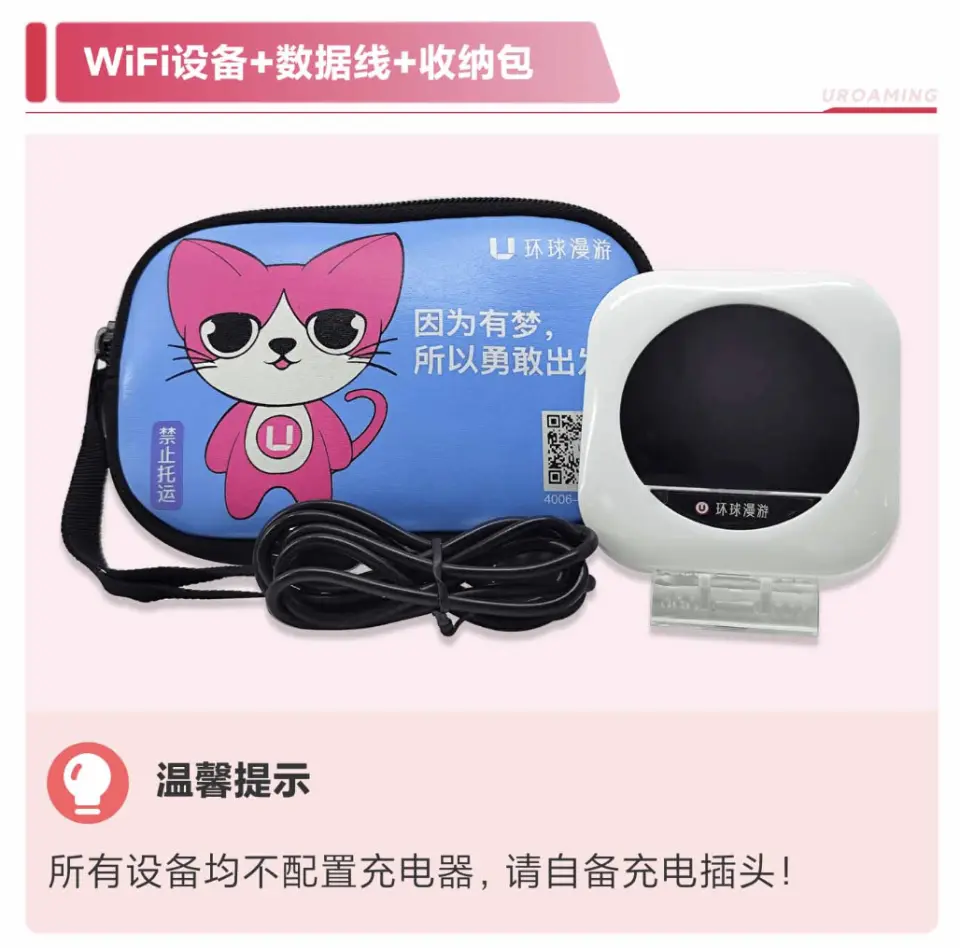
- WIFI machine rental fee
- USB cable
- Protective bag
- Other expenses not mentioned above
Equipment Damage & Loss Fee Policy
WiFi Equipment Compensation Rules
The whole set is lost/damaged/the waterproof sticker turns red: HKD$500
Damage to the casing/screen: HKD$200
Battery lost/damaged: HKD$100
Back cover lost/damaged: HKD$100
Storage bag lost/damaged: HKD$20
USB cable lost/damaged: HKD$10
Plug lost/damaged: HKD$20 (applicable if rented)
Overdue billing
If the device is returned within 2 days after the expiration date, no additional charges will be made. If the device is returned within 2 days after the expiration date, a device occupation fee of HKD$10/day/device will be charged.
Reminders
When picking up the item, please provide your order number and phone number so that the counter can verify the shipment.
Deposit HKD$500/device, payable at the airport counter when picking up the device. You can pay by cash, credit card, or Payme, and the money will be refunded after the device is returned. (Cash and Payme will be refunded upon return, credit card is frozen by pre-authorization without deduction, the bank will automatically release it within 30 days)
The style and model of the WiFi device will be determined based on on-site pick-up and no specific model will be specified.
WiFi devices cannot be checked in, please carry them with you.
This item cannot be cancelled, refunded or changed.
If you need to extend the use time of the equipment, please contact customer service to renew the lease at least 1 day before the end of the order.
Since communication quality is affected by different usage environments, network speed will vary depending on factors such as terrain, climate, building shielding, number of users and location. Please be aware of this.
Pickup/Return Point
Hong Kong International Airport (HKG) T1
Counter A16, Arrival Hall, 5/F

Monday 07:00 - 23:00
Tuesday 07:00 - 23:00
Wednesday 07:00 - 23:00
Thursday 07:00 - 23:00
Friday 07:00 - 23:00
Saturday 07:00 - 23:00
Sunday 07:00 - 23:00

Shanghai Pudong International Airport (PVG) T1
(After customs and security check) 3rd floor, International Departure Restricted Area, opposite Security Checkpoint 22, 1B-W1 "iTravel" service counter (self-pickup only)Monday 00:00 - 23:59
Tuesday 00:00 - 23:59
Wednesday 00:00 - 23:59
Thursday 00:00 - 23:59
Friday 00:00 - 23:59
Saturday 00:00 - 23:59
Sunday 00:00 - 23:59
Shanghai Pudong International Airport (PVG) T1
(Outside the security checkpoint) 1st Floor, International Arrivals Public Area, opposite Gate 9, 1D-W2 "iTravel" service counter (pickup and return available)Monday 00:00 - 23:59
Tuesday 00:00 - 23:59
Wednesday 00:00 - 23:59
Thursday 00:00 - 23:59
Friday 00:00 - 23:59
Saturday 00:00 - 23:59
Sunday 00:00 - 23:59
Shanghai Pudong International Airport (PVG) T2
(After customs and security check) 3rd floor, International Departure Restricted Area, opposite Gate D80, 2B-W2 "iTravel" service counter (self-pickup only)Monday 00:00 - 23:59
Tuesday 00:00 - 23:59
Wednesday 00:00 - 23:59
Thursday 00:00 - 23:59
Friday 00:00 - 23:59
Saturday 00:00 - 23:59
Sunday 00:00 - 23:59
How to Redeem Your Voucher
How to Use Your Voucher
- Please present the e-voucher on-site
Voucher Redemption Period
- The voucher must be redeemed on the selected date and within operating hours; Invalid after expiration
Validity Period
- The voucher must be used on the selected date and within operating hours; Invalid after expiration
Cancellation Policy
- Once the order has been completed, it cannot be canceled, modified, or refunded
- Due to time zone differences, the confirmed cancellation date is based on the supplier’s local time. Please allow 2–5 business days to process your cancellation request, after which the cancellation fee will be charged according to the product’s cancellation policy. Once your refund request is confirmed, KKday will initiate the refund to your original payment method within 15 days. The actual refund timing depends on your card-issuing bank’s policy.
FAQ
1. Are there any daily data usage limits for the Malaysia WiFi Sharing Device's 4G high-speed connection?
The Malaysia WiFi Sharing Device operates without fixed daily data usage limits for its 4G high-speed connection. This rental ensures you have continuous internet access for all your travel needs, from browsing and social media to maps and video calls, without worrying about daily allowances. Enjoy seamless connectivity throughout your stay in Malaysia.
2. Which network carriers does the Malaysia WiFi Sharing Device use to provide 4G high-speed internet in Malaysia?
The Malaysia WiFi Sharing Device operates through the Uroaming service, which partners with leading local network carriers in Malaysia. This ensures wide 4G high-speed internet coverage and reliable connectivity across various regions, from urban centers to popular tourist destinations, for a stable online experience.
3. How many devices or users can share the Malaysia WiFi Sharing Device simultaneously?
The Malaysia WiFi Sharing Device is designed for convenience and group travel, supporting connectivity for up to 5 devices or users simultaneously. This allows families or groups of friends to share one device, ensuring everyone stays connected and can access the internet for navigation, communication, and sharing travel moments.
4. How easy is it to operate the Malaysia WiFi Sharing Device upon arrival?
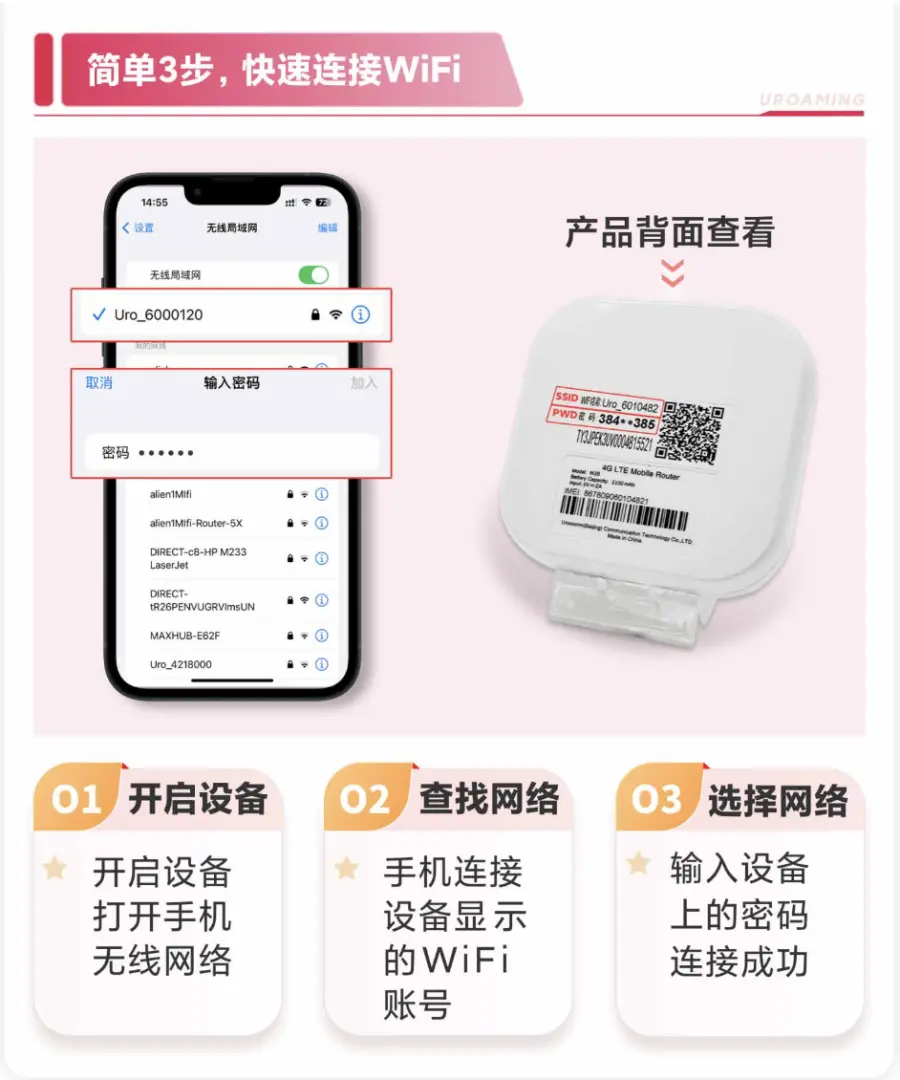
Operating the Malaysia WiFi Sharing Device is very straightforward. Simply turn on the device, locate its WiFi network on your phone or other gadgets, and enter the password provided with the rental. There's no complex setup or configuration required, allowing you to connect to 4G high-speed internet within minutes of arriving in Malaysia.
5. Where can travelers pick up the Malaysia WiFi Sharing Device at Hong Kong International Airport?
Travelers can conveniently pick up their Malaysia WiFi Sharing Device directly at Hong Kong International Airport. Typically, pickup points are located at designated counters within the airport, often near arrival halls or specific service zones. It's recommended to confirm the exact counter location and operating hours specified in your booking confirmation for a smooth collection process.
6. What are the available pickup locations for the Malaysia WiFi Sharing Device in mainland China?
For travelers flying from mainland China, the Malaysia WiFi Sharing Device can be picked up at several major airports. These include Beijing Capital Airport, Shanghai Airport, and Zhoushuizi Airport. Each location will have a designated counter or service point, and you should refer to your booking details for the precise pickup instructions and operational timings.
7. What kind of network coverage and connection stability can I expect from the Malaysia WiFi Sharing Device across Malaysia?
The Malaysia WiFi Sharing Device is designed to provide extensive 4G high-speed network coverage throughout popular tourist areas and major cities in Malaysia. Thanks to partnerships with reliable local carriers, you can expect stable connections for navigation, social media, video calls, and web browsing, ensuring consistent internet access during your travels.
Get Help


