

[20% Off% Off] Japan WiFi Switch Rental | Daily High-Speed/Unlimited 4G Internet | Pick-up at China/Hong Kong Airports
- The WiFi device is easy to operate, making internet access effortless and hassle-free!
- Supports up to 5 people sharing the internet, making it the top choice for family trips and outings with friends and relatives!
- Pick up at Shanghai and Hong Kong International Airports – quick and convenient!
- Uroaming offers services in over 120 countries worldwide, with affordable prices and stable connections, making it your top choice for internet access abroad!
Package Options
Product Info
The content of this product is provided by machine translation and may not reflect the actual information, please take this into consideration before booking.
-Place of Collection-
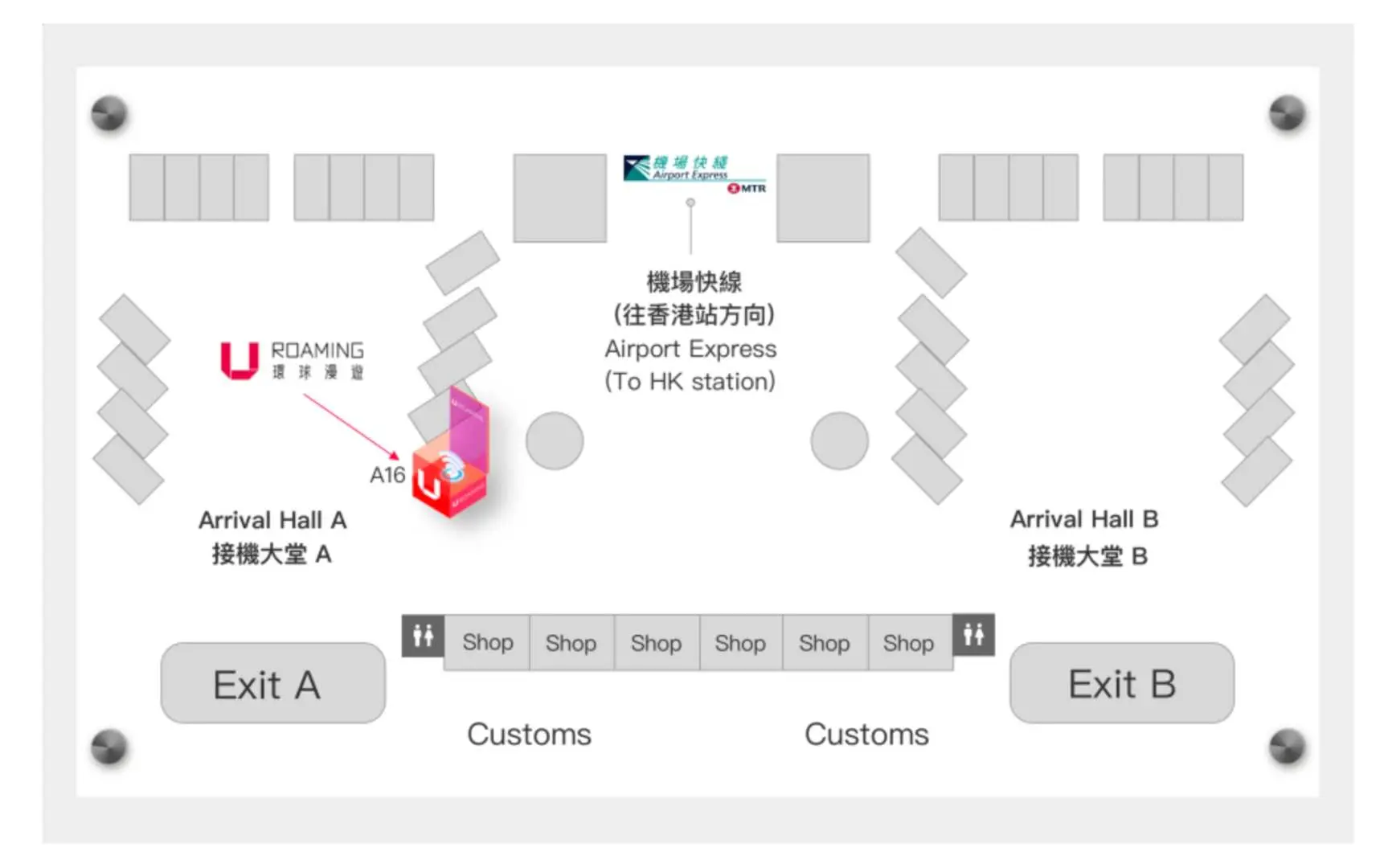
- Hong Kong International Airport (HKG) Terminal 1: Arrival Hall, Area A, Counter A16 (refundable)
Business hours: 07:00 - 23:00 daily
- Shanghai Pudong International Airport (PVG) T1: (After customs and security) 3rd floor, opposite security checkpoint 22 in the international departure restricted area, "iTravel" service counter 1B-W1 (self-pickup only)
Business hours: Daily 00:00 - 23:59
- Shanghai Pudong International Airport (PVG) T1: (Outside the security checkpoint) 1D-W2 "iTravel" service counter opposite Gate 9 in the International Arrivals Public Area on the 1st floor (pickup and return available).
Business hours: Daily 00:00 - 23:59
- Shanghai Pudong International Airport (PVG) T2: (After customs and security check) 3rd floor, opposite gate D80 in the international departure restricted area, "iTravel" service counter 2B-W2 (self-pickup only)
Business hours: Daily 00:00 - 23:59


Purchase Notice
- You can connect up to 5 devices, and the connected devices will share the bandwidth. The more connected devices are, the slower the network speed will be.
- Rental charging method: charged on a daily basis, and based on the rental time on the day of pick-up and return of the device.
- If you pick up the device before 20:00 in the evening, it will be counted as one day, but if you take an early morning flight back home and return the device before 07:00, it will not be counted as one day.
- Deposit HKD$500/device, payable at the airport counter when picking up the device. You can pay by cash, credit card, or Payme, and the money will be refunded after the device is returned. (Cash and Payme will be refunded upon return, credit card is frozen by pre-authorization without deduction, the bank will automatically release it within 30 days)
- If the device is lost, the compensation price is as follows: WIFI device HKD$500, USB data cable HKD$10, plug HKD$20, protective case HKD$20
- Late billing: If the device is returned within 2 days after the expiration date, no additional fees will be charged. If the device is returned within 2 days after the expiration date, a device occupation fee of HKD$10/day/device will be charged.
- The quality of Internet access may be affected by factors such as location, terrain, building shielding, number of users and weather.
Includes/Excludes
- WIFI machine rental fee
- USB cable
- Protective bag
- Other expenses not mentioned above
Equipment Damage & Loss Fee Policy
WiFi Equipment Compensation Rules
The whole set is lost/damaged/the waterproof sticker turns red: HKD$500
Damaged case/screen: HKD$200
Battery lost/damaged: HKD$100
Back cover lost/damaged: HKD$100
Storage bag lost/damaged: HKD$20
USB cable lost/damaged: HKD$10
Plug lost/damaged: HKD$20 (applicable if rented)
Overdue billing
If the device is returned within 2 days after the expiration date, no additional charges will be made. If the device is returned within 2 days after the expiration date, a device occupation fee of HKD$10/day/device will be charged.
Reminders
When picking up the item, please provide your order number and phone number so that the counter can verify the shipment.
Deposit HKD$500/device, payable at the airport counter when picking up the device. You can pay by cash, credit card, or Payme, and the money will be refunded after the device is returned. (Cash and Payme will be refunded upon return, credit card is frozen by pre-authorization without deduction, the bank will automatically release it within 30 days)
The style and model of the WiFi device will be determined based on on-site pick-up and no specific model will be specified.
WiFi devices cannot be checked in, please carry them with you.
This item cannot be cancelled, refunded or changed.
If you need to extend the use time of the equipment, please contact customer service to renew the lease at least 1 day before the end of the order.
Since communication quality is affected by different usage environments, network speed will vary depending on factors such as terrain, climate, building shielding, number of users and location. Please be aware of this.
Pickup/Return Point
Hong Kong International Airport (HKG) T1
Counter A16, Arrival Hall, 5/F

Monday 07:00 - 23:00
Tuesday 07:00 - 23:00
Wednesday 07:00 - 23:00
Thursday 07:00 - 23:00
Friday 07:00 - 23:00
Saturday 07:00 - 23:00
Sunday 07:00 - 23:00
Shanghai Pudong International Airport (PVG) T1
(After customs and security check) 3rd floor, International Departure Restricted Area, opposite Security Checkpoint 22, 1B-W1 "iTravel" service counter (self-pickup only)Monday 00:00 - 23:59
Tuesday 00:00 - 23:59
Wednesday 00:00 - 23:59
Thursday 00:00 - 23:59
Friday 00:00 - 23:59
Saturday 00:00 - 23:59
Sunday 00:00 - 23:59
Shanghai Pudong International Airport (PVG) T1
(Outside the security checkpoint) 1st Floor, International Arrivals Public Area, opposite Gate 9, 1D-W2 "iTravel" service counter (pickup and return available)Monday 00:00 - 23:59
Tuesday 00:00 - 23:59
Wednesday 00:00 - 23:59
Thursday 00:00 - 23:59
Friday 00:00 - 23:59
Saturday 00:00 - 23:59
Sunday 00:00 - 23:59
Shanghai Pudong International Airport (PVG) T2
(After customs and security check) 3rd floor, International Departure Restricted Area, opposite Gate D80, 2B-W2 "iTravel" service counter (self-pickup only)Monday 00:00 - 23:59
Tuesday 00:00 - 23:59
Wednesday 00:00 - 23:59
Thursday 00:00 - 23:59
Friday 00:00 - 23:59
Saturday 00:00 - 23:59
Sunday 00:00 - 23:59
How to Redeem Your Voucher
How to Use Your Voucher
- Please present the e-voucher on-site
Voucher Redemption Period
- The voucher must be redeemed on the selected date and within operating hours; Invalid after expiration
Validity Period
- The voucher must be used on the selected date and within operating hours; Invalid after expiration
Cancellation Policy
- Once the order has been completed, it cannot be canceled, modified, or refunded
- Due to time zone differences, the confirmed cancellation date is based on the supplier’s local time. Please allow 2–5 business days to process your cancellation request, after which the cancellation fee will be charged according to the product’s cancellation policy. Once your refund request is confirmed, KKday will initiate the refund to your original payment method within 15 days. The actual refund timing depends on your card-issuing bank’s policy.
FAQ
1. When traveling in Japan, how should I assess suitable Wi-Fi router data plans?
To assess a data plan, consider your usage habits. If primarily for map navigation, social media check-ins, and basic messaging, 500MB to 1GB of high-speed data per day should suffice. If you frequently stream videos, make video calls, or need to work, it's recommended to choose a plan with a higher daily high-speed data cap or unlimited data to ensure a smooth experience and avoid travel disruptions due to data limits.
2. What are the key quality and performance indicators to consider when choosing a Wi-Fi router for Japan?
When selecting a router, consider the following indicators: first is connection stability, ensuring stable internet access in various environments. Second is network speed; 4G high-speed internet provides a better user experience. Next is battery life, which is crucial for an entire day's itinerary. Additionally, pay attention to the ease of device operation and customer support to address any potential issues.
3. What are the main usage differences between free Wi-Fi hotspots and renting a Wi-Fi router while traveling in Japan?
Free Wi-Fi hotspots are usually found in specific public places like airports, stations, and cafes. Their connection quality and security vary, and their coverage is limited, making continuous use difficult while on the move. Renting a Wi-Fi router provides a private, stable internet environment with wide signal coverage. It's portable and supports multiple simultaneous connections, allowing you to connect securely anywhere, greatly enhancing travel convenience.
4. After booking a Wi-Fi router for Japan, where can I typically pick up and return the device?
After booking, you can typically pick up and return Wi-Fi routers at designated airport counters in your departure location, such as Beijing Capital, Shanghai, Zhoushuizi Airports in China, and Hong Kong International Airport, offering fast and convenient service. This allows you to have internet ready before arriving in Japan and easily return it on your way back, eliminating the hassle of finding extra locations. By booking through KKday, you can easily choose the most convenient pickup and return locations.
5. How many people can typically share the internet connection on a Japanese Wi-Fi router, and does this affect connection quality?
Most Japanese Wi-Fi routers are designed to support up to 5 people sharing the internet connection simultaneously. Within a reasonable number of users, this typically does not significantly impact connection quality. However, if all users engage in high-bandwidth activities (like watching high-definition videos or downloading large files) concurrently, you might experience a slight decrease in network speed. It's recommended to manage internet usage reasonably to maintain the best experience.
6. How is the signal coverage and connection stability when using a Wi-Fi router in different regions of Japan?
High-quality Japanese Wi-Fi routers typically offer broad signal coverage, encompassing major cities, tourist attractions, and even some remote areas, ensuring stable connectivity for most of your trip. Service providers partner with local telecom operators to ensure network quality comparable to local mobile networks. However, signal may still be limited in extreme mountainous areas or underground facilities, which is a common phenomenon.
7. Is operating a rented Japanese Wi-Fi router complicated, and is it user-friendly for those unfamiliar with electronics?
Rented Wi-Fi routers are generally designed for simple operation, making them very suitable for users unfamiliar with electronic devices. The device typically only requires a one-button power-on. Then, connect your phone or tablet to the Wi-Fi network name provided by the device and enter the password. The straightforward operating process allows you to get started quickly and enjoy internet service with ease, without complex setup, reducing travel inconvenience.
8. Besides speed and data, what other hidden service details should I pay attention to when renting a Wi-Fi router for Japan?
In addition to speed and data, you should note the battery life, whether a spare battery is provided, charging methods (USB-C or Micro-USB), compensation policies for device damage or loss, and the language and availability of customer support. Choosing a brand that offers stable and comprehensive service will make your trip to Japan more secure and smooth.


