
Xplori Tunisia 4G eSIM | Daily & Unlimited Data Plans
- Supports iOS one-click installation: Update to the latest version of the iOS App and iOS 17.4 or above to install eSIM with one click in the KKday App.
- Experience seamless, high-speed 4G/5G connectivity with no need to swap SIM cards—just activate your eSIM data plan directly from your email
- Stay connected throughout your journey on the most reliable local network
- Enjoy peace of mind with our satisfaction guarantee: if you're not completely satisfied with the product, contact us for assistance or a refund
Package options
Product Info
Booking Guidelines:
- This is a Data-only eSIM. There is generally no phone number (except where expressly mentioned). Calls and texts are still possible via messenger services (WhatsApp, FB etc.)
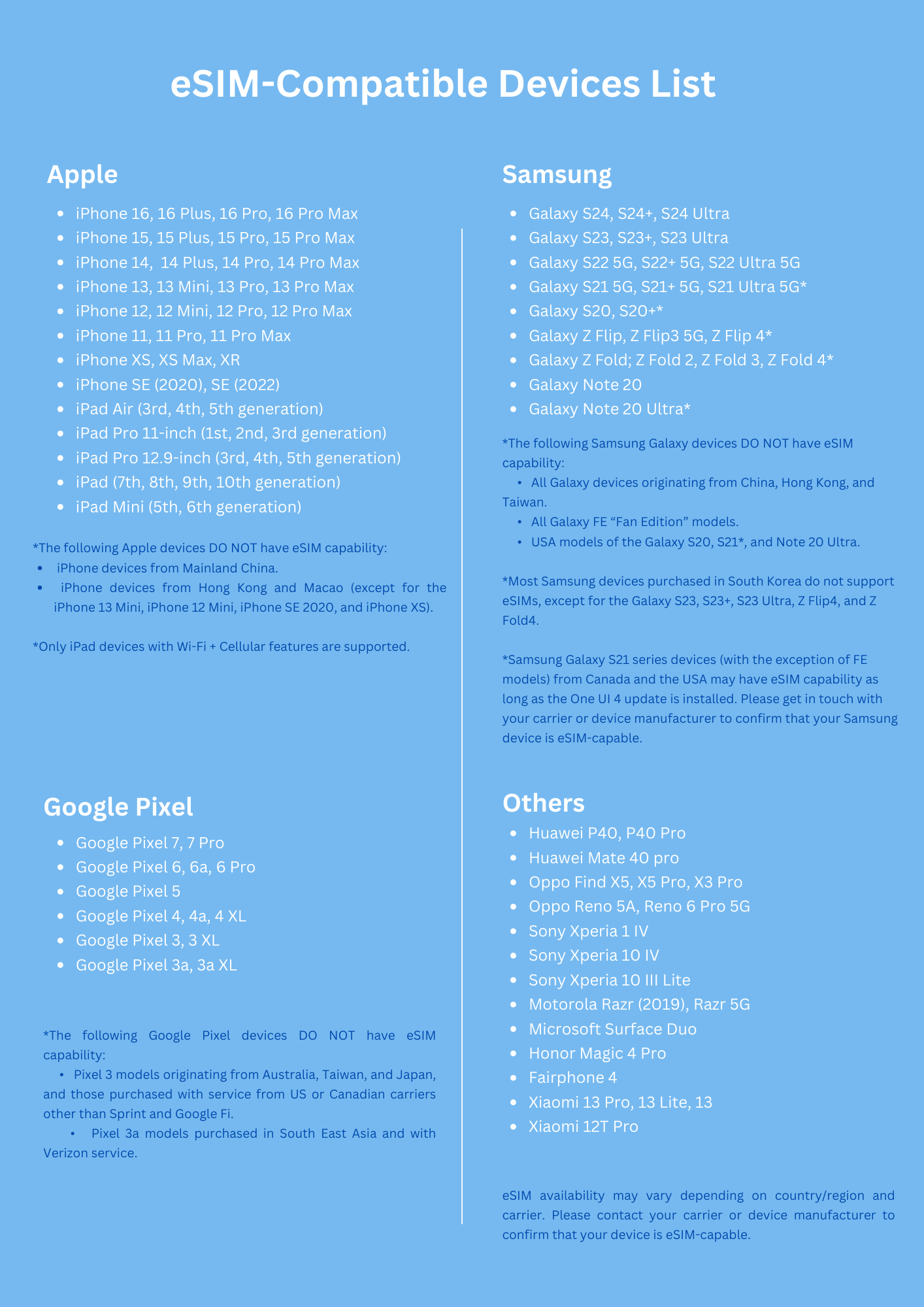
- Before booking, please ensure your mobile device supports the usage of eSIMs. You can find a list of compatible devices here.
- Dial "*#06#" on your mobile phone. If the EID barcode appears, it means your mobile phone supports the eSIM function.
Activation Procedure:
- The eSIM should be activated within 180 days of purchase. It is recommended to activate your eSIM on day of departure (can be done in your country) to avoid causing unintended early start of data usage.
- The eSIM is valid for the selected number of days after activation. Each day is counted as 24 hours from the first connection. For example, if you purchase a 3-day eSIM and first connect at 10AM on October 1, it will remain valid until 10AM on October 4.
- Scan the QR code and activate it automatically. No registration is required.
- Internet connection is required to install the eSIM (using either Cellular or WiFi).
- Do not delete the eSIM. QR code can often only be scanned and activated only once. After scanning, eSIM cannot be transferred to another device.


Purchase Notice
Customer Support:
- If you experience any service disruptions, such as inability to connect to the internet, slow speeds, or issues with APN settings after inserting the card, please reach out to our customer service at [email protected] or +852 5382 7074 (WhatsApp).
- If you're still not satisfied with our service, we are happy to process a refund. However, we encourage you to contact us first as soon as the issue arises. Leaving a negative review can complicate the support or refund process. Thank you for your understanding!
Usage Reminder:
- Under the Fair Usage Policy, data speed and usage may be limited for users who process large amounts of data in a short period of time. This is at the discretion of the subscribed telecommunications company and may occur without prior notice.
- Please refrain from extensive video streaming and/or processing a huge amount of data in a short time.
- The connection speed depends on your reception coverage and the local tele company. No refund will be issued for any speed drop.
Includes/Excludes
- eSIM
- Phone number [to voice calls, texts]
Reminders
Cancellation Policy: Offered in case of technical issues. You need to contact us when the issue occurs.
Hotspot sharing: Not available.
Speed after data cap: daily data plans drop to 256 Kbps after the daily data is used up, until the data resets 24 hours after first connection. Unlimited Data (Fair Use Policy) plans keep an ongoing connection at 10 Mbps.
Cancellation Policy
- Once the order has been completed, it cannot be canceled, modified, or refunded
- Due to time zone differences, the confirmed cancellation date is based on the supplier’s local time. Please allow 2–5 business days to process your cancellation request, after which the cancellation fee will be charged according to the product’s cancellation policy. Once your refund request is confirmed, KKday will initiate the refund to your original payment method within 15 days. The actual refund timing depends on your card-issuing bank’s policy.
FAQs
1. How does the Xplori Tunisia 4G eSIM provide mobile data coverage during a trip?
The Xplori Tunisia 4G eSIM delivers seamless, high-speed 4G/5G connectivity by connecting directly to the most reliable local network in Tunisia. You can activate your data plan immediately from your email via a simple QR code scan, eliminating the need to physically swap out your traditional SIM card.
2. Can I continue using my WhatsApp account with the Xplori Tunisia 4G eSIM installed?
Yes, you can use WhatsApp without any interruption when using the Xplori Tunisia 4G eSIM. Since your primary phone number remains active for messaging apps while the eSIM handles your mobile data, you can chat, call, and send media to your contacts just like you normally would.
3. What are the limitations or potential disadvantages of using an eSIM like the Xplori Tunisia 4G eSIM abroad?
The primary limitation of using an eSIM is device compatibility, as your smartphone must be carrier-unlocked and support eSIM technology. Additionally, an active internet connection, such as Wi-Fi, is required initially to download and install the eSIM profile via QR code before arrival in Tunisia.
4. How can travelers set up and use an eSIM for mobile data while traveling in Tunisia?
To use data abroad, purchase your Xplori Tunisia 4G eSIM and receive a QR code via email. Scan the QR code with your compatible smartphone before or upon arrival in Tunisia to install the profile, then enable data roaming in your phone settings once you land to access the local network.
5. Is it safe for American travelers to visit Tunisia while relying on the Xplori Tunisia 4G eSIM for communication?
Travel safety depends on current official travel advisories, but having reliable mobile connectivity through the Xplori Tunisia 4G eSIM ensures that American travelers can easily access maps, emergency services, translation tools, and stay in touch with family throughout their journey in Tunisia.
6. What is the installation process for iOS users setting up the Xplori Tunisia 4G eSIM?
iOS users running iOS 17.4 or above can utilize the convenient one-click installation feature. By updating to the latest version of the KKday App, users can install the Xplori Tunisia 4G eSIM directly through the app with a single click, providing a streamlined setup process before starting their journey.
7. How do travelers activate their data plan after purchasing the Xplori Tunisia 4G eSIM?
After purchasing the Xplori Tunisia 4G eSIM, travelers receive an activation email containing a QR code. You can activate your data plan directly from this email by scanning the code, which connects your compatible device to the reliable local network without requiring any physical card replacement.
8. What customer support and satisfaction guarantees are included with the Xplori Tunisia 4G eSIM?
When you book through KKday, you can enjoy peace of mind with a dedicated satisfaction guarantee for your Xplori Tunisia 4G eSIM; if you are not completely satisfied with the product, you can contact customer support for assistance or to request a refund.