
Get Exclusive App Deals
Product #574484

South America 5 Countries | Peru, Argentina, Brazil, Chile, Colombia | Daily Data / Total Data eSIM
No cancellation
- Receive your eSIM quickly after ordering, no need to worry about shipping.
- Scan the QR code to enjoy 4G internet; no physical card required, convenient and eco-friendly.
- Uses local network providers for excellent coverage.
- Supports iOS and various Android phones (please verify if your Samsung phone supports eSIM).
Package Options
Product Info
-eSIM Installation Notes-
- A stable internet connection (WiFi or mobile data) is required to install the eSIM.
- The validity period begins once you arrive at your destination, switch to the eSIM, and connect to the local network. It is recommended to complete the installation/setup before departure and switch to the eSIM upon arrival (ensure data roaming is turned on).
- If you receive an 'Invalid Code' message during scanning or installation, it is usually because the code has already been scanned. Please go to 'Settings' > 'Cellular' to check if a new plan labeled 'Personal', 'Travel', 'Business', 'Secondary', or 'Cellular Data' appears in the list. If it is already displayed (usually at the bottom), the installation was successful, and there is no need to scan or install it again.

Please confirm your device is eSIM compatible before purchasing. This product is non-refundable after the eSIM QR code is sent.

eSIM Installation and Activation Process
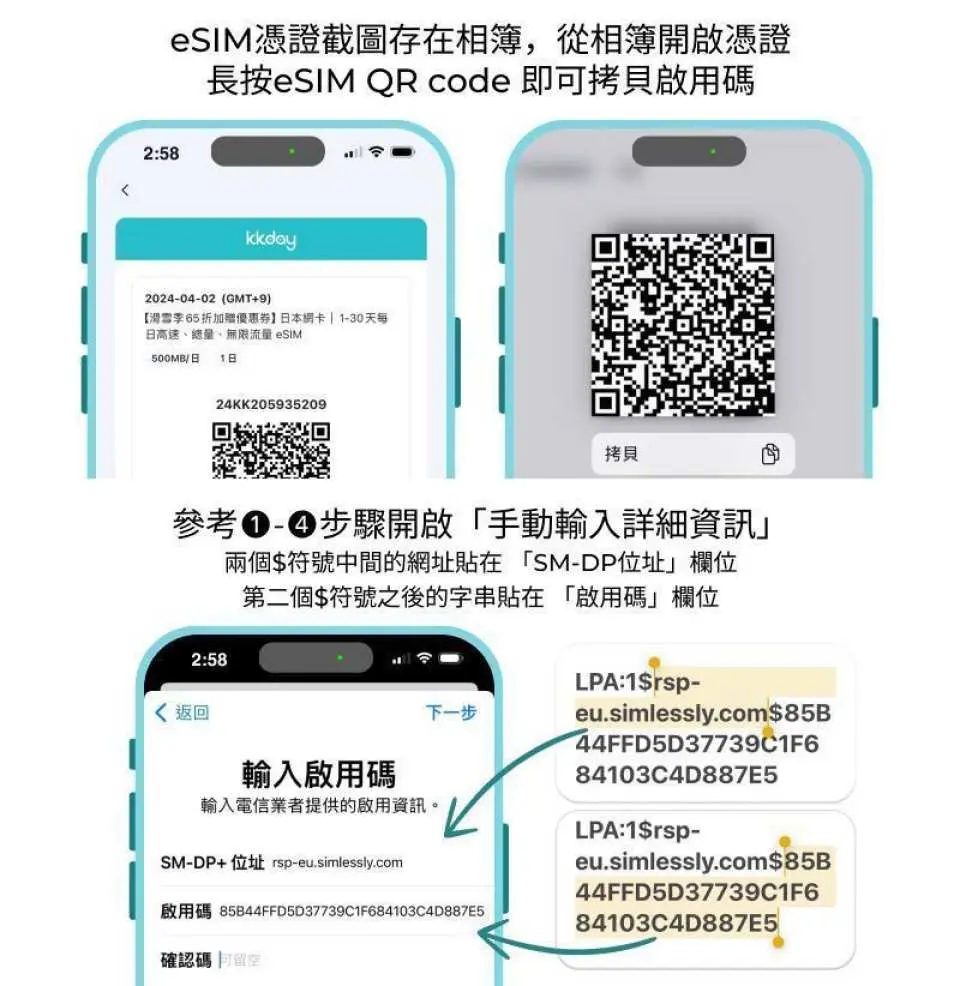
How to manually enter the activation code
Purchase Notice
- Please confirm your phone's eSIM compatibility before purchasing. Samsung phones purchased in Taiwan do not support eSIM. For Samsung phones purchased overseas, please check the Samsung website first.
- iOS version 12.1 or above is required. Phones with locked SIM cards or those purchased in mainland China, Hong Kong, or Macau do not support eSIM functionality.
- Each QR code can only be downloaded and installed once. Once the product's QR code has been scanned, returns and refunds are not possible.
- Activation period: Calculated from the time when network traffic begins to be used, with 24 hours as one day (not calculated in calendar days).
- It is recommended to download and install the app on the day of departure, and then switch to eSIM and enable data roaming upon arrival at your destination.
- Hotspot sharing is possible (but not recommended for optimal internet quality).
- Network speed will vary depending on factors such as terrain, climate, building obstruction, number of users, and location. If you experience unstable reception, please contact technical support.
- To maintain network connection quality and ensure fair usage, telecommunications companies worldwide sometimes impose data rationing on customers who consume excessive amounts of data within a short period. This may result in internet access disruptions or slower speeds. To ensure uninterrupted service, please avoid prolonged periods of watching videos or updating software that consumes large amounts of data.
- Telecommunications network quality varies from country to country, and base station coverage is not as dense as in Taiwan. Each country also has its own regional and telecommunications infrastructure differences. Therefore, refunds cannot be requested based on signal conditions in a few specific areas.
Reminders
For any issues regarding eSIM operation and usage, please contact the supplier's technical support and provide your KKday order number, a screenshot of your KKday voucher (including the ICCID), and a screenshot of your phone settings (see order notes for contact/providing details) to quickly obtain assistance from a specialist.
How to Redeem Your Voucher
Validity Period
- Valid for use within 180day(s) from the date of issue; Invalid after expiration
Cancellation Policy
- Once the order has been completed, it cannot be canceled, modified, or refunded
NOTE
- Due to time zone differences, the confirmed cancellation date is based on the supplier’s local time. Please allow 2–5 business days to process your cancellation request, after which the cancellation fee will be charged according to the product’s cancellation policy. Once your refund request is confirmed, KKday will initiate the refund to your original payment method within 15 days. The actual refund timing depends on your card-issuing bank’s policy.


