

【50% OFF Special】Singapore eSIM | 4G/5G Internet - Daily Data & Unlimited Data Plans | ChatGPT Supported
- Scan the QR code to set up your eSIM, skipping the hassle of swapping physical cards.
- Supports ChatGPT and TikTok.
Package Options
What You Can Expect
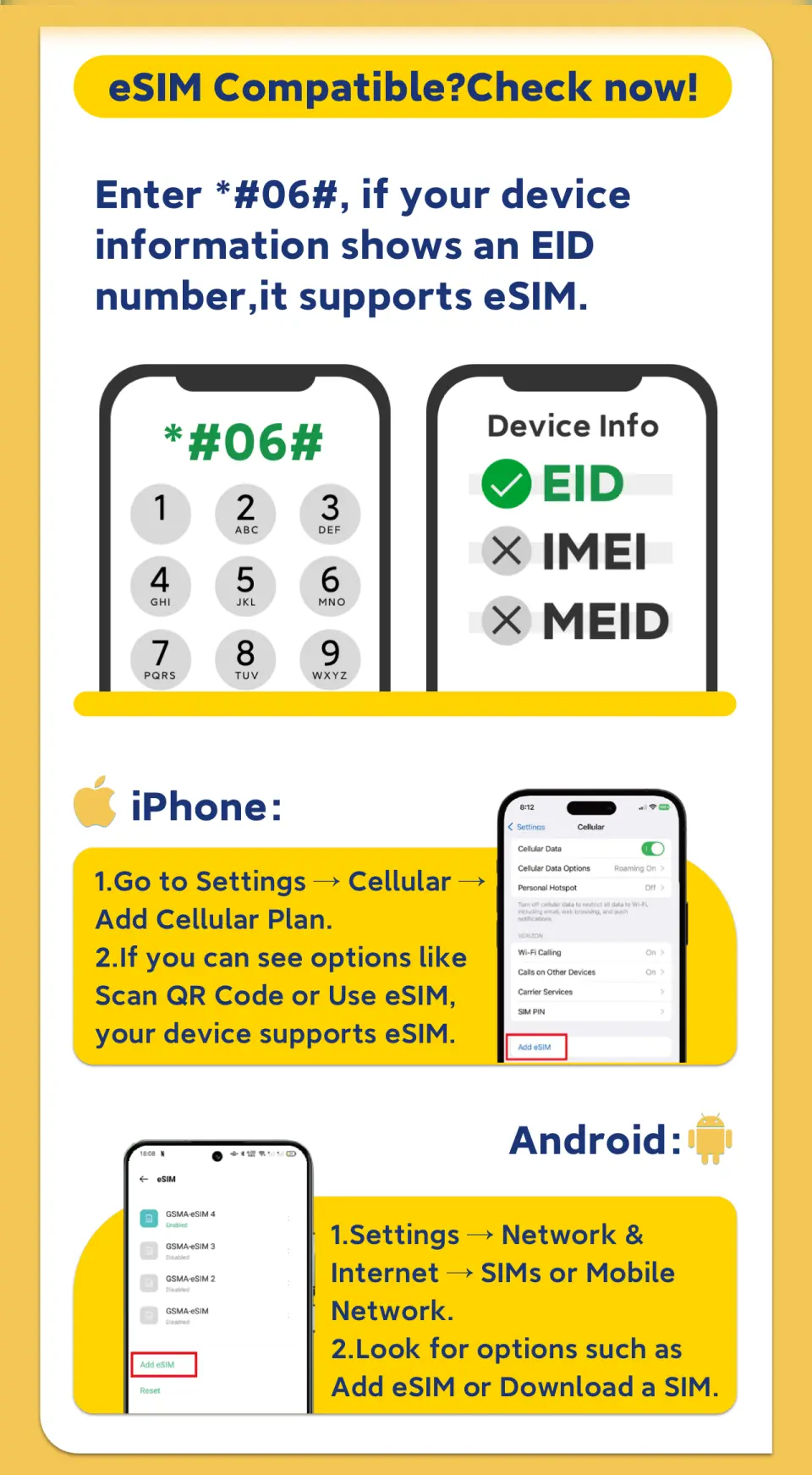
Please confirm that your phone is eSIM compatible before purchasing (cancellations are not accepted after purchase).


Frequently Asked Questions
Purchase Notice
- Before purchasing, please ensure your phone supports eSIM functionality.
- Please dial *#06# on your mobile phone. If EID is displayed, it means your phone supports eSIM; if not, it does not support eSIM.
- This product only includes data services and does not provide call or SMS functions.
- Please confirm that the selected data plan is correct before placing your order. Once the voucher is sent, cancellations will not be accepted.
- To ensure all users have a fair use of mobile network services at all times, each telecommunications operator has its own fair usage agreement to regulate fair network usage. If a user consumes excessive data in a congested area within a short period, causing other users to be unable to use the service normally, the telecommunications company may temporarily throttle the speed. We will not be able to intervene in this matter, and your mobile network may be temporarily affected.
- If your location or mobile phone does not support 5G, it will automatically switch to 4G/3G signal. The actual network speed depends on the local signal.
Reminders
Please dial *#06# on your mobile phone. If EID is displayed, it means your phone supports eSIM; if not, it does not support eSIM.
Once the QR code is scanned and the order is successfully downloaded, cancellation and refunds are not possible.
Installing an eSIM requires a network connection. Please ensure there is available Wi-Fi or mobile data in your environment before installation.
Please install and use the eSIM within 30 days of receiving it; otherwise, it will become invalid.
Each QR code can only be scanned once, and once bound, it cannot be changed to a different device or deleted.
iOS version 12.1 or later is required. Please note that iPhones sold in mainland China do not support eSIM. In Hong Kong and Macau, only the iPhone 13 mini, iPhone 12 mini, iPhone SE 2020, and iPhone XS have eSIM functionality.
Samsung phones vary by country. Samsung phones purchased in Taiwan do not support eSIM. For other regions, please check with the Samsung website first.
If your location or mobile phone does not support 5G, it will automatically switch to 4G/3G signal. The actual network speed depends on the local signal.
Please be aware that communication quality is affected by different usage environments, and network speed will vary depending on factors such as terrain, climate, building obstruction, number of users, and location.
To ensure all users have a fair use of mobile network services at all times, each telecommunications operator has its own fair usage agreement to regulate fair network usage. If a user consumes excessive data in a congested area within a short period, causing other users to be unable to use the service normally, the telecommunications company may temporarily throttle the speed. We will not be able to intervene in this matter, and your mobile network may be temporarily affected.
How to Use
- Installing an eSIM requires a network connection. Please ensure there is available WiFi or mobile data in your environment before scanning the QR code to add and install the eSIM. Once you reach your destination, you can activate the eSIM.
- It takes approximately 1-3 minutes to activate and can only be used after data roaming is enabled.
- The APN is automatically identified. However, if some devices cannot access the internet, the APN needs to be manually set to: indosatgprs
Cancellation Policy
- Once the order has been completed, it cannot be canceled, modified, or refunded
- Due to time zone differences, the confirmed cancellation date is based on the supplier’s local time. Please allow 2–5 business days to process your cancellation request, after which the cancellation fee will be charged according to the product’s cancellation policy. Once your refund request is confirmed, KKday will initiate the refund to your original payment method within 15 days. The actual refund timing depends on your card-issuing bank’s policy.


