

【FLASH SALE – 15% OFF】Australia Total Data & Unlimited Data with local Calls & Texts eSIM
Set up the novel eSIM by scanning the QR code after booking for hassle-free access to powerful internet services, and explore useful information about attractions in Australia for a great start to your next adventure.
- Unlimited local SMS/Text and Calls, International Calls available on Unlimited Data options.
* Total Data eSIM does not provide a phone number. - Simplify your travel with eSIM, eliminating SIM card pin needle and installation hassles
- Experience seamless connectivity throughout your trip with its easy-to-use design
- Enjoy high-speed internet across the Australia with 4G LTE coverage
Package Options
Product Info
[Unlimited Data] international Calls areas and minutes
- Unlimited Data 7 Days :
250 International Minutes in - (Bangladesh, Japan, Philippines, USA, Vietnam, Thailand, India, Singapore, China, UK, Ireland, North Korea, France, Italy, Greece, Portugal, Spain, Austria, Canada, Pakistan, Malaysia, New Zealand, Indonesia, Sri Lanka, Hong Kong). - Unlimited Data 15 Days :
500 International Minutes in - (Bangladesh, Japan, Philippines, USA, Vietnam, Thailand, India, Singapore, China, UK, Ireland, North Korea, France, Italy, Greece, Portugal, Spain, Austria, Canada, Pakistan, Malaysia, New Zealand, Indonesia, Sri Lanka, Hong Kong). - Unlimited Data 30 Days :
1000 International Minutes in - (Bangladesh, Japan, Philippines, USA, Vietnam, Thailand, India, Singapore, China, UK, Ireland, North Korea, France, Italy, Greece, Portugal, Spain, Austria, Canada, Pakistan, Malaysia, New Zealand, Indonesia, Sri Lanka, Hong Kong).
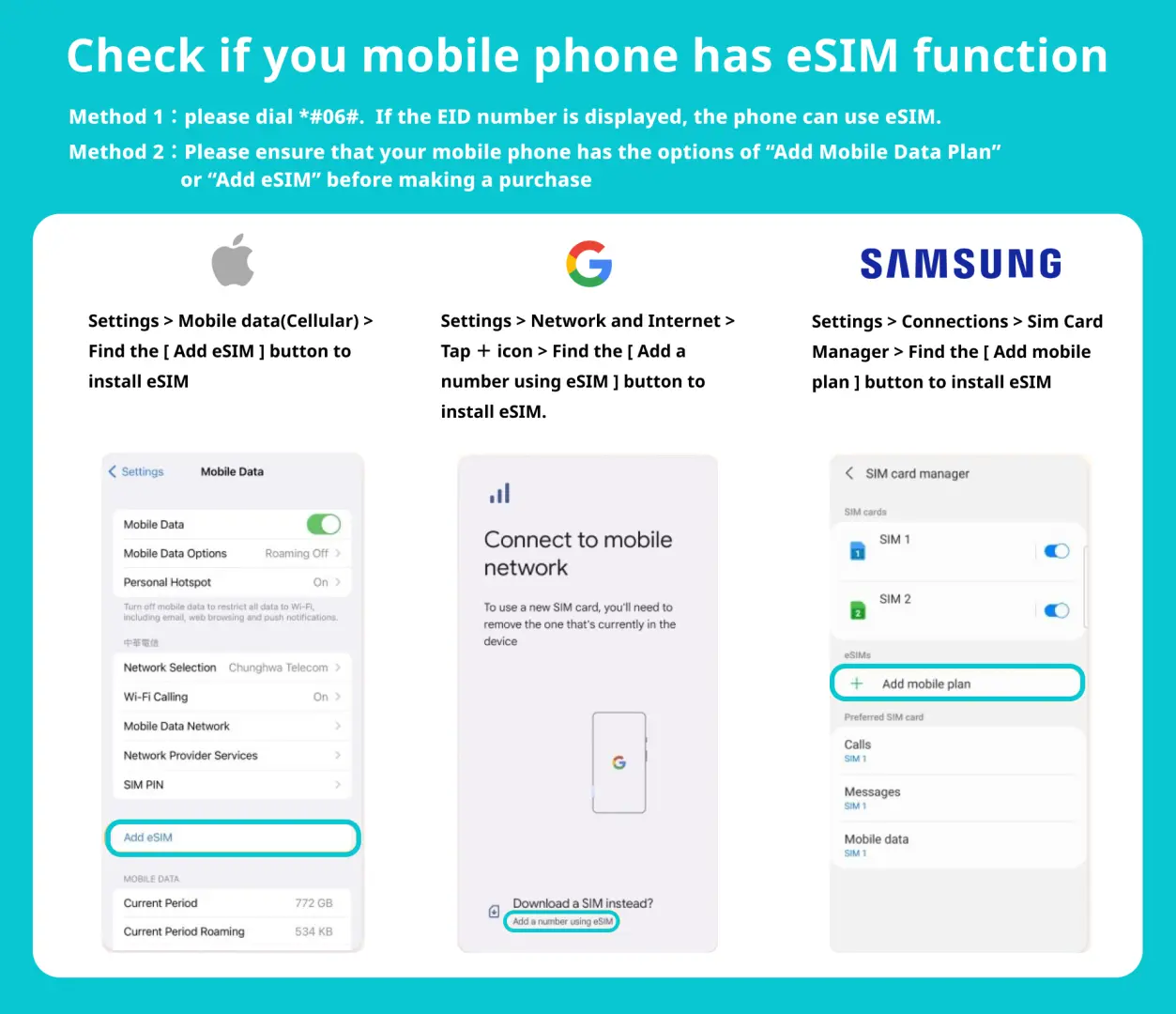
Check if your mobile phone supports eSIM.

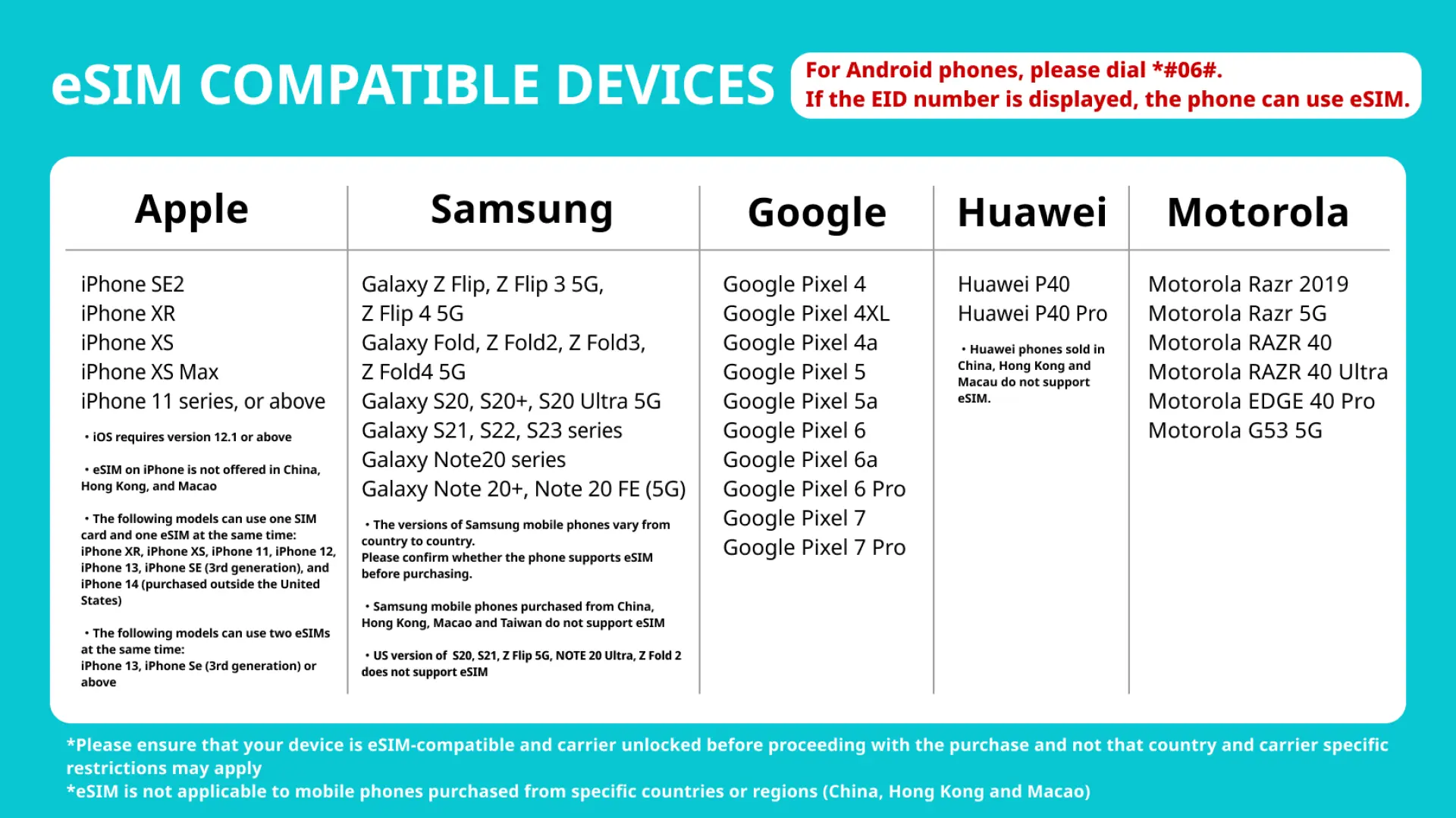
eSIM Compatible Devices

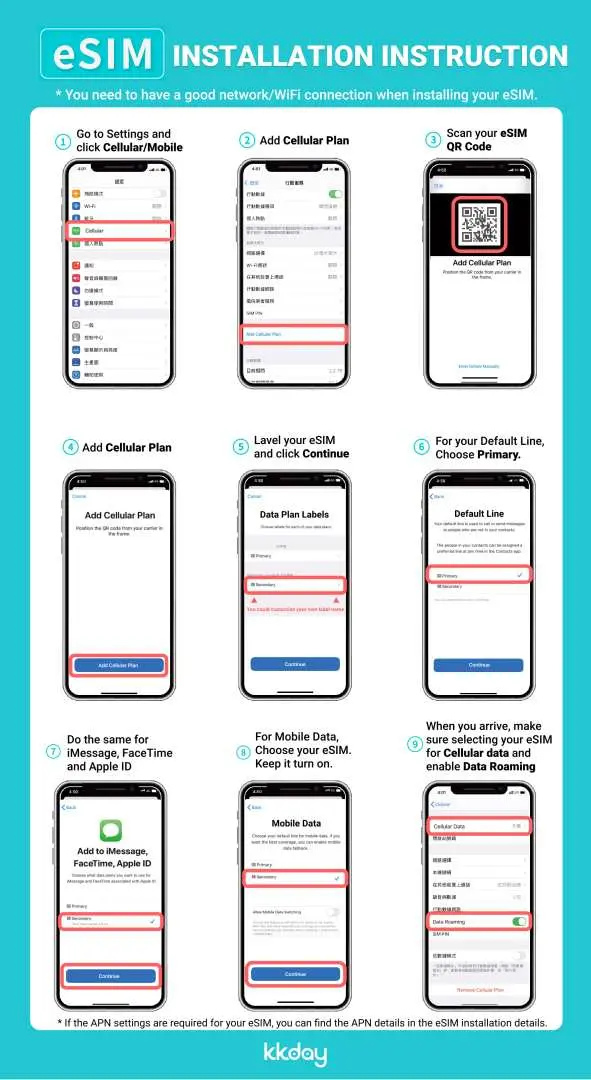
eSIM Installation Instruction

Purchase Notice
- Stable internet connection is essential during eSIM QR code scanning.
- The validity of the eSIM starts upon successful scanning and installation.
- The eSIM QR code is a one-time scan, and once removed, reactivation is not possible.
- The eSIM is exclusively functional within Australia.
- To ensure proper functionality, Data Roaming must be enabled for the eSIM.
Reminders
In order to ensure all users' accessibility to the internet, each telecom carrier implements their fair usage policy to monitor data consumption. If a user's data consumption negatively affects other users' internet connections, the telecom carrier may enforce speed restrictions temporarily. Please note that under such circumstances, KKday has no right to intervene.
The quality of communication may be affected by outside conditions; surrounding landforms (e.g. mountains), weather, obstruction by buildings, the number of users, or locations may affect the speed and quality of the internet.
Please turn off the data roaming function of the original SIM Card to avoid high roaming fees.
How to Use
- Once the purchase has been confirmed, we shall send you the eSIM QR code.
- Access eSIM Settings: Open the settings menu on your mobile device.
- Find Mobile or Cellular Options: Depending on your device, look for options like "Mobile Data," "Cellular," or "Network & Internet."
- Select Add eSIM: Within the mobile or cellular settings, you should find an option to "Add eSIM" or "Add Cellular Plan." Tap on it.
- Scan QR Code: Use your device's camera to scan the eSIM QR code. Ensure that the QR code is well-lit and clear for successful scanning.
- The eSIM will successfully installed in your device once the QR Code has been scanned.
- Set eSIM APN : Usually the APN will be automatically recognized. If it cannot be automatically recognized, you need to set it manually.
- iPhone: (Setting > Cellular > Cellular Data Options > Set the APN) APN: 3gnet / Username: empty / Password: empty
- Android: (Settings > SIM 1 > APN > Add New APN) APN: 3gnet / Username: empty / Password: empty
Cancellation Policy
- Once the order has been completed, it cannot be canceled, modified, or refunded
- Due to time zone differences, the confirmed cancellation date is based on the supplier’s local time. Please allow 2–5 business days to process your cancellation request, after which the cancellation fee will be charged according to the product’s cancellation policy. Once the cancellation is confirmed, you will receive your refund within 14 working days.
FAQ
An Australia eSIM simplifies your travel by eliminating the need for physical SIM cards and pin needles. It offers easy setup via QR code and provides seamless, high-speed 4G LTE internet connectivity across Australia. This ensures you stay connected effortlessly throughout your trip, accessing useful information and navigating with ease without physical card installation hassles.
You can purchase an Australia eSIM conveniently through KKday. After booking, you'll receive a QR code. Simply scan this QR code to set up the eSIM on your compatible device, providing immediate and hassle-free access to powerful internet services. KKday offers a streamlined booking process and reliable service to ensure a smooth start to your connectivity in Australia.
The Australia eSIM ensures reliable and high-speed internet connectivity across the country. It typically utilizes major local mobile networks to provide extensive 4G LTE coverage. This allows for seamless browsing, streaming, and communication, supporting your travel needs from urban centers to many regional areas, delivering consistent performance.
Australia eSIMs generally offer various data plan options to suit different travel needs. These include "Total Data" plans with a specific data allowance, and "Unlimited Data" options. The unlimited data plans often come with additional benefits like unlimited local SMS/Text and calls, and even international calls, providing comprehensive communication solutions.
Yes, the Australia eSIM includes "Unlimited Data" options. These plans are designed for travelers who require extensive internet usage without worrying about data caps. Additionally, these unlimited data options often come with the valuable inclusion of unlimited local SMS/Text and calls, as well as international call capabilities for comprehensive communication during your trip.
The Australia eSIM is designed to provide robust connectivity by leveraging established major local mobile networks across Australia. This ensures broad 4G LTE coverage, allowing users to experience consistent high-speed internet access whether in bustling cities or exploring more remote regions, ensuring reliable service quality.
An Australia eSIM simplifies mobile data access by removing the need for physical SIM card installation. Travelers can activate their eSIM by scanning a QR code, which eliminates fumbling with tiny cards or searching for local stores upon arrival. This digital setup provides immediate connectivity, making it a hassle-free solution for staying online quickly and efficiently.
For the Australia eSIM, "Unlimited Data" options typically include unlimited local SMS/Text and calls, and even international call capabilities. However, "Total Data" eSIM plans generally do not provide a phone number or associated call and text services, focusing solely on data connectivity for internet access.
Get Help


