

Hong Kong and Macau eSIM cards|Hong Kong and Macau CSL/CTM Telecom daily/total/unlimited traffic eSIM
- This product uses the roaming resources of CSL Mobile Limited and Companhia de Telecomunicações de Macau, SARL
- The eSIM QR code will be sent within 24 hours after placing the order, regardless of weekdays and holidays
- Universally applicable to both places, the best choice for traveling to and from Hong Kong and Macau
Package Options
Product Info
- Before purchasing, please make sure your phone supports eSIM. Please click this link to view the list of eSIM compatible mobile phones.
- After purchase, please make sure to update iOS to the latest version and have a stable WiFi connection before installing eSIM. Please click this link to refer to the instructional pictures.
- Please click this link for eSIM installation instruction video.
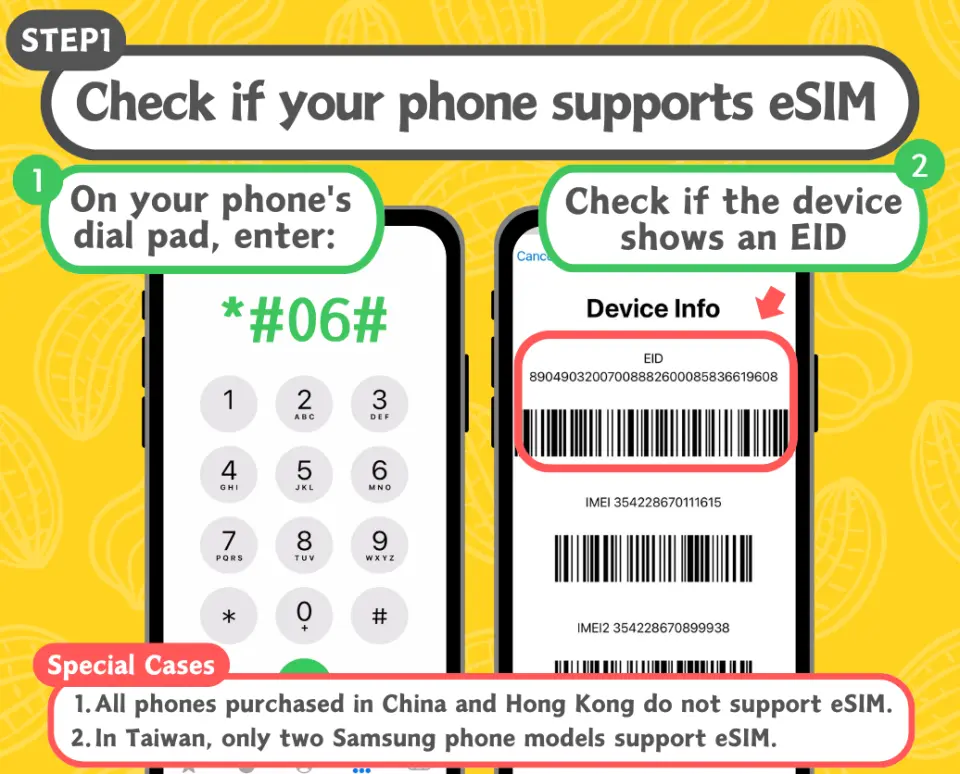
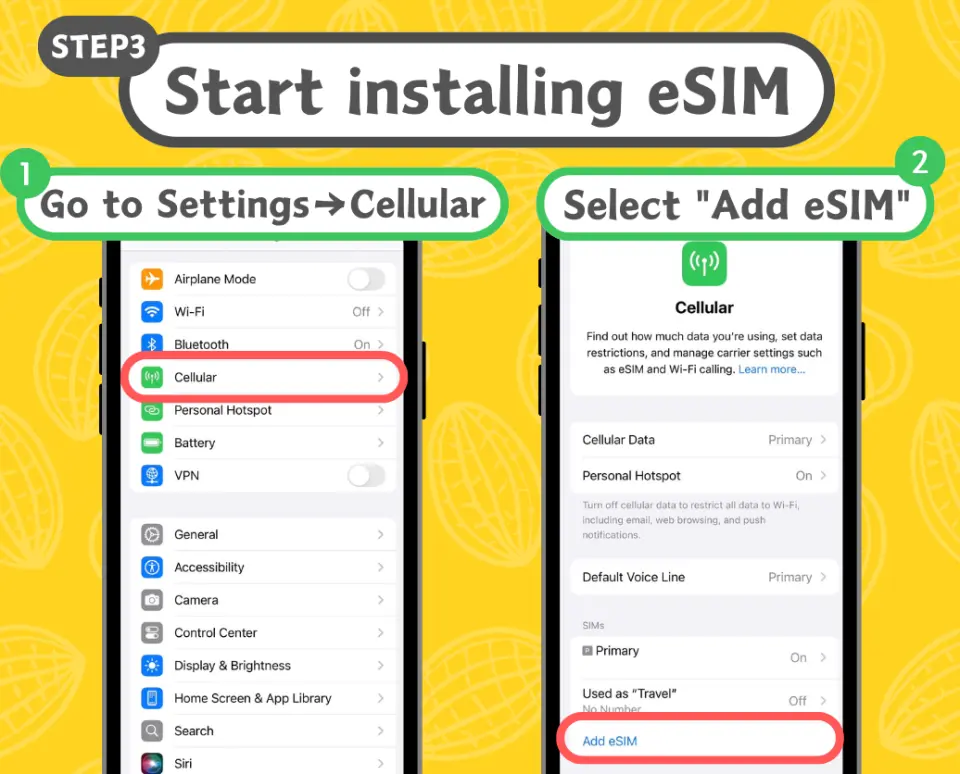


Purchase Notice
- Validity period: Calculated in calendar days. No matter what time it is on the day of activation in Hong Kong and Macau, it will be the first day, and the next day will be after 12:00 pm. For example: if it is activated at the destination on 12/20, the activation time will be 23:59 on the same day as the first day, and the activation time will be after 00:00 on 12/21 as the second day.
- Traffic reset time: If you purchase fixed daily traffic, the daily traffic reset time is 00:00 every day.
- The eSIM QR code will be sent to your email within 24 hours after placing the order, regardless of weekdays and holidays.
- It is recommended to purchase eSIM 2 days before departure and install it on the day of departure.
- Please install and activate the eSIM within 30 days after receiving the QR code.
Includes/Excludes
- eSIM
- telephone number
- voice call
- SMS function
Reminders
Principle of fair network traffic usage: For users who use a large amount of data traffic in a short period of time, such as mobile games, uploading and downloading large amounts of photos and videos in the cloud, iCloud automatic/manual backup, Google Cloud automatic/manual backup, etc., telecommunications companies may limit their traffic as appropriate. and speed, please avoid watching videos for a long time or processing large amounts of data in a short time.
Please make sure your phone supports eSIM before purchasing. Please refer to the [Applicable Mobile Phone Models] list on this product page. It is recommended to refer to the official information of the mobile phone manufacturer. Mobile phones shipped from factories in China, Hong Kong and Macau cannot use eSIM. Most Samsung phones sold in Taiwan cannot use eSIM. Mobile phones with numbers locked by telecom operators cannot be used.
Please refer to the official website of the mobile phone brand to confirm whether it supports eSIM. This product is non-refundable once the eSIM has been sent.
Hotspot sharing will affect traffic and speed, and the effect of hotspot sharing involves equipment and environmental conditions. There is no guarantee that all devices can be connected.
Internet speed will be affected by the signal strength of the area and local telecommunications company, and refunds cannot be requested on the grounds of speed reduction.
How to Redeem Your Voucher
Validity Period
- Valid for use within 30day(s) from the date of issue; Invalid after expiration
Cancellation Policy
- Once the order has been completed, it cannot be canceled, modified, or refunded
- Due to time zone differences, the confirmed cancellation date is based on the supplier’s local time. Please allow 2–5 business days to process your cancellation request, after which the cancellation fee will be charged according to the product’s cancellation policy. Once your refund request is confirmed, KKday will initiate the refund to your original payment method within 15 days. The actual refund timing depends on your card-issuing bank’s policy.
FAQ
1. Does the Hong Kong and Macau eSIM provide coverage in both regions?
Yes, the Hong Kong and Macau eSIM is designed for seamless use across both Hong Kong and Macau. It automatically connects to local networks in each region, ensuring you stay online whether you are traveling between cities or staying within one. This universal applicability makes it a convenient choice for multi-destination trips.
2. How can I choose the best Hong Kong and Macau eSIM plan type for my travel duration?
To choose the best plan, consider your travel duration and data usage habits. Daily plans are ideal for short trips or specific heavy-use days, offering data for a set period. Total data plans provide a fixed amount of data for the entire trip, suitable if your usage is predictable. Unlimited data plans are best for longer stays or if you anticipate high data consumption, ensuring uninterrupted connectivity throughout your journey.
3. What are the steps to activate the Hong Kong and Macau eSIM upon arrival?
Activating your Hong Kong and Macau eSIM is straightforward. After receiving your QR code, ensure your device is connected to Wi-Fi. Go to your phone's settings, select "Add eSIM" or "Cellular Plan," and scan the QR code. Follow the on-screen prompts to complete the installation. Remember to enable the eSIM line for data roaming once you arrive in Hong Kong or Macau to start using the network.
4. What devices are compatible with the Hong Kong and Macau eSIM?
The Hong Kong and Macau eSIM is compatible with most eSIM-enabled smartphones and tablets. This includes newer iPhone models (XR and later), Google Pixel phones (3a and later), Samsung Galaxy S/Note/Fold series, and other devices that support eSIM technology. Always check your device's specifications or consult its manufacturer to confirm eSIM support before purchasing.
5. Which network providers are used by the Hong Kong and Macau eSIM?
The Hong Kong and Macau eSIM utilizes the robust roaming networks of CSL Mobile Limited in Hong Kong and Companhia de Telecomunicações de Macau, SARL (CTM) in Macau. This ensures reliable and high-speed internet access across both regions, offering consistent connectivity for all your travel needs.
6. How quickly will I receive the QR code after purchasing a Hong Kong and Macau eSIM?
After successfully purchasing your Hong Kong and Macau eSIM, the QR code required for activation will be sent to your designated email address within 24 hours. This delivery timeframe applies regardless of whether your order is placed on a weekday or a holiday, ensuring prompt access to your eSIM details.
7. Can the Hong Kong and Macau eSIM be used immediately after activation?
Yes, once your Hong Kong and Macau eSIM is successfully activated on your device and you've enabled data roaming, it is typically ready for immediate use. You should be able to access the internet and use data services right away upon arrival in either Hong Kong or Macau, providing instant connectivity for your trip.
8. Are there different data plan options available for the Hong Kong and Macau eSIM?
Yes, the Hong Kong and Macau eSIM offers a variety of data plan options to suit diverse travel preferences. You can choose from daily data plans for short, intensive use, total data plans that provide a fixed amount of data for your entire trip, or unlimited data plans for peace of mind during longer stays with high data needs.


