

【50% Off】China & Macau eSIM | 4G/5G Internet - Daily, Total, and Unlimited Data Plans
- Uses China Mobile / 3Macau networks with excellent signal coverage
- Supports hotspot functionality, allowing you to share your connection with travel companions
- No need to swap cards; enjoy 4G/5G internet quickly and easily without any fuss
- Install and use immediately upon receiving the eSIM QR code, with no need to pick up or wait for a physical card delivery
Package options
What You Can Expect

Please confirm that the mobile phone can support eSIM before purchasing. The order cannot be canceled and refunded after ordering.

Before activating eSIM, please update iOS to the latest version and connect to stable WiFi. Older versions of iOS and unstable network are common reasons for eSIM activation failure.
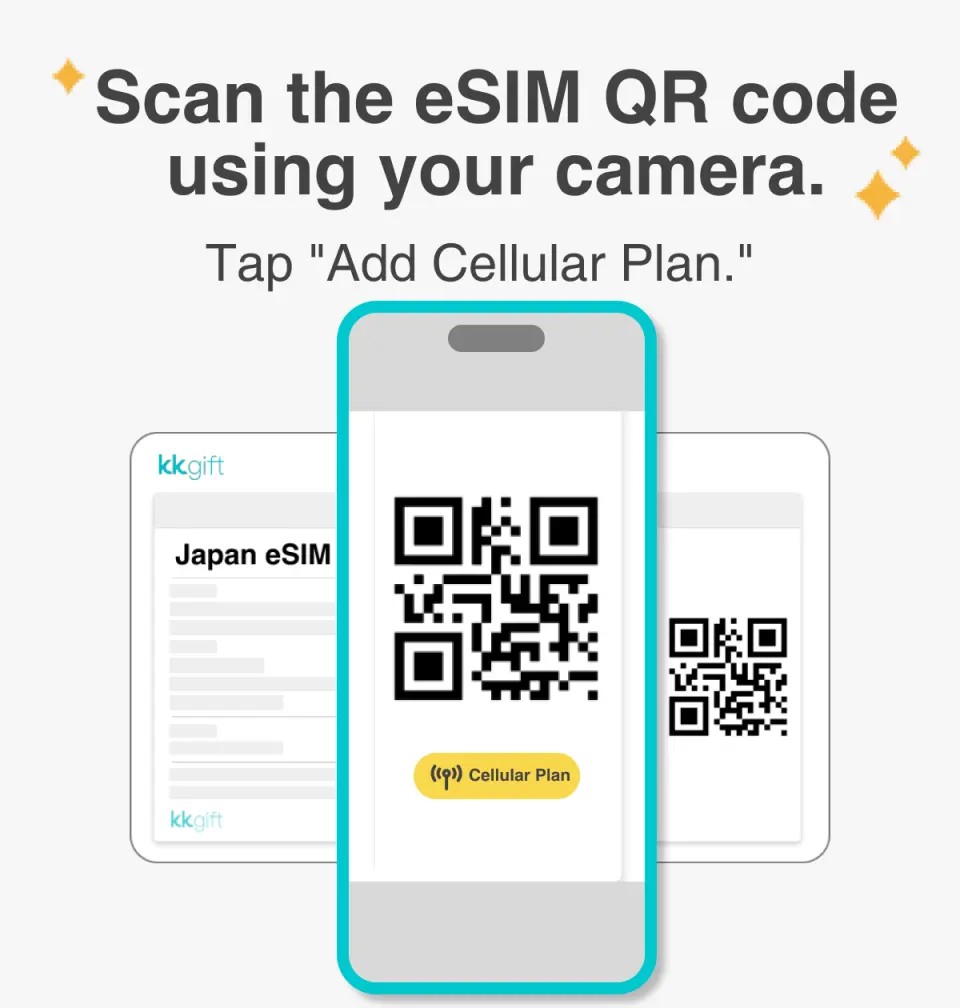
Open the camera to scan the eSIM and click "Action Plan".

The activation time is about 2~3 minutes, and the installation may fail if the activation screen pops up.

The eSIM name can be customized to facilitate the management of multiple eSIMs.

Select the default number to specify the original main phone number to receive messages (you must first apply to the original telecom operator to activate the main phone number for international roaming in order to receive text messages).

You can specify the main phone number to use iMessage and Facetime functions.

If you choose to use eSIM mobile data, "eSIM mobile data is not turned on" is a common reason for being unable to access the Internet.

This eSIM needs to enable data roaming
Purchase Notice
- For eSIM-enabled Android/Google phones, please refer toFigure 1 andFigure 2 for the steps to manually enter the activation code.
- Hotspot sharing will occupy bandwidth, and the network speed will also vary depending on the terminal device and geographical location, so the minimum network speed is not guaranteed. Please confirm before placing an order.
- According to the principle of fair use of the Internet, telecommunications companies may limit users who use a large amount of data traffic in a short period of time. It is recommended to avoid watching videos or updating the system for a long time.
- Please make sure your mobile phone and its operating system support the eSIM function before purchasing. If you need to cancel the order due to device incompatibility, no refund will be given.
- Supports Apple iPhone and iOS (requires version 12.1 or higher), "Android and Google phones"
- Please note that iPhones sold in mainland China do not support eSIM. In Hong Kong and Macau, only iPhone 13 mini, iPhone 12 mini, iPhone SE 2020 and iPhone XS have eSIM function (or please go to Apple’s official website to check)
- Click on the website to learn about the latest news and precautions at any time: https://www.happysim.hk/KKDayHappySIMUserGuide.html
Includes/Excludes
- eSIM
- Only provide Chinese and English customer service
Reminders
When confirming your order, please provide your complete email address
After placing an order and completing payment, you will receive the eSIM QR code via email within 48 hours.
Each QR code can only be scanned and installed once, and the device cannot be replaced after binding. Please do not delete or remove it unless you have finished using it, otherwise you will not be able to rescan the installation.
The eSIM must be installed and activated in the "use area" within 90 days after the order is placed. If it expires after the expiration date, it will not be usable and no refund will be given.
To end the use of the eSIM plan available on your phone, click [Remove Action Plan] at the bottom to remove it.
Please note that the signal may affect the quality of the Internet depending on factors such as location, terrain, building coverage, number of users, weather, etc.
Day calculation method: natural day system (users purchase a 3-day Internet plan, install it and activate it at 10:00 am on 9/1, and 23:59 pm on 9/1 is the first day. This plan will be activated at 23:59 pm on 9/3 termination)
Time zone calculation method: GMT +8 Hong Kong time zone is the standard and is not the time zone of the "use area"
Please remember to turn off data roaming on the original SIM card to avoid using the mobile network of the original SIM card and incurring high roaming charges.
How to Use
- Each QR code can only be scanned and installed once, and the device cannot be replaced after binding. Please do not delete or remove it unless you have finished using it, otherwise you will not be able to rescan the installation.
- You must be connected to the Internet when installing eSIM. Please confirm that there is available WiFi or mobile data in the environment before installation.
- Apple iPhone eSIM installation steps: Settings>Mobile services>Add mobile plan>QR code>Click to join mobile plan
- After installing eSIM, please enable data roaming
- Please check to confirm that the network is connected to China Unicom/3Macau
- APN: 3gnet
- Click on the website to learn about the latest news and precautions at any time: https://www.happysim.hk/KKDayHappySIMUserGuide.html
Cancellation Policy
- Once the order has been completed, it cannot be canceled, modified, or refunded
- Due to time zone differences, the confirmed cancellation date is based on the supplier’s local time. Please allow 2–5 business days to process your cancellation request, after which the cancellation fee will be charged according to the product’s cancellation policy. Once your refund request is confirmed, KKday will initiate the refund to your original payment method within 15 days. The actual refund timing depends on your card-issuing bank’s policy.
FAQs
1. Can I use the China and Macau network card eSIM to connect to the internet in both China and Macau?
Yes, this eSIM is designed for seamless connectivity across both regions. It utilizes the China Unicom network in mainland China and the 3Macau network in Macau, ensuring excellent signal coverage for your travel needs in both locations without needing to switch services or cards.
2. Is the China and Macau network card eSIM compatible with international phones for travel to China?
This eSIM is generally compatible with most unlocked smartphones that support eSIM technology. Before traveling, it's recommended to verify your specific phone model's eSIM compatibility to ensure a smooth setup and internet experience during your trip to China and Macau.
3. What is an eSIM and how does it function for travelers using the China and Macau network card eSIM?
An eSIM (embedded SIM) is a digital SIM card built directly into your phone. For travelers using the China and Macau network card eSIM, it means you receive a QR code, scan it, and install the network profile. This eliminates the need for a physical SIM card, allowing for quick and convenient internet activation without card swapping.
4. How does the China and Macau network card eSIM provide a reliable internet solution for tourists visiting China?
The China and Macau network card eSIM ensures reliable internet access by leveraging established networks like China Unicom and 3Macau. This provides excellent signal coverage and stable 4G internet access, allowing tourists to stay connected for navigation, communication, and information access throughout their visit to China and Macau.
5. What are the setup requirements and process for activating the China and Macau network card eSIM?
To activate the eSIM, your device must be eSIM-compatible and unlocked. The process involves receiving a QR code, which you then scan using your phone's camera through your cellular settings. Follow the on-screen prompts to install the eSIM profile, and once installed, you can begin using your 4G internet immediately.
6. Does the China and Macau network card eSIM support internet sharing through a hotspot feature?
Yes, the China and Macau network card eSIM supports the hotspot function. This allows you to share your mobile internet connection with other traveling companions or devices, ensuring everyone in your group can stay connected using a single eSIM plan, which is convenient for shared data needs.
7. What are the potential considerations or limitations when choosing an eSIM, such as the China and Macau network card eSIM, for travel?
Key considerations for an eSIM include ensuring your device is eSIM-compatible and unlocked. While convenient, some older phone models may not support eSIM. Additionally, activation requires an initial internet connection to download the profile. Users should also manage data plans based on their consumption to optimize usage.
8. How does the China and Macau network card eSIM offer convenience compared to traditional physical SIM cards?
The China and Macau network card eSIM offers significant convenience by eliminating the need to physically change SIM cards. Travelers receive a QR code instantly, allowing for quick setup by scanning. This means no waiting for physical delivery or searching for local SIM card vendors, providing immediate internet access upon arrival.


