

【20% OFF】China, Hong Kong, and Macau eSIM | Daily High-Speed Data eSIM
- No need to swap cards; enjoy fast and convenient 4G internet without the hassle.
- Scan the eSIM QR code to install and use immediately; no need to pick up a physical card or wait for shipping.
- Eco-friendly with no physical waste, no shipping fees, and zero risk of loss.
Package Options
What You Can Expect
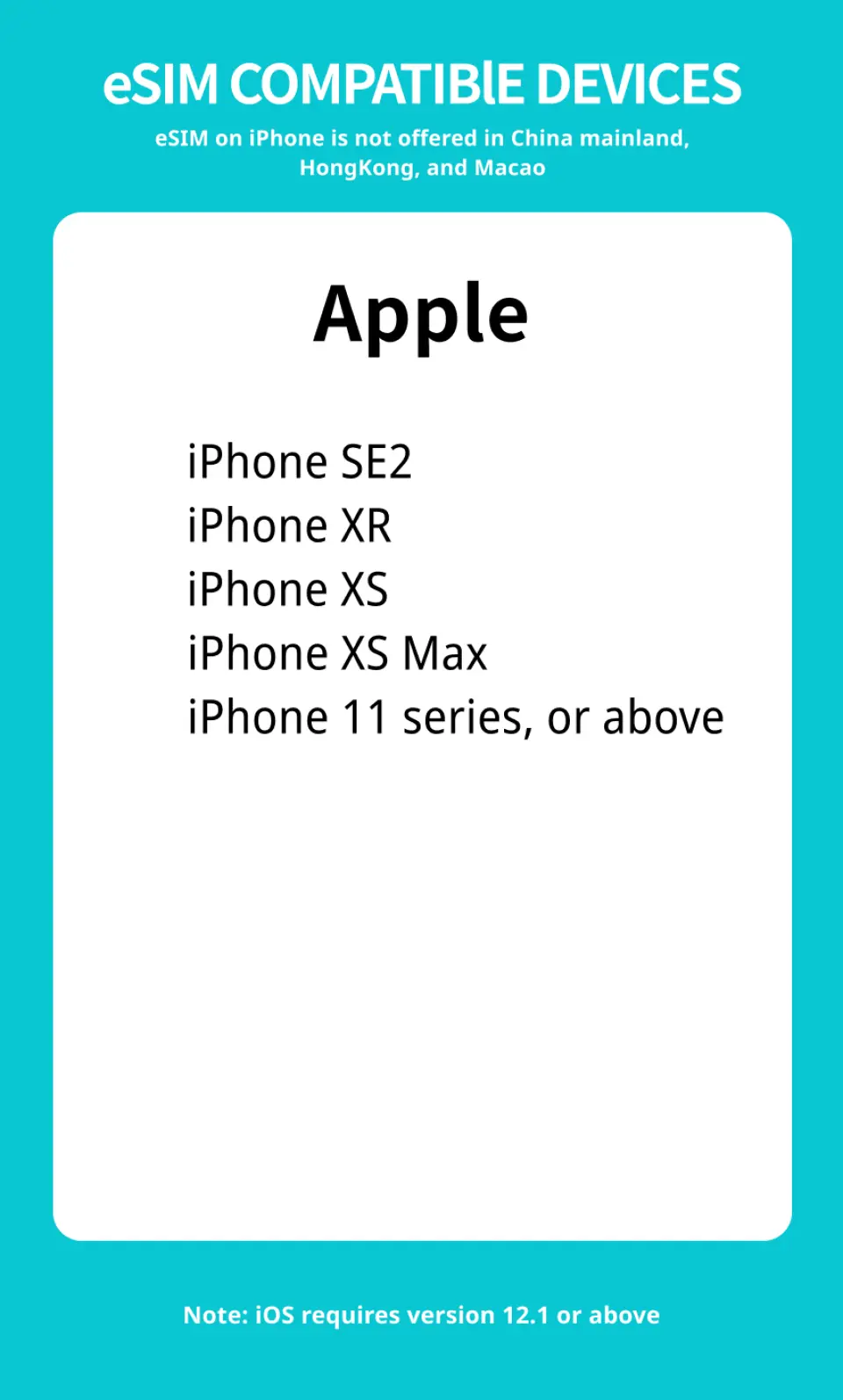
Applicable models

eSIM installation instructions (ios)
SIM Card Specifications
| Data Usage Specifications | 500MB, 1GB, 2GB, 3GB |
| Transmission Specifications | 4G |
| Signal Coverage Area | Hong Kong, China, Macau |
| Mobile Carrier | China Mobile |
| Supported Sizes | eSIM |
| Hotspot Sharing | Unavailable |
| Supported Frequencies(4G) | B1(2100 MHz) |
| Excludes | Voice calls, Texts |
| Not Supported | SIM-locked device, Carrier-customized device, Pocket WiFi, Modified phones, 3G mobile phones, translators, mobile phones without eSIM function |
| Network Type | Roaming |
Purchase Notice
- After placing the order and completing the payment, the QR code will be sent by E-mail within 24 hours
- Before purchasing, please ensure that your phone and its operating system support the eSIM function. If the order is cancelled due to device incompatibility, no refund will be given.
- eSIM applicable models: iPhone XR and above, Google Pixel 6 and above
- eSIM is an online service that is finalized upon provision. It will only be provided to you via email in the form of a QR Code with your consent. In accordance with the Consumer Protection Act and the Guidelines for Reasonable Exceptions to the Right to Cancel Telecommunications Transactions, etc., once you receive the email containing the eSIM QR Code, you cannot cancel or modify your order, nor can you request a return or refund. Please note that this is not possible due to the restrictions set forth in the Consumer Protection Act.
Reminders
Please make sure your mobile phone and its operating system support the eSIM function before purchasing. No refunds will be issued if the order is canceled due to device incompatibility.
iOS requires version 12.1 or higher; please note that iPhones sold in mainland China do not support eSIM. In Hong Kong and Macau, only iPhone 13 mini, iPhone 12 mini, iPhone SE 2020 and iPhone XS have eSIM functionality.
The versions of Samsung mobile phones vary from country to country. Samsung mobile phones purchased in Taiwan do not support eSIM. In other regions, please check with Samsung’s official website first.
After placing the order and completing the payment, the QR code will be sent by E-mail within 24 hours
Each OR code can only be scanned once. After binding, the device cannot be changed or deleted. Once deleted, it cannot be rescanned and installed.
Installing eSIM requires an Internet connection. Please confirm that there is available WiFi or available mobile data in the environment before installation.
Please install the eSIM after arriving at your destination to avoid activating it in advance to calculate the validity period.
The eSIM must be installed and activated at the destination within 30 days of ordering, otherwise it will become invalid and unusable.
Please remember to turn off data roaming on the original SIM card to avoid using the mobile network of the original SIM card and incurring high roaming charges.
To end using the eSIM plan available on your phone, click [Remove Action Plan] at the bottom to remove it.
Please be aware that the signal may affect the quality of the Internet depending on factors such as location, terrain, building coverage, number of users, weather, etc.
eSIM is an online service that is finalized upon provision. It will only be provided to you via email in the form of a QR Code with your consent. In accordance with the Consumer Protection Act and the Guidelines for Reasonable Exceptions to the Right to Cancel Telecommunications Transactions, etc., once you receive the email containing the eSIM QR Code, you cannot cancel or modify your order, nor can you request a return or refund. Please note that this is not possible due to the restrictions set forth in the Consumer Protection Act.
How to Use
- Before purchasing, please ensure that your phone and its operating system support the eSIM function. If the order is cancelled due to device incompatibility, no refund will be given.
- After placing the order and completing the payment, the QR code will be sent by E-mail within 24 hours
- Please fill in the correct email address to ensure you can receive the eSIM activation information.
- Please confirm that you are connected to WiFi when joining the eSIM mobile plan
- Installation steps:
Settings -> Mobile Services -> Join Mobile Plan -> Scan eSIM QR Code - If you have any questions, please contact customer service and we will serve you wholeheartedly.
Cancellation Policy
- Once the order has been completed, it cannot be canceled, modified, or refunded
- Due to time zone differences, the confirmed cancellation date is based on the supplier’s local time. Please allow 2–5 business days to process your cancellation request, after which the cancellation fee will be charged according to the product’s cancellation policy. Once your refund request is confirmed, KKday will initiate the refund to your original payment method within 15 days. The actual refund timing depends on your card-issuing bank’s policy.
FAQ
1. Is eSIM technology currently available for use in mainland China?
While local Chinese mobile carriers primarily offer physical SIM cards, international eSIM providers do offer services for mainland China. These eSIMs allow travelers to access mobile data and maintain connectivity, bypassing the need for a physical local SIM card. It's important to choose a provider that ensures stable and reliable service across the region.
2. What factors should I consider when selecting an eSIM for travel in China, Hong Kong, and Macau?
When selecting an eSIM for China, Hong Kong, and Macau, prioritize network coverage and data stability across all three regions. Consider the data allowance offered and if it matches your usage needs, as well as the validity period. Look for providers that offer easy activation via QR code and provide customer support for setup assistance. Device compatibility is also crucial for seamless use.
3. Do local mobile carriers in China, Hong Kong, and Macau provide direct eSIM support?
In Hong Kong and Macau, many local mobile carriers readily support eSIM technology, allowing residents and visitors to activate services digitally. However, in mainland China, direct eSIM support from domestic carriers is less common for consumer plans, with most services relying on traditional physical SIM cards. Travelers often use international eSIM providers to ensure connectivity in mainland China.
4. Can an eSIM purchased for Hong Kong be used seamlessly across Macau and mainland China?
The cross-region compatibility of an eSIM for Hong Kong, Macau, and mainland China depends entirely on the specific eSIM plan you purchase. Many international eSIM plans are designed to cover multiple regions, including these three, providing a single solution for seamless internet access without needing separate eSIMs. Always verify the geographical coverage details of your chosen plan.
5. What are the general steps to set up and activate an eSIM for internet access in China and Hong Kong?
Setting up an eSIM for China and Hong Kong typically involves a few simple steps. First, ensure your device is eSIM-compatible and connected to Wi-Fi. You will receive a QR code from your provider; scan this code via your phone's settings (usually under Cellular or Mobile Data). Follow the on-screen prompts to complete the installation and activate the cellular plan. Once installed, select the new eSIM for data roaming.
6. What kind of internet speed and network coverage can I expect from an eSIM in China, Hong Kong, and Macau?
With an eSIM in China, Hong Kong, and Macau, you can generally expect 4G LTE internet speeds, providing fast and reliable connectivity for browsing, streaming, and navigation. Network coverage is usually robust in urban areas and tourist destinations across all three regions. Performance can vary slightly depending on the specific eSIM provider and your exact location.
7. Which mobile devices are compatible with eSIM services for international travel to China, Hong Kong, and Macau?
Most modern smartphones released in recent years are compatible with eSIM services, including iPhone models (iPhone XS and newer), Samsung Galaxy series (S20 and newer, Note 20 and newer, Fold/Flip series), and Google Pixel phones (Pixel 3 and newer). It's essential to confirm your specific device model supports eSIM functionality before purchasing a plan for travel to China, Hong Kong, and Macau.
8. How can I check my data usage and manage my eSIM plan while traveling in China, Hong Kong, and Macau?
To check your eSIM data usage while traveling in China, Hong Kong, and Macau, you can often use the mobile app or website provided by your eSIM carrier. Additionally, most smartphones have built-in settings (typically under 'Cellular' or 'Mobile Data') where you can monitor data consumption for each active plan. If you need to extend your service, many providers offer options for top-ups or purchasing new plans directly through their platforms.


