

UK Total / Unlimited Data + Unlimited Calls & Texts eSIM
Navigate the UK easily using this eSIM by simply scanning a QR code after booking for quick internet access.
- Scan the QR code to set up your eSIM
- Skip the hassle of physical SIM card installations
- Stay connected with high-speed internet, unlimited calls, and texts
- Discover helpful attraction information to guide you on your UK travels
What You Can Expect
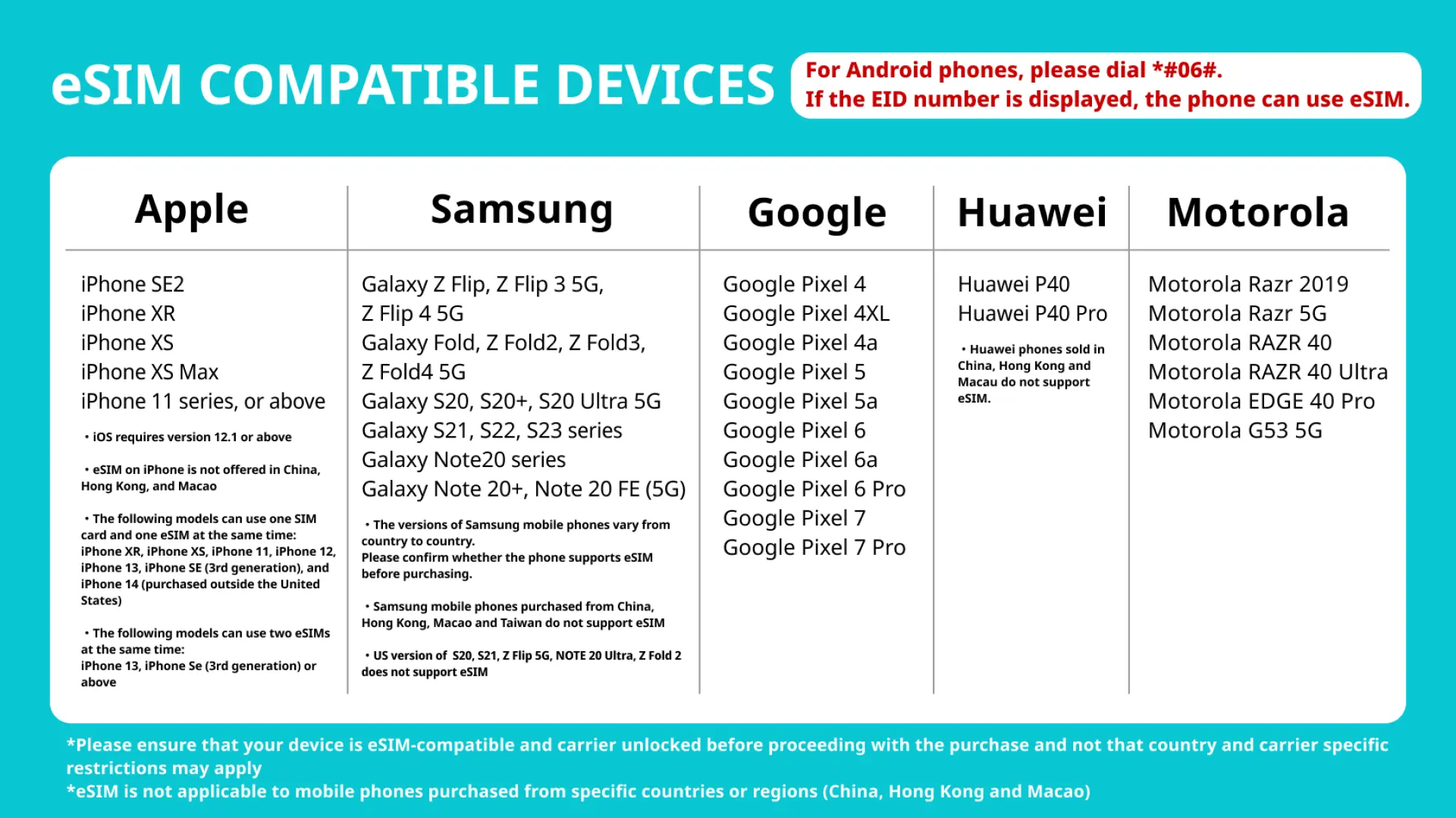
Check your mobile phone's eSIM functionality with these easy steps


Refer to the following range of eSIM compatible devices

Follow the simple eSIM installation guide shown in the image and get connected


Important Info
Reminders
❗️The phone number will be showed in the reminder column above.
In order to avoid early activation of eSIM, eSIM QRcode will be sent to you one day before the “usage date” you select.
Stable internet connection is essential during eSIM QR code scanning
The validity of the eSIM starts upon successful scanning and installation
Calculation method of days: 24-hour system. For example, you purchase a 3-day plan and install it at September 1 at 10:00 am. The plan will end at September 4 at 9:59 am
The day you scan the QR code counts as the first day of use. It is recommended to scan the QR code and install it before taking off or after arriving at your destination to avoid activating it in advance and affecting your usage rights.
The eSIM QR Code is a one-time scan, and once removed, reactivation is not possible
The eSIM is exclusively functional within the UK
To ensure proper functionality, Data Roaming must be enabled for the eSIM
In order to ensure all users' accessibility to the internet, each telecom carrier implements their fair usage policy to monitor data consumption. If a user's data consumption negatively affects other users' internet connections, the telecom carrier may enforce speed restrictions temporarily. Please note that under such circumstances, KKday has no right to intervene
The quality of communication may be affected by outside conditions; surrounding landforms (e.g. mountains), weather, obstruction by buildings, the number of users, or locations may affect the speed and quality of the internet
Please turn off the data roaming function of the original SIM Card to avoid high roaming fees
How to Use
1 ) Once the purchase has been confirmed, we shall send you the eSIM QR Code
2 ) Access eSIM Settings: Open the settings menu on your mobile device.
3 ) Find Mobile or Cellular Options: Depending on your device, look for options like "Mobile Data," "Cellular," or "Network & Internet."
4 ) Select Add eSIM: Within the mobile or cellular settings, you should find an option to "Add eSIM" or "Add Cellular Plan." Tap on it.
5 ) Scan QR Code: Use your device's camera to scan the eSIM QR code. Ensure that the QR code is well-lit and clear for successful scanning.
6 ) The eSIM will successfully installed in your device once the QR Code has been scanned
- Set eSIM APN : Usually the APN will be automatically recognized. If it cannot be automatically recognized, you need to set it manually.
* iPhone ( Setting > Cellular > Cellular data options > set the APN ) APN : ee internet / Username : empty / Password: empty
* Android ( Settings > SIM 1 > APN > Add new APN ) APN : ee internet / Username : empty / Password: empty
Cancellation Policy
- Once the order has been completed, it cannot be canceled, modified, or refunded
- Due to time zone differences, the confirmed cancellation date is based on the supplier’s local time. Please allow 2–5 business days to process your cancellation request, after which the cancellation fee will be charged according to the product’s cancellation policy. Once the cancellation is confirmed, you will receive your refund within 14 working days.
FAQ
When selecting a UK travel eSIM, prioritize easy setup via QR code to avoid physical SIM hassles. Look for high-speed data, unlimited calls and texts, and reliable network coverage across the UK. It should also offer clear information to support your travels, ensuring seamless connectivity for navigation and communication throughout your trip.
Activating a UK travel eSIM is straightforward. After booking, you will receive a QR code. Simply scan this QR code with your compatible mobile device. Follow the on-screen prompts to complete the installation and setup, usually within your phone's settings. This process eliminates the need for physical SIM card installation, allowing for quick internet access.
Yes, this UK travel eSIM typically includes unlimited calls and texts. This feature often comes with a local UK phone number, enabling you to make and receive calls within the UK and send text messages to local numbers without incurring additional roaming charges. It’s ideal for communicating with local services or contacts during your stay.
Expected internet coverage and reliability with a UK eSIM are generally strong in urban areas, major towns, and along main transport routes. While reliable, connectivity can vary in remote rural regions, mountainous areas, or underground. Providers continuously work to expand network reach, aiming for consistent high-speed internet access throughout the country for travelers.
Most unlimited data plans for UK travel eSIMs are subject to a Fair Usage Policy. This policy ensures fair access for all users and prevents network congestion from excessive, continuous data consumption. While generally allowing generous usage for typical travel needs, it's wise to review specific terms to understand any potential speed reductions after a very high data threshold.
Yes, this UK travel eSIM offers unlimited high-speed data. Beyond data, it typically includes unlimited calls and texts, allowing comprehensive communication throughout your trip. This ensures you stay connected for navigation, accessing helpful attraction information, and personal communication without worrying about data caps or extra charges for local calls and messages.
Using an eSIM for UK travel offers several advantages over a physical SIM card. It provides instant activation via QR code, eliminating the need to physically swap cards or find a local store. You can also retain your original SIM for important calls, and it contributes to reducing plastic waste. It's a hassle-free and convenient way to get connected quickly upon arrival.
To use an eSIM for UK travel, your mobile device must be eSIM-compatible. Most newer smartphone models from major manufacturers (e.g., iPhone XR and later, Google Pixel 3 and later, Samsung Galaxy S20 and later) support eSIM technology. It's recommended to check your specific device's specifications or settings before purchasing to confirm compatibility.
Get Help


