

[20% OFF] Vietnam eSIM | Native Vinaphone 5G/4G High-Speed Data (No Throttling) | Includes Voice Calls | ChatGPT Supported
Stable LOCAL data network supported by one of the most reliable provider, VINAPHONE. Scan & Install your eSIM right before your trip, laid-back and enjoy high-speed data like locals.
- Supports iOS One-Click Installation: Update to the latest iOS App version and iOS 17.4 or higher to install eSIM with one click in the KKday App
- Scan and install with ease! No back-and-forth for a physical card or waiting for deliveries after you receive the voucher
- Enjoy unlimited local data(5/6/7-day options only)without throttling. Network supported by Vinaphone, one of the most reliable providers in Vietnam. Get-rid of unstable and slow roaming network
- Hassle-free eSIM setup and use immediately upon arrival
Package Options
Product Info
The content of this product is provided by machine translation and may not reflect the actual information, please take this into consideration before booking.
【eSIM Specificaions】
1. Data Allowance:
- Unlimited 5G/4G local data without throttling
- 6GB/day 5G/4G local data without throttling
2. Voice Calls:
- (Unlimited data options) Vietnam phone number provided for incoming calls only.
- (6GB per day plan) 3-4 days 40mins / 5-10 days 60mins / 15 days 100mins / 30 days 200mins inter-network calls; Unlimited for intra-network(Vinaphone, 30 mins. Per calls)
3. SMS:
- (Unlimited data options) Vietnam phone number provided for incoming SMS only.
- (6GB per day plan) 30 in 3-4 days / 50 in 5-10 days / 100 in 15 days / 200 in 30 days intra-network(Vinaphone) SMS ; Free for incoming
4. Plans: (Unlimited data options) 3/4/5/6/7/10/15/30 days, (6GB per day plan) 3/4/5/6/7/10/15/30 days
5. Calculation of Usage Days: Based on calendar days. Once successfully connected to the Vietnamese network, the first day will be deducted at 00:00 local time. Example: If activation is successful at 22:00 on December 1st, the first day will be deducted after only 2 hours.
6. Activation due date: eSIM should be activate within 30 days upon booking.
7. Hotspot Sharing / Tethering: Available
8. Setup: Click to Download
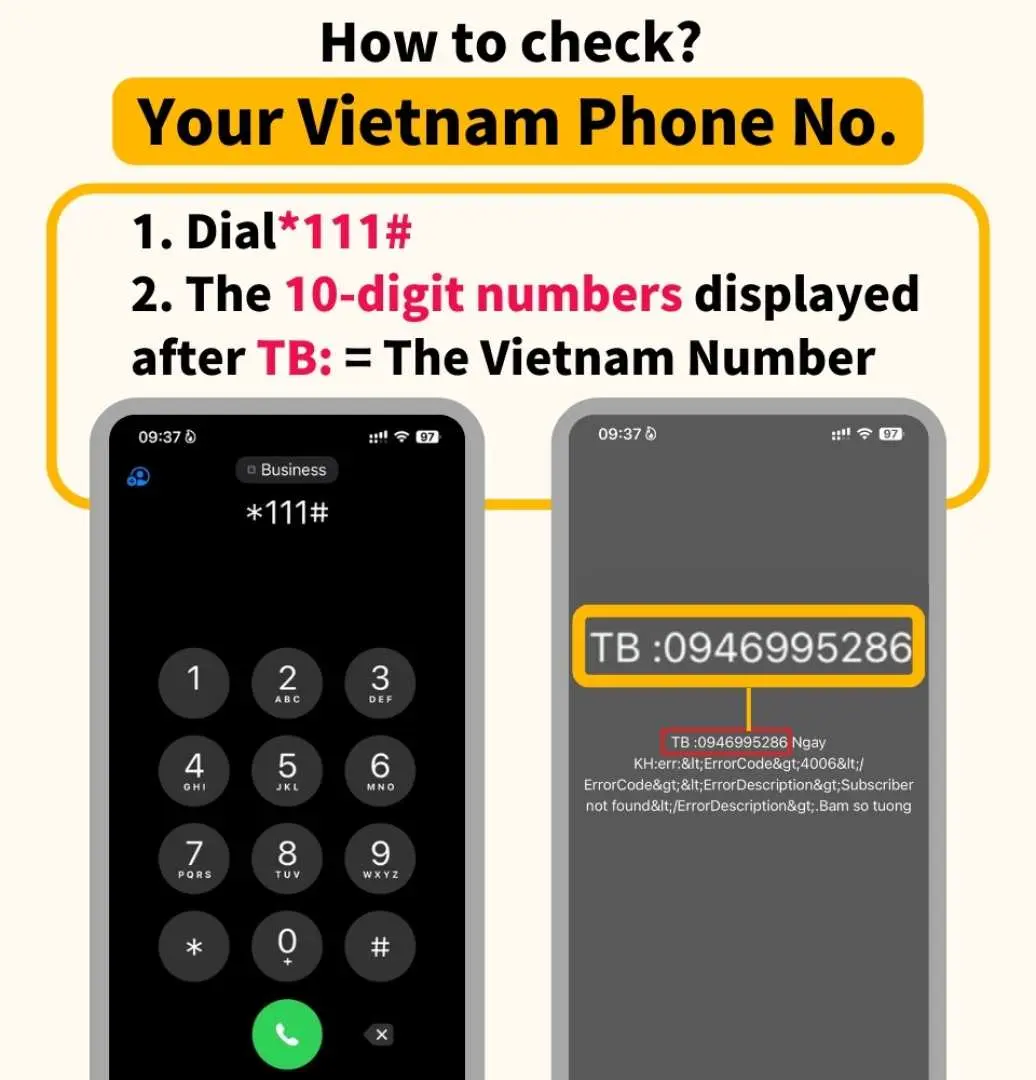
Where to check the Vietnam phone number?

How to query the remaining data amount


Dose my phone support eSIM?


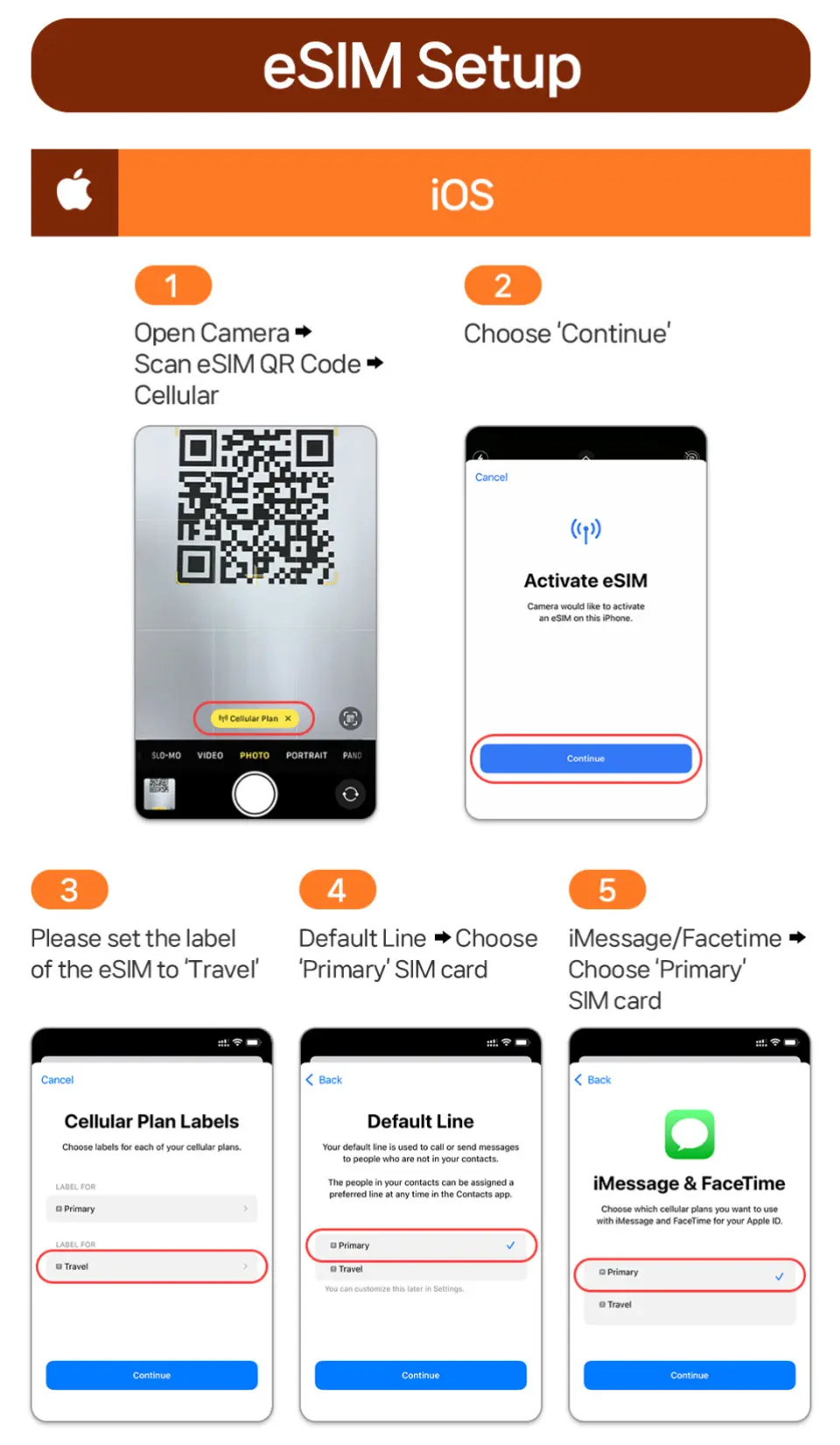
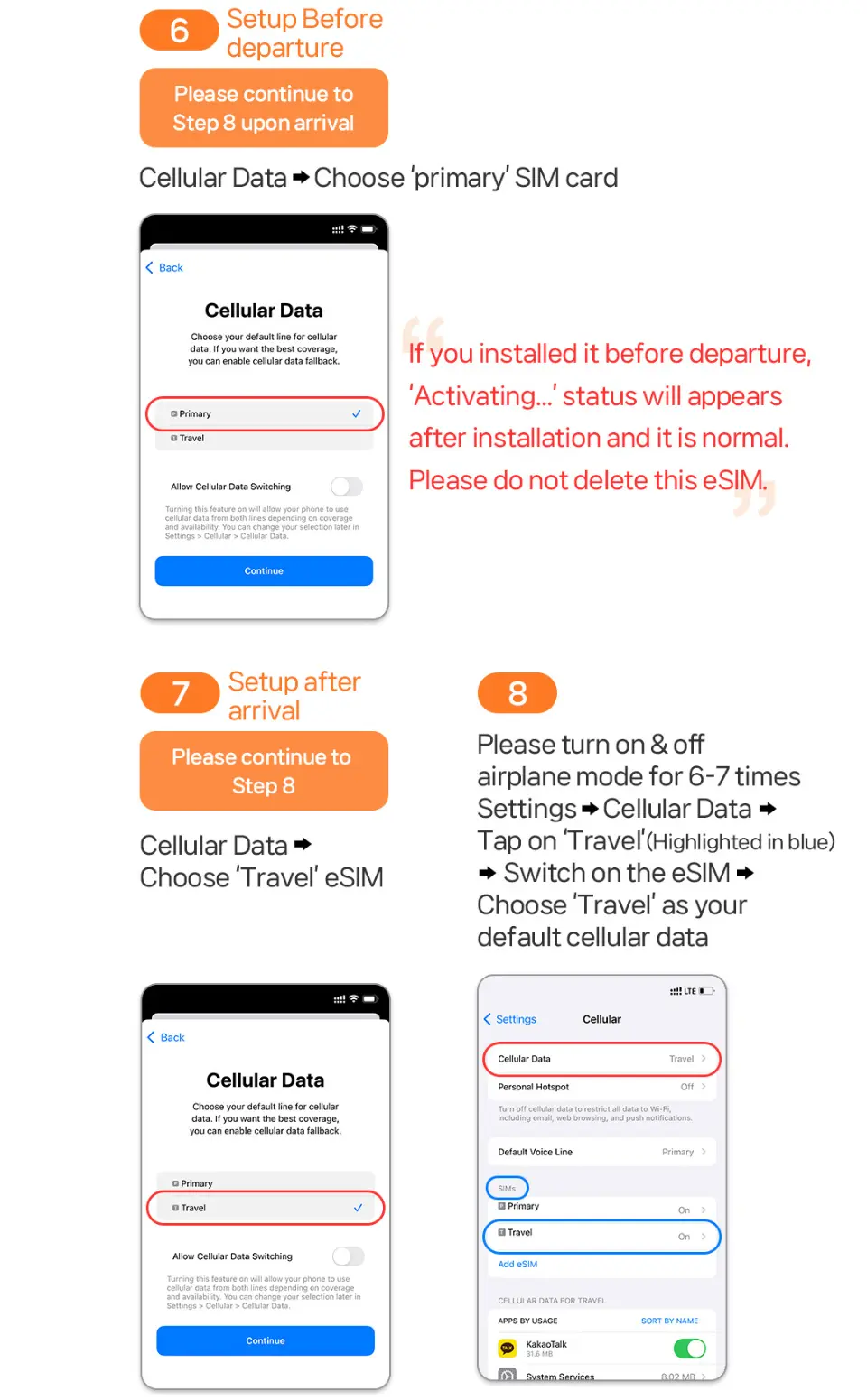
eSIM setup



SIM Card Specifications
| Data Usage Specifications | Unlimited data, 6GB |
| Transmission Specifications | 5G/4G |
| Signal Coverage Area | Vietnam |
| Mobile Carrier | VINAPHONE |
| Supported Sizes | eSIM |
| Hotspot Sharing | Available |
| Supported Frequencies(4G) | B3(1800 MHz) |
| Top-Up Availability | Top-up unavailable |
| Not Supported | SIM-locked device, Carrier-customized device, Mobile hotspot |
| Reminders | Before purchasing, you must first confirm whether the mobile phone supports the installation of eSIM; if you find that the mobile phone does not support the installation after purchase, you will not be able to refund |
| Network Type | Local |
Purchase Notice
- There are different versions of same phone models launched in each country, you MUST reconfirm that your device support eSIM
- eSIM QR code is non-refundable or cancel upon issuance.
- Exchange or refund of the eSIM QR code is not possible if not used after the due date.
- A voucher with the eSIM QR Code will be sent to your Email within 24 hours upon booking.
- When using hotspot sharing, the internet speed may be affected by the location. Therefore minimum internet speed cannot be guaranteed. Please make sure to confirm before placing an order.
- Excessive data usage can result in reduced internet speed or potential service disruption.
- If the mobile phone is purchased from the United States, Canada, Japan, or the Philippines, please confirm with the local carrier that the mobile phone has been unlocked (Country Lock)
【FAQ】
Q1 : Can I cancel or get a refund for the eSIM?
A : No. The eSIM is non-refundable upon issuance, as it has included all information and can be used upon installation.
Q2 : Can I use the same eSIM on multiple devices?
A : No. One eSIM QR Code can be used on 1 device only. You are not allowed to scan the same QR code with 2 different devices.
Q3 : “Activating” or “Unable to activate eSIM” shows during the installation. What should I do?
A : If you are stuck activating on your device. This usually happens when you have installed an eSIM but haven’t yet arrived at your destination country/region. Please reconfirm the eSIM has been successfully installed. If it doesn’t, please reach to our customer service center.
Q4 : What should I do if I have deleted the eSIM?
A : Unfortunately, the eSIM in not available to restore.
Q5 : What should I do if the eSIM is not working?
A : Please reach to our customer service center immediately and DO NOT remove the eSIM.
Q6 : Can I use the eSIM and a physical SIM together?
A : Yes. But please make sure that you have connected the correct eSIM / SIM card on data and voice calls respectively. (e.g. Data = using our eSIM / Voice = Primary SIM card) Additional roaming charges may occur based on your usage and your primary phone service carrier’s policy.
Q7 : Can I buy multiple eSIMs and use them continuously?
A : The eSIM may activated once if you have installed it. Please install the new eSIM after the current one expires.
Includes/Excludes
Reminders
This eSIM offers either unlimited data or 6 GB of local Vietnamese data per day, depending on the plan.
Validity : Based on days, starts when connected to vietnam’s network. (e.g. Activated at 22:00, ~24:00 [2 hours later] = 1 day)
eSIM QR code is non-refundable or cancel upon issuance.
eSIM QR Code should be activate within 30 days upon booking. It can be used for 5/6/7 days
The eSIM in not available to restore, refund or exchange upon removal.
Please print out the eSIM QR code in advance for installation. DO NOT save the QR code inside the phone that is going to install the eSIM.
One eSIM QR Code can be used on 1 device only. You are not allowed to scan the same QR code with 2 different devices.
Please make sure to switch off the data roaming service of your own SIM card. Surcharges may occurs if you have switched it on.
If "Invalid QR code" or "Unable to activate" appear while scanning the QR code, please see whether the eSIM has been added in Settings - Mobile Data.
If you installed it prior to departure, the "Activating..." status will appear after installation, which is normal and do not remove the eSIM. When you arrived, set the eSIM as your default cellular data instead of your primary SIM card, and activate and deactivate airplane mode several times before use.
eSIM can only be connected after your arrival at your travel destination.
To avoid international roaming charges, blocking the roaming service with your own service provider before your trip is suggested.
If the eSIM is damaged, or you are facing any difficulties during installation or usage, please reach to our customer service center immediately for refund during your trip. The eSIM is non-refundable once if you have returned to your own country.
Excessive data usage can result in reduced internet speed or potential service disruption.
Coverage and data speed may vary depending on the network congestion of your destination.
Additional compensation such as roaming costs, overseas SIM card purchase costs or transportation costs are not provided.
If you need to use UBER or GRAB in Vietnam, please download the application in your country first, and use your country number or GOOGLE account to log in in advance; the number provided by eSIM is reused and cannot be used to log in to related applications.
This eSIM is designed for foreign travelers. The included phone number does not support receiving verification SMS from local applications.
How to Use
【Setup Method – iPhone】
- Settings> Cellular> Cellular Data> Switch off Data Roaming(Please print out the eSIM QR code in advance for installation.)
- Open Camera> Scan eSIM QR Code> Click ‘Cellular Plan’ (Yellow Bubble)
- Press “Continue”> Please feel free to set the label of the eSIM(e.g. Travel)
- Setup before landed : Default Line, iMessage & Facetime, Cellular Data – Choose Primary SIM
- “Activating” or “Unable to activate eSIM” shows during the installation. This usually happens when you have installed an eSIM but haven’t yet arrived at your destination country/region. Please reconfirm the eSIM has been successfully installed. If it doesn’t, please reach to our customer service center.
- Upon arrival: Settings> Cellular> Cellular Data> – Choose ‘Travel’ (the eSIM) > continue to step 8
- Setup upon arrival: Default Line, iMessage & Facetime - Choose Primary SIM // Cellular Data – Choose ‘Travel’ (the eSIM)
- Switch on & off 6-7 times until 4G or LTE shows.
【Setup Method – Android】
- Please turn off data roaming before installation. (Please print out the eSIM QR code in advance for installation.)
- Open Camera> Scan eSIM QR Code> Click ‘Add Plan to Phone’ (Yellow Bubble)
- Setup before landed : “Activating” or “Unable to activate eSIM” shows during the installation. This usually happens when you have installed an eSIM but haven’t yet arrived at your destination country/region. Please reconfirm the eSIM has been successfully installed. If it doesn’t, please reach to our customer service center.
- Switch OFF the eSIM after setup> Continue to Step 6 upon arrival.
- Setup upon arrival:(SIM Management) eSIM ON > Tab ’Mobile Data’ > Choose eSIM and apply
- Switch on & off 6-7 times until 4G or LTE shows.
Cancellation Policy
- Once the order has been completed, it cannot be canceled, modified, or refunded
- Due to time zone differences, the confirmed cancellation date is based on the supplier’s local time. Please allow 2–5 business days to process your cancellation request, after which the cancellation fee will be charged according to the product’s cancellation policy. Once the cancellation is confirmed, you will receive your refund within 14 working days.
FAQ
Using a Vietnam eSIM offers several benefits over a physical SIM card. It eliminates the risk of losing a physical card and the need for swapping. Setup is hassle-free through a QR code, allowing for rapid activation upon arrival. You can enjoy a stable local data network, often superior to international roaming, ensuring seamless internet access throughout your trip without geographical restrictions.
Yes, using an eSIM in Vietnam is legally permitted and a popular option for travelers. The Vietnam eSIM is compatible with most modern smartphones that support eSIM functionality, including recent iOS and Android flagship models. It is recommended to check your specific device's compatibility with eSIM technology before purchasing to ensure a smooth experience.
Absolutely, you can purchase the Vietnam eSIM before your trip. After confirming your online voucher, you can scan the QR code to set up your eSIM right before you depart or upon arrival. This allows you to have your internet ready for use as soon as you land, avoiding the need to find a local SIM card vendor.
The activation process for the Vietnam eSIM is straightforward. After confirming your online voucher, you'll receive a QR code to scan for eSIM setup. Once installed, it activates rapidly, typically within 12 hours of voucher confirmation, allowing you to start enjoying high-speed data immediately upon arrival in Vietnam. iOS users on version 17.4 or higher can benefit from one-click installation via the App.
With the Vietnam eSIM, you can expect a stable 4G local data network supported by Vinaphone, one of Vietnam's most reliable providers. It offers ultra-large bandwidth for super-smooth internet surfing. For 5, 6, or 7-day options, you can enjoy unlimited local data without throttling, ensuring consistent high-speed access for all your online needs.
Yes, the Vietnam eSIM supports iOS One-Click Installation for enhanced convenience. To utilize this feature, you need to update to the latest iOS App version and ensure your device is running iOS 17.4 or higher. This allows for seamless eSIM installation directly within the App, making setup even easier and quicker.
The Vietnam eSIM offers various data plan durations to suit different travel needs. Options typically include 5, 6, and 7-day plans, which often come with unlimited local data without throttling. These plans are designed to provide ample data coverage for your entire trip, ensuring you stay connected throughout your stay.
The Vietnam eSIM is supported by Vinaphone, one of the most reliable local network providers in Vietnam. This partnership ensures a stable and robust 4G local data network, meaning you can enjoy consistent, high-speed internet access across the country. It helps avoid the instability and slow speeds often associated with international roaming networks.
Get Help


