

[Super Popular Deal - 50% OFF] Thailand SIM Card | Thailand Daily/Total/Unlimited Data eSIM | ChatGPT Supported
- Support iOS one-click installation: Update to the latest iOS App version and iOS 17.4 or above, you can install eSIM in one click on the KKday App
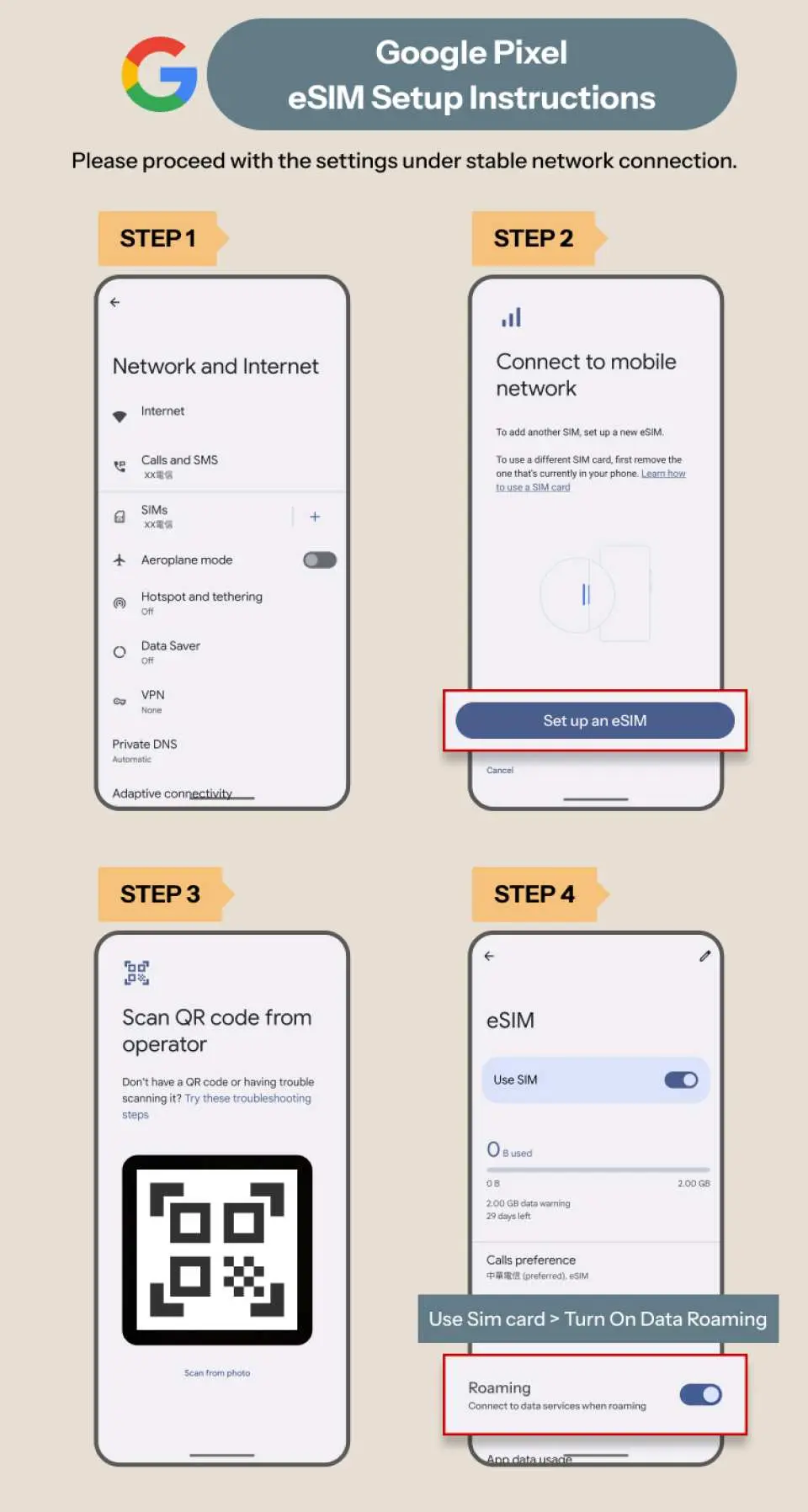
- Receive the voucher and redeem it immediately. Scan the QR Code to connect automatically. It is very convenient to surf the Internet
- No need to wait for mailing, no need to rush to pick it up, no need to worry about losing the card pin, you can travel abroad with peace of mind
- Carefully selected local operators, stable signal, no need to change cards, no missed calls with the original number, high efficiency on business trips
Package Options
Product Info
The content of this product is provided by machine translation and may not reflect the actual information, please take this into consideration before booking.
- eSIM (virtual SIM card), just scan the QR code on the voucher to bind the eSIM to your phone and enjoy local network connection. It is fast, convenient, environmentally friendly and requires no consumables. It is your best choice for travel Internet access
- Please make sure that your phone has eSIM function and there are no SIM card restrictions. No refunds or cancellations will be accepted after the order is placed.




SIM Card Specifications
| Data Usage Specifications | Unlimited data, 500MB, 1GB, 2GB, 3GB, 5GB, 10GB, 20GB |
| Transmission Specifications | 5G/4G |
| Signal Coverage Area | Thailand |
| Mobile Carrier | Truemove、DTAC |
| Supported Sizes | eSIM |
| Hotspot Sharing | Available |
| Supported Frequencies(4G) | B1(2100 MHz) |
| Top-Up Availability | Top-up unavailable |
| Not Supported | SIM-locked device, Carrier-customized device, Mobile hotspot |
| Network Type | Roaming |
| Mobile Virtual Network Operator (MVNO) | China Mobile International Limited |
Purchase Notice
- This product only provides data Internet access services and does not include local phone numbers
- If you need to recharge, please purchase a new card directly and the system will automatically send you a voucher.
- According to the principle of fair use of the Internet, telecommunications companies may restrict the traffic of users who use a large amount of data traffic in a short period of time. Please avoid watching videos for a long time or processing a large amount of data in a short period of time.
- This product supports hotspot sharing, but whether it can be shared depends on the mobile phone and operating system. No refund will be provided due to failure to share.
- Please note that the quality of Internet access may be affected by factors such as location, terrain, building obstruction, number of users, and weather.
- Please confirm that the selected data plan is correct before placing the order. Cancellation will not be accepted after the receipt is sent.
Includes/Excludes
Reminders
This eSIM telecom data roaming service is provided by China Mobile International Limited
If you need to manually add an eSIM, please refer to the eSIM details in the "Pre-departure Reminder", copy and paste the <SM-DP_Address> and <Activation Code> in the box, and you do not need to enter the <Confirmation Code>
Day calculation method: 24-hour system (user purchases a 3-day Internet plan, installs and activates it at 10:00 am on 9/1, and this plan will end at 9:59 am on 9/4)
This eSIM must be activated within 90 days after distribution. It is recommended to activate it as soon as possible after arriving at your destination to ensure your rights and interests.
If the device cannot be used but there is no record of contacting customer service to troubleshoot the problem, we cannot determine the cause of the problem and will not be able to apply for a refund.
If an error message appears during installation indicating that the QR code is invalid, it does not mean that the eSIM has expired. Please go to "Settings → Mobile Services" to confirm whether the eSIM has been successfully added.
If you install an eSIM before arriving at your destination and a message such as "Activating" or "Unable to activate eSIM" appears, do not delete the eSIM. Turn off the eSIM temporarily and turn it back on after arriving at your destination. If you still cannot connect after arriving, turn on roaming, try restarting your phone, or manually select a supported network.
If the device has installed a profile, it may affect the normal use of eSIM. Please go to Settings → General → VPN and Device Management, scroll to the bottom to check if there is a profile. If there is, please delete it to ensure that you can use eSIM smoothly.
Due to device settings and network environment, some apps may have usage restrictions in certain regions. For example, ChatGPT does not support Huawei phones and outdated iOS systems. The actual situation varies depending on the device and system version. It is recommended to confirm whether the required functions meet the plan conditions before departure to ensure smooth use.
This product is an international roaming service. Some websites or apps may not work properly due to IP address restrictions. Actual usage may vary due to different device brands, operating systems or versions. We cannot provide refunds due to the inability to open or browse some apps.
For common eSIM questions, please refer to the Help Center (https://www.kkday.com/zh-tw/help-center/category/65)
Enter the order number to easily check the usage: https://search.t-sim.hk/dataplan/order
Cancellation Policy
- Once the order has been completed, it cannot be canceled, modified, or refunded
- Due to time zone differences, the confirmed cancellation date is based on the supplier’s local time. Please allow 2–5 business days to process your cancellation request, after which the cancellation fee will be charged according to the product’s cancellation policy. Once the cancellation is confirmed, you will receive your refund within 14 working days.
FAQ
A physical SIM card requires a tangible chip to be inserted into your phone, necessitating a card pin and careful handling to prevent loss. An eSIM, conversely, is a digital SIM embedded directly in your device, activated by scanning a QR code. This method removes the need for physical card swaps, minimizes the risk of losing the card, and allows you to retain your original SIM card in its slot for your primary phone number while using the eSIM for data.
Obtaining a local data plan or eSIM for Thailand offers significant value by providing seamless and often more cost-effective internet access compared to international roaming. It ensures constant connectivity for critical needs like navigation, using translation apps, booking local services, contacting others, and researching attractions or dining options on the go. This constant access enhances safety, convenience, and the overall enjoyment of your travel experience.
To successfully use an eSIM for mobile data in Thailand, your smartphone must be both eSIM compatible and unlocked by your home carrier. Most modern smartphone models from leading manufacturers now support eSIM technology. For specific features like one-click iOS installation, your device typically needs to be updated to the latest iOS App version and iOS 17.4 or above. Always confirm your device's eSIM capabilities before purchasing.
Travelers should assess their typical internet usage habits to select the ideal data plan size for their trip to Thailand. Consider activities such as browsing, using social media, map navigation, video calls, and streaming content. Shorter trips with minimal usage might be fine with smaller daily data limits, while longer trips or frequent users who stream or engage in video calls may benefit from larger total data packages or unlimited options. Data sharing across multiple devices will also increase your overall data requirements.
When acquiring a physical local SIM card in Thailand, foreigners are generally required to present their passport for registration to comply with local telecommunications regulations. However, for eSIM products, the activation process is typically more streamlined. Upon completing your order, you can usually receive a voucher with a QR code, which you then scan to set up the eSIM, thus simplifying the activation without the need for immediate in-person registration procedures.
An eSIM featuring one-click iOS installation provides notable practical advantages for staying connected in Thailand. It enables swift and effortless setup directly through your device, eliminating the need for complex manual network configurations. Users can instantly install and activate the eSIM simply by scanning a QR code, ensuring immediate internet access as soon as they arrive. This streamlined process offers unparalleled convenience for travelers seeking hassle-free connectivity.
An eSIM for Thailand significantly simplifies connectivity by eliminating the logistical challenges associated with traditional physical SIM cards. You no longer need to carry a card return needle, worry about misplacing a tiny physical card, or visit local stores for purchase and activation. The digital setup via a QR code means you can receive your connection details instantly and activate it remotely, allowing for seamless internet access without interfering with your original phone number.
To ensure reliable and stable network coverage in Thailand, travelers should opt for data solutions from reputable providers that collaborate with established local operators. These partnerships typically guarantee strong signals and consistent service in major cities and popular tourist destinations. It's wise to review customer feedback and, if available, check network coverage maps. Prioritizing options that emphasize working with 'carefully selected local operators' can greatly contribute to a smooth internet experience throughout your journey.
Get Help


