

Korea eSIM: Daily/Total/Unlimited Data - 50% Off
- Surf high speed connection across Korea with this 4G/5G Korea eSIM
- Ditch physical SIM cards for effortless installation (iOS 17.4 or later)
- Explore Korea with real-time help from ChatGPT, NAVER and more
- Choose from a variety of data plans for up to 30 day, perfect for both short trips and business visits
- Book on KKday for real-person online tech support, instant use and amazing price
Package Options
Product Info
The content of this product is provided by machine translation and may not reflect the actual information, please take this into consideration before booking.
Check if your device is eSIM compatible


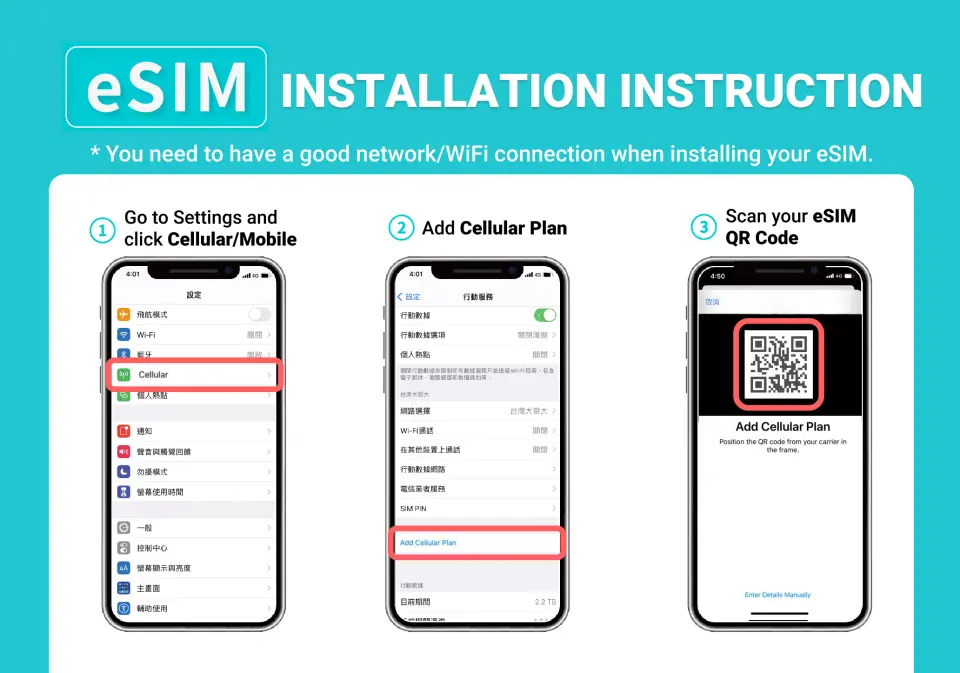
Follow the instructions below to install the eSIM

.


.


SIM Card Specifications
| Data Usage Specifications | Unlimited data, 500MB, 1GB, 2GB, 3GB, 5GB, 10GB, 20GB, 50GB |
| Transmission Specifications | 4G |
| Signal Coverage Area | South Korea |
| Mobile Carrier | SKT / LG U+ |
| Supported Sizes | eSIM |
| Hotspot Sharing | Available |
| Supported Frequencies(4G) | B1(2100 MHz), B3(1800 MHz), B5(850 MHz), B7(2600 MHz) |
| Top-Up Availability | Top-up unavailable |
| Excludes | Voice calls, Texts |
| Not Supported | SIM-locked device, Carrier-customized device, Mobile hotspot, Tablet |
| Network Type | Roaming |
| Mobile Virtual Network Operator (MVNO) | Hutchison Telecommunications Hong Kong Holdings Limited |
Purchase Notice
- Minimum speed is not guaranteed as hotspot sharing takes up bandwidth and internet speed can vary depending on your device and location
- Network quality and base station density differ by country. Refunds cannot be requested due to poor signal in a few areas
- To maintain network quality, telecom providers follow Fair Use Policy. Heavy network usage in a short period may result in a slower speed or temporary connection restrictions
- Actual signal and connection speed may be affected by region, terrain, weather, building obstructions, number of users, network systems, or devices. If 5G is unavailable locally or on your device, it will automatically switch to 4G
- In Korea, it is recommended to use NAVER Maps or other local map apps instead of Google Maps for a better experience
- The data roaming service in South Korea on this eSIM is provided by Hutchison Telecommunications Hong Kong Holdings Limited
Includes/Excludes
Reminders
Day Calculation Method: Calculation begins when you arrive in the destination country, turn on data roaming, and successfully connect to the internet. Calculation is based on Taiwan time (GMT+8), with each day ending at midnight, not in 24-hour increments
Before installing the eSIM, ensure you are connected to a working Wi-Fi or mobile data; then scan the QR code to add the data plan. The eSIM can be installed before arriving in the destination country and activated once you get there
Follow the instruction for installation. Stay on the installation page and do not switch to other pages in the process; otherwise the eSIM may be deleted
A QR code can only be scanned once by one device and cannot switch devices once it's linked
If there's an error message after scanning, it does not mean that the eSIM is invalid. Please restart your phone and check the mobile data setting whether the eSIM has been linked to your phone, or contact customer service for assistance. Do not scan other QR codes without authorization or it may cause the eSIM to become invalid
eSIM is valid for 180 days if not scanned. Once scanned, it must be activated and used within 30 days. No refunds or extensions if expired
For iPhones, please delete the Configuration file to ensure smooth use (Settings -> General -> Device Management. Scroll to the bottom and if there is no Configuration file, it is normal)
If the eSIM is not used up or the plan is deleted without customer service confirmation, the eSIM will not be reissued or refunded
Network quality and base station density differ by country. Refunds cannot be requested due to poor signal in a few areas. If you encounter poor signal, you can manually switch telecom providers (Network Selection/Telecom Provider -> turn off "Automatic" -> choose from the different telecom providers
If you cannot connect to the internet when arriving at your destination, contact the customer service. After-sales service is unavailable after returning to the country
This product uses an international roaming IP. Some apps on Android devices may not work due to the IP location (e.g., TikTok/Douyin/Alipay/AutoNavi/Meituan/WeChat/etc.).
Actual signal and connection speeds may vary due to factors such as region, terrain, weather, building obstruction, number of users, network system, or end-user equipment. For example, if 5G networks are not supported locally or by your mobile phone, the connection will automatically switch to a 4G signal.
How to Use
Validity Period
- eSIM is valid for 180 days if not scanned. Once scanned, it must be activated and used within 30 days. No refunds or extensions if expired
Cancellation Policy
- Once the order has been completed, it cannot be canceled, modified, or refunded
- Due to time zone differences, the confirmed cancellation date is based on the supplier’s local time. Please allow 2–5 business days to process your cancellation request, after which the cancellation fee will be charged according to the product’s cancellation policy. Once the cancellation is confirmed, you will receive your refund within 14 working days.
FAQ
Yes, the Korea eSIM is readily available for travelers visiting South Korea. You can order it instantly and begin using it immediately after purchase. It eliminates the need for physical SIM card swaps, offering a hassle-free and convenient internet access option.
The Korea eSIM offers several key advantages. It eliminates the need to physically swap SIM cards, meaning no ejector pin is required and there's no risk of losing your original SIM. Installation and activation are simple, often with a one-click process for iOS users. This convenient digital solution also supports environmental protection by reducing consumables.
Yes, the Korea eSIM is designed to provide a stable network connection in South Korea, supported by access to two major local carriers. This ensures reliable 5G/4G unlimited data service throughout your travels, enhancing your connectivity experience.
When using the Korea eSIM, travelers can expect to experience both 5G and 4G network speeds. The eSIM provides unlimited data, ensuring a fast and stable connection for all your online needs while exploring South Korea, from navigation to communication.
After purchasing your Korea eSIM, you simply confirm your voucher. For setup, you will typically scan a QR code. For iOS users with the latest KKday App and iOS 17.4 or above, a convenient one-click installation is available. This allows for quick activation and immediate use directly within the KKday App, streamlining your experience significantly.
For optimal navigation in South Korea, it is highly recommended that travelers using a Korea eSIM use local map applications such as NAVER Maps. These local apps often provide a more comprehensive and user-friendly experience, including better public transport routes and local points of interest, compared to international alternatives like Google Maps.
Yes, the Korea eSIM provides travelers with 5G/4G unlimited data. This ensures you have continuous internet access throughout your trip in South Korea, without worrying about data caps or unexpected additional charges for your online activities.
Yes, for the one-click installation feature of the Korea eSIM on iOS devices, you need to update to the latest version of the iOS App and ensure your device runs iOS 17.4 or above. This specific requirement ensures seamless eSIM installation directly within the KKday App.
Get Help


